
AKS cost optimization comes down to four moves, in this order: see which namespaces drive the bill, stop paying for node capacity you do not use, right-size what pods request, and then buy discounts for the steady load that remains. Skip the order and you commit to capacity you should have deleted.
This guide is for platform, DevOps and FinOps teams running Azure Kubernetes Service in production, and for the MSPs who manage it for customers. It covers what to measure, what to change, what to buy, and how to keep the savings from quietly leaking back.
TL;DR
- Start with allocation. Enable AKS cost analysis so the bill maps to clusters and namespaces, not just VMs.
- Fix node overprovisioning before pod tuning. Idle node capacity is usually the largest silent cost.
- Put dev and test on Spot node pools and the steady production baseline on reservations or savings plans.
- Treat optimization as a continuous cycle with quotas, limits and ownership, not a one-time cleanup.
- Verify every claimed saving against the invoice, not against a dashboard estimate.
Table of Contents
- Where AKS money actually goes
- Step 1: Get cost visibility down to the namespace
- Step 2: Stop paying for peak
- Step 3: Right-size what pods request
- Step 4: Buy discounts for what is left
- Step 5: Govern it so savings stay saved
- A 30-day plan
- Our perspective: recommendations are not savings
- Make it continuous with EverythingCloud
- Common mistakes to avoid
- FAQ
- Sources
Where AKS money actually goes
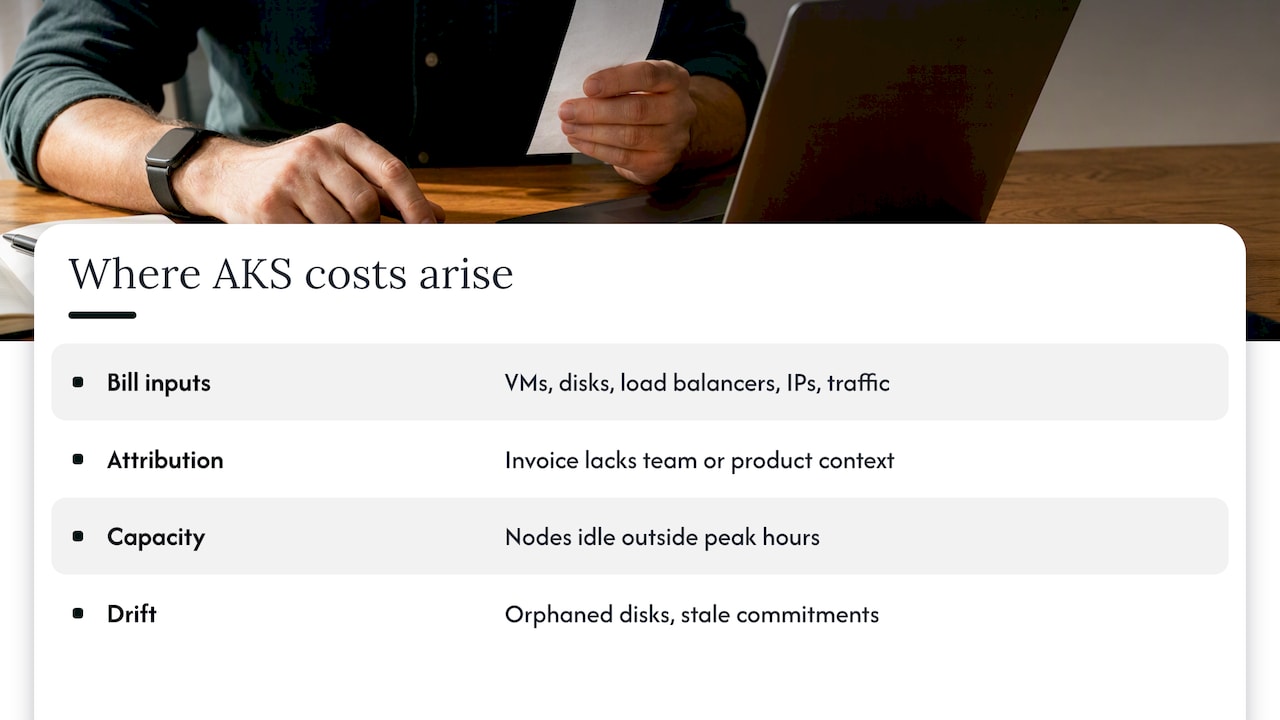
AKS itself is not the expensive part. You pay for the Azure resources underneath: virtual machines, disks, load balancers, public IPs and network traffic. Microsoft’s own description of AKS cost analysis makes the point that several applications share those resources, so consumption patterns rarely line up with the invoice lines.
That is the first problem. The bill says “Standard_D8s_v5, 40 instances.” It does not say which team, product or environment those instances served. Until you can answer that, every optimization conversation turns into a debate about whose workload is at fault.
The second problem is capacity. Clusters are usually sized for the worst day anyone remembers, then left that way. The result is a node pool that is largely idle outside a few peak hours. In our experience, and in what practitioners report, this cluster-level overprovisioning costs more than any single badly configured pod.
The third problem is drift. A cluster that was tidy in January has orphaned disks, forgotten test namespaces and stale commitments by June. This is the cloud margin leak: no single line looks alarming, yet the pattern compounds every month.
Step 1: Get cost visibility down to the namespace
FinOps practitioners describe Kubernetes cost as a context problem. The FinOps Foundation’s container cost guidance frames the work as adapting the inform, optimize and operate phases you already use for cloud, with the added complexity of shared, short-lived workloads. You cannot optimize what you cannot attribute.
On AKS, the practical starting point is the cost analysis add-on. It is built on OpenCost, the open-source CNCF project, and it reconciles usage data with your Azure invoice data so you can see cost by cluster and namespace in the Azure portal. A few things to check before you enable it:
Your cluster must be on the Standard or Premium tier, not Free. You need a managed identity and the Azure Disk CSI driver enabled. Kubernetes cost views are limited to certain Azure agreement types, so confirm yours is supported. After enabling, allow up to 24 hours for data to appear.
If you are weighing the add-on against self-managed tooling, our comparison of Kubecost and OpenCost walks through where each fits.
Add labels before you need them
Allocation is only as good as your metadata. Agree on a small set of labels, such as team, product, environment and cost center, and enforce them at deploy time. The FinOps Foundation publishes a container cost allocation labels dictionary that is a sensible starting vocabulary, so you do not invent your own from scratch.
Once attribution is in place, the conversation changes. Finance stops asking why the cloud bill is high. Engineering starts asking which service drove a specific increase. That shift is the real return on this step.
Read the idle cost number
The same add-on surfaces idle cost: capacity you pay for that no workload is using. Microsoft documents how to monitor and reduce AKS idle costs. Treat that figure as your baseline. If idle cost is a large share of cluster spend, pod-level tuning will not fix it. Nodes will.
Step 2: Stop paying for peak
Most AKS savings come from changing the cost model from paying for peak to paying for actual usage. Two mechanisms do that work.
Node autoscaling and Node Auto-Provisioning
The classic option is the Cluster Autoscaler, which adds and removes nodes in a pool based on pending pods. It works, but it depends on how well you have tuned scale-down thresholds, pool sizes and VM choices. Node Auto-Provisioning (NAP) goes further by choosing VM sizes to fit the pending workload rather than scaling fixed pools.
Microsoft’s cost best practices recommend AKS Automatic for most production workloads. Automatic mode preconfigures NAP, the horizontal and vertical pod autoscalers, KEDA and managed Prometheus, which cuts the manual configuration that Standard mode requires. If you run Standard, you can still get most of the benefit, but you own the tuning.
Pod autoscaling and KEDA
Horizontal Pod Autoscaler handles CPU and memory driven load. KEDA scales on events such as queue depth, and it can scale workloads to zero when nothing is waiting. For batch, queue consumers and off-hours services, that is often the difference between a node pool that empties out at night and one that sits warm all day.
Schedule what does not need to run
Dev and test clusters rarely need to run at 3 a.m. Stop them, or scale their pools to zero outside working hours. Hunt for orphaned resources too: unattached disks, unused public IPs and load balancers left behind by deleted services. These are small individually and persistent in aggregate.
Also count clusters. Control plane charges are per cluster, so a dozen forgotten sandbox clusters add up. Microsoft’s pricing tier comparison shows what each tier includes, so you can match dev and test to the Free tier where an SLA is not needed, and keep production on a tier that carries one.
Step 3: Right-size what pods request
Kubernetes schedules on requests, not on actual use. If a service requests 2 CPUs and uses 0.3, the scheduler still reserves 2, and you still pay for the node that holds it. Multiply that across hundreds of pods and you have a cluster that looks full but runs empty.
A workable routine looks like this:
- Pull two to four weeks of actual CPU and memory use per workload, including a peak period.
- Compare it to requests and limits. Flag workloads where requests exceed typical use by a wide margin.
- Lower requests in steps, starting with non-critical services, and watch for throttling or OOM kills.
- Use the vertical pod autoscaler in recommendation mode first, then decide where automation is safe.
- Repeat monthly. Application behavior changes, and so should requests.
For a deeper engineering walkthrough of why requests come before discounts, see our EKS cost optimization guide. The reasoning applies on AKS too, and our broader Kubernetes cost optimization guide covers the cross-cloud patterns.
Pick the right VM for the job
Match VM family to the workload profile. Memory-heavy services on compute-optimized nodes waste CPU. General-purpose nodes for everything is convenient and rarely cheapest. Separate node pools by workload type, use taints and tolerations to place pods deliberately, and revisit choices when newer VM generations arrive. Our Azure VM cost optimization guide lists the levers to verify before you commit.
Step 4: Buy discounts for what is left
Discounts come last on purpose. Commit to capacity before rightsizing and you lock in the waste.
Microsoft’s guidance says Spot VMs can offer savings of up to 90% for interruptible workloads, and that reservations or Azure savings plans can reach up to 72% for steady-state use. Those are ceilings, not promises. Your actual rate depends on region, VM family, term and how well you use what you buy.
The pattern that tends to pay off fastest:
| Environment | Typical fit | Why |
|---|---|---|
| Dev and test | Spot node pools, scheduled shutdown | Interruptions are tolerable, idle hours are the cost |
| Batch and CI jobs | Spot with retry logic | Work can restart without harm |
| Production baseline | Reservations or savings plans | Load is predictable, so commitment risk is low |
| Production burst | On-demand with autoscaling | Flexibility matters more than discount |
Do not set and forget commitments
A common pitfall is buying reservations once and never looking again. VM families change and architectures move, which strands old commitments. The FinOps Foundation’s case study on resolving a post-Azure migration cost increase describes how a team centralized reservation purchasing and used exchanges to apply leftover commitment dollars to other subscriptions and workloads. The lesson holds for AKS: someone must own commitment utilization every month.
For the wider Azure picture, including savings plans and enterprise agreement considerations, read our Azure cloud cost optimization enterprise guide.
Step 5: Govern it so savings stay saved
Even with strong autoscaling, governance decides whether savings last. Microsoft’s guidance points to resource quotas and request and limit policies as the main defense against noisy neighbors and uncontrolled consumption. That turns optimization from a reactive cleanup into a preventive framework.
In practice, that means:
Set namespace quotas so one team cannot silently claim half a cluster. Require requests and limits on every deployment through policy. Require cost labels, and reject workloads without them. Set budgets and anomaly alerts per subscription and per namespace owner. Review the top movers in cost each month with the engineers who own them.
Chargeback or showback closes the loop. When teams see the dollar effect of their own requests, behavior changes without a mandate.
A 30-day plan
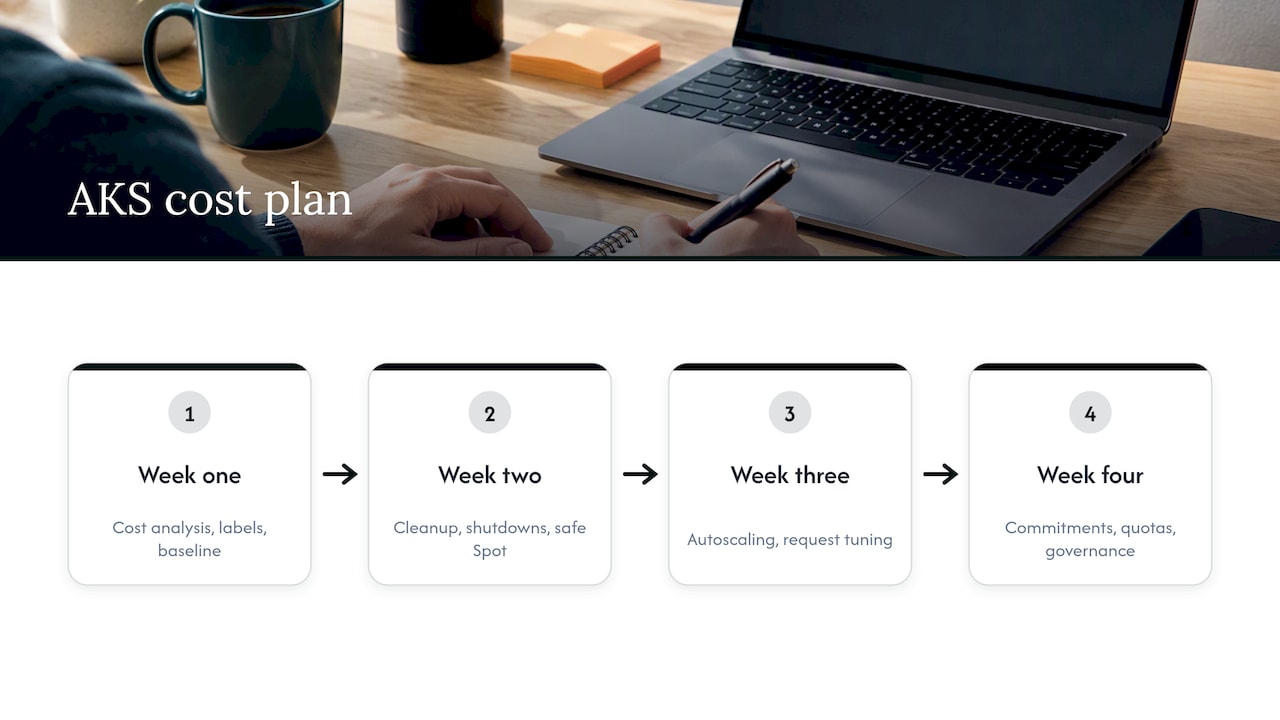
Week one: enable cost analysis, agree on labels, record the baseline for total spend, idle cost and commitment coverage. Week two: delete orphaned resources, schedule non-production shutdowns, and move dev and test to Spot where it is safe. Week three: tune autoscaling or move to NAP or AKS Automatic, and lower the worst oversized requests. Week four: size reservations or savings plans against the new, smaller baseline, and put quotas and policies in place.
Then repeat. The first month finds the obvious waste. The second and third find what the first month hid.
Our perspective: recommendations are not savings
We see the same pattern in cloud accounts of every size. A tool produces a long list of recommendations. The list sits in a backlog. Three months later the bill is higher, and nobody is sure whether the tool failed or the process did.
On AKS, the gap is wider because the work crosses teams. Finance owns the commitment, platform engineering owns the nodes, and application teams own the requests. A recommendation that lands in one team’s queue and needs another team’s approval rarely ships.
That is why we built EverythingCloud around execution rather than advice. The goal is to automate the optimization actions that are safe to automate, keep a human owner on the ones that are not, and monitor continuously instead of quarterly. Savings should then be verified against invoice-level billing, not against a projected number on a dashboard. If a saving does not show up on the invoice, it did not happen.
For MSPs, the stakes are sharper. Unmanaged commitments and idle capacity across a customer base erode margin quietly, and doing this by hand across many tenants means hiring people you cannot bill for. Multi-tenant controls and unified reporting are what make managed FinOps workable without adding headcount.
One more opinion: do not start with the tool. Start with ownership. Name who owns each cluster, each namespace and each commitment. Automation amplifies whatever process you already have, good or bad.
— Dan
Make it continuous with EverythingCloud
A one-time AKS cleanup typically decays within a few quarters. If you want the cycle above run for you, our Continuous Cloud Optimization service monitors your Azure, AWS and Google Cloud environments around the clock and acts on opportunities every month. Our Managed FinOps team adds expert guidance for allocation, commitments and governance. If you are an MSP who wants to offer this to your customers, see the Founding Partner Membership, which is listed at 500 USD per month, or look at the platform directly.
Common mistakes to avoid
Buying reservations before rightsizing is the costly one. The second is tuning pods while nodes sit half empty. The third is enabling visibility but never assigning an owner to the numbers. The fourth is optimizing only the cluster and ignoring adjacent spend: observability logs, storage and data egress often grow quietly beside it. If your clusters feed databases or AI services, the same discipline applies to Azure SQL costs and Azure OpenAI token and PTU spend.
FAQ
What is the fastest way to cut AKS costs?
Remove idle capacity first. Shut down or scale to zero the non-production clusters and node pools you do not use overnight, delete orphaned disks and IPs, and tune autoscaling so nodes drain when load drops. These changes need little engineering risk and show up quickly on the invoice.
Should I use AKS Automatic or Standard for cost savings?
Microsoft recommends Automatic for most production workloads because it preconfigures node auto-provisioning, pod autoscalers and managed Prometheus. Standard gives you more control, but you carry the tuning work. Choose Standard when you have specific networking, node or policy needs that Automatic does not allow.
Can I see AKS cost by namespace?
Yes. Enable the AKS cost analysis add-on, which is built on OpenCost and reconciles Kubernetes usage with your Azure invoice. The cluster needs the Standard or Premium tier, and data can take up to 24 hours to appear after you enable it.
When should I buy reservations or savings plans for AKS?
After you have rightsized and set up autoscaling. Commit only to the steady production baseline, and review utilization monthly. Reservations bought against an oversized cluster lock in the waste.
Sources
- Best Practices for Cost Optimization in AKS, Microsoft Learn
- AKS cost analysis, Microsoft Learn
- AKS idle costs, Microsoft Learn
- AKS pricing tiers, Microsoft Learn
- Calculating Container Costs, FinOps Foundation
- Container Cost Allocation Labels and Dictionary, FinOps Foundation
- Resolving a Post-Azure Migration Cost Increase, FinOps Foundation