
Cloud cost forecasting is the practice of predicting future cloud spend from historical usage plus what your business plans to do next. The native tools in AWS, Azure and Google Cloud give you a trend line. A forecast you can defend to a CFO adds business drivers, engineering input and a monthly rhythm of correction. This guide shows how to build that, what accuracy to aim for, and where the built-in forecasts fall short.
TL;DR
- A forecast is a trend line plus planned change. Trend-only models miss launches, migrations and AI usage spikes.
- Maturity sets the target: the FinOps community treats roughly 20% variance as acceptable at Crawl, 15% at Walk and 12% at Run.
- AWS Cost Explorer forecasts up to 18 months out, Google Cloud up to 12 months. Azure shows forecast in Cost Analysis, but not grouped by service by default.
- Make forecasting an engineering-owned process with finance, and refresh it on a rolling basis, not once a year.
- AI workloads break old estimation habits. Pair forecasts with anomaly alerts and spend caps.
Table of Contents
- What a cloud cost forecast should actually do
- Two methods, and why you need both
- How accurate should your forecast be?
- What AWS, Azure and Google Cloud forecast natively
- Build the forecast in six steps
- Why engineering has to own part of the number
- Forecast on a rolling basis
- AI workloads break the old rules
- Common mistakes that widen the variance
- Our perspective: a forecast is only as good as what you do with it
- Turning forecasts into action with EverythingCloud
- FAQ
- Sources
What a cloud cost forecast should actually do
The FinOps Foundation defines forecasting as building a model of the anticipated future cost and value of IT systems, using statistical methods, historical spend patterns, planned changes and related metrics. Notice that the definition has two halves: what happened, and what is about to change.
That second half is where most forecasts leak. A bill from last quarter tells you nothing about the product launch in March, the data warehouse migration in June or the new AI feature your product team promised a customer. If the forecast ignores those, you will find out in the invoice.
A useful forecast answers three questions for three audiences:
Finance wants to know what number to put in the budget and how confident you are in it. Engineering wants to know which workloads drive the number and what happens if an architecture decision changes. Leadership wants to know whether spend is growing faster or slower than revenue.
If your forecast answers only the first question, it is a budget, not a forecast.
Two methods, and why you need both
There are two core approaches. Most mature teams blend them.
Trend-based forecasting
Trend-based models extrapolate historical spend. They are quick, cheap to run and work well for stable, steady-state workloads: the long tail of storage, databases and compute that grows slowly and predictably. Native tools from the cloud providers are essentially trend engines.
The weakness is obvious. A trend cannot see a decision that has not happened yet. Relying only on history will miss out-of-band events such as new product launches or marketing-driven spikes.
Driver-based forecasting
Driver-based forecasting links spend to a business metric: active accounts, transactions processed, gigabytes ingested, models served. You forecast the driver (which the business already plans) and multiply by a unit cost.
FinOps practitioners usually split drivers into three groups. Internal drivers are things like new launches. External drivers include seasonal traffic and marketing events. Strategic drivers cover market expansion or an acquisition.
The hybrid model
The practical answer is to use drivers for your top services and trends for everything else. If your five biggest line items account for most of the bill, model those against business metrics. Let the trend engine handle the remainder.
For new workloads with no history, practitioners often start with a rough engineering estimate, the half-joking “swag” (a scientific guess), and layer it into the trend model. An honest guess with an owner and a review date beats a blank row.
One more habit helps: forecast by workload, not by SKU. Engineers rarely make decisions by cloud SKU. They decide to build a recommendation service or move a pipeline. Forecasting at the workload level lets them see their own choices in the number.
How accurate should your forecast be?
The State of FinOps report shows forecasting is a top priority for practitioners, who describe maturity in three stages. The variance targets below reflect what teams at each stage typically accept.
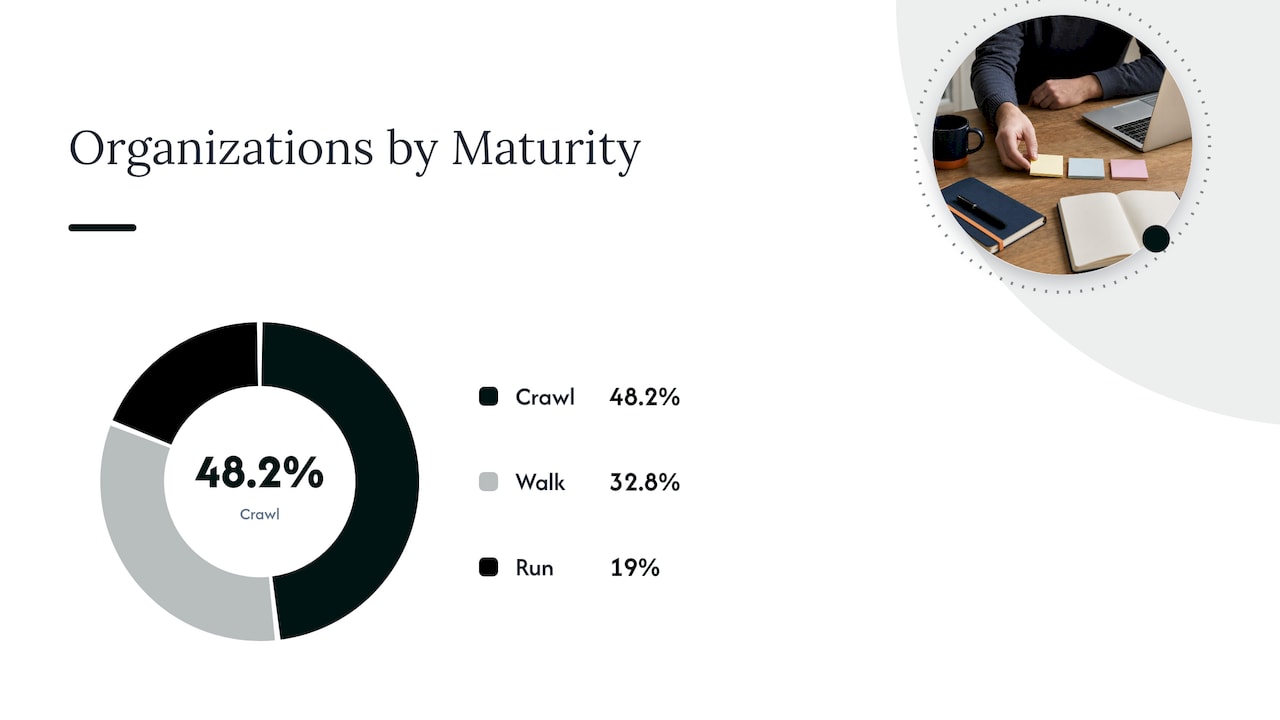
| Maturity | What it looks like | Typical acceptable variance | Share of organizations |
|---|---|---|---|
| Crawl | Manual, ad hoc, trend-only, little engineering input | 20% | 48.2% |
| Walk | Regular cadence, some discount-adjusted modeling | 15% | 32.8% |
| Run | Hybrid models, driver-based, automated data flow | 12% | 19% |
The useful takeaway: nearly half of organizations are still at Crawl. If your forecast lands within 20% of actual spend and you feel behind, you are in the majority. The goal is not perfection. It is tightening the band each quarter and knowing why you missed.
Track variance as a plain number. Compare the forecast you made at the start of each month with the invoice at the end, by workload or business unit, and write down the reason for every miss over your target. After three or four cycles, the reasons repeat. Those patterns tell you which drivers to add.
What AWS, Azure and Google Cloud forecast natively
Each provider gives you a starting point. Know its limits before you build on it.
AWS Cost Explorer
AWS recently extended Cost Explorer forecasting to 18 months, up from 12, which suits enterprise planning cycles that start in the third and fourth fiscal quarters. AWS notes the earlier version used machine learning on six months of history. Explainable AI insights now help you see why a projection moved.
If you searched for AWS cost forecasting, this is the first place to look. It is a strong trend baseline at the account, service and region level. It does not know about your launch calendar.
Azure Cost Management
If you are looking for an Azure cost forecast, open Cost Analysis. Microsoft shows forecast costs in area and stacked column charts, based on your historical resource use, so changes in usage change the forecast. The default view does not group forecast by service, so you add a group-by selection yourself. Microsoft Learn also publishes a forecasting capability guide aligned to the FinOps framework, useful for process design.
Google Cloud Billing
Google Cloud reports let you view forecasted costs up to 12 months ahead and see how spend is trending against projections. Like the others, it is built from your own billing history.
The gap they all share
Three limits show up for mid-market and enterprise teams. Each tool sees only its own cloud, so a multicloud estate needs stitching together. Each projects from history, so planned change is your job. And none of them owns the follow-through: a forecast says spend will rise, but someone still has to act on commitments, rightsizing and cleanup. We come back to that below.
Build the forecast in six steps
- Get allocation right first. A forecast by business unit only works if most spend is tagged or mapped to an owner. If a large share sits in “unallocated,” fix that before modeling. Our guide to cloud cost visibility and allocation covers how to get to 90%.
- Pull 12 to 24 months of invoice-level data. Use amortized costs so commitments and reserved capacity do not distort the picture. Remove one-off items such as credits and large true-ups, or flag them.
- Split the bill into drivers and tail. Identify the top services or workloads and attach a business metric to each. Leave the rest to the trend model.
- Collect planned changes from engineering and product. Ask for launches, migrations, decommissions, load tests and customer onboarding dates, with a rough cost impact for each.
- Adjust for discounts. Model how commitments, savings plans and reserved instances will change unit costs, including those expiring during the forecast window. Missed renewals are a quiet source of variance.
- Publish a range, not a point. Give a base case and an upper bound, with the assumptions written next to them.
A worked example helps. Say a SaaS company’s steady-state tail costs $400,000 a month and grows 2% monthly by trend. Its top service, a search platform, is driven by queries. Product expects query volume to rise 30% after a launch in the second quarter. You forecast the tail by trend, forecast the search platform as queries times unit cost, add a line for the launch load test, and then subtract the savings from a commitment already approved. Each assumption has an owner. When the invoice comes in off target, you know which line to question.
Why engineering has to own part of the number
The most common failure is the engineer-disconnected forecast: finance sets a budget, engineering never sees it. The FinOps Foundation’s case study from Hulu describes a turning point when engineers asked for 4.5 times the previous year’s spend for the next budget cycle. Decentralized teams had been making pricing decisions on products without understanding the underlying costs.
The fix was not a better spreadsheet. It was making forecasting an engineering-led objective, so teams understood the cost of their architecture choices. Accuracy improved, and so did cost awareness in the teams that shape spend.
In practice, that means a short monthly conversation per major workload owner: what is changing, what will it cost, and who signs off. Finance brings the model. Engineering brings the roadmap.
Forecast on a rolling basis
An annual forecast starts decaying on day one. Practitioners describe forecasting as a rolling process: update projections regularly as the business shifts, so forecasting becomes a proactive tool rather than a reactive finance exercise.
A simple cadence works for most teams. Refresh the trend baseline weekly or monthly from the latest billing data. Review drivers and planned changes monthly with workload owners. Reforecast the full horizon quarterly, and log the reasons for any change over your variance target. This is the cadence that moves a team from Crawl toward Walk.
AI workloads break the old rules
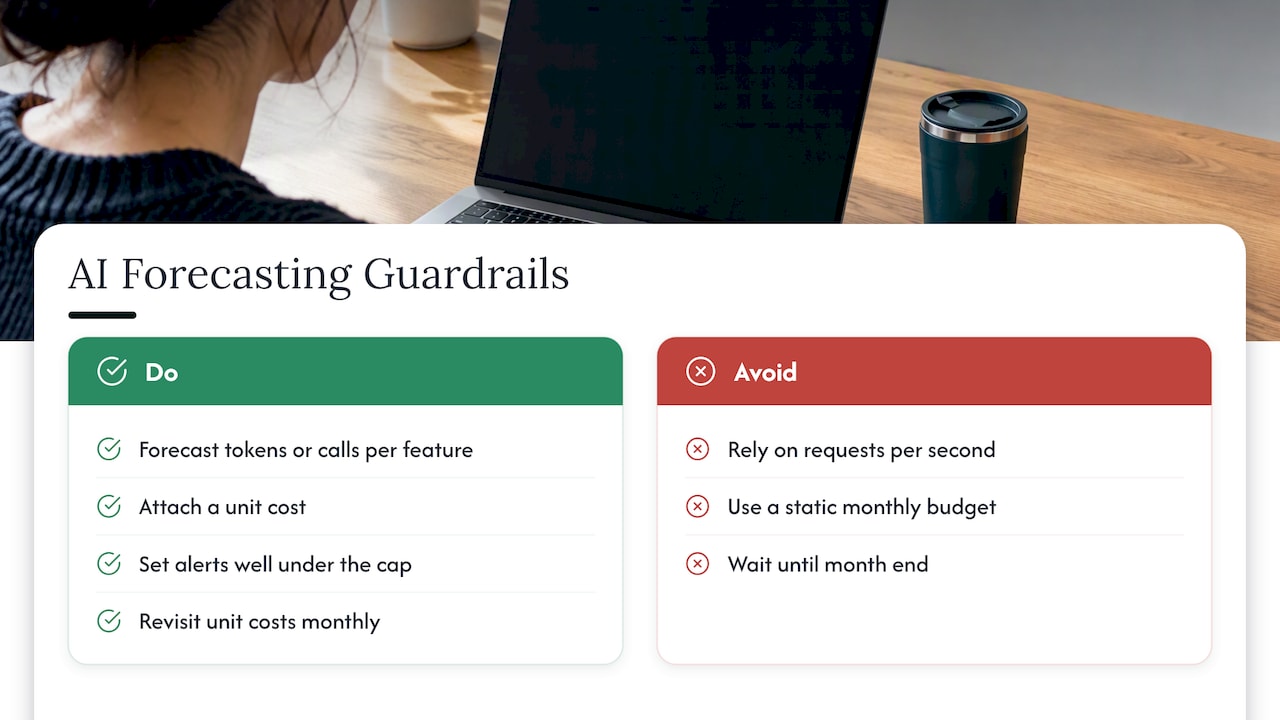
Generative AI has weakened the assumptions behind classic estimation. Requests per second no longer reliably predicts cost when one request can consume ten times the tokens of the next. A single new feature, a prompt change or an agent loop can move spend by an order of magnitude overnight.
Google Cloud’s own guidance reflects this. Its recent launch of early anomaly detection and spend caps on budgets flags directional variances in daily AI costs within a project, and lets you cap spend. The message for forecasters is clear: when demand is unpredictable, a static monthly budget is not enough. You need a range, daily monitoring and guardrails that act before month end.
The demand curve behind AI is steep. Public revenue figures for OpenAI are one way to see how quickly usage-based AI spending has scaled, and your own bill may follow a similar shape on a smaller scale.
For AI workloads we suggest forecasting in tokens or inference calls per product feature, attaching a unit cost, and setting an alert threshold well under the cap. Then revisit the unit cost every month, because model pricing and your prompts both change. Our piece on measuring AI cost governance in one reporting cycle goes deeper.
Common mistakes that widen the variance
Treating a forecast as a one-off. It is a process with an owner, not a deliverable.
Ignoring SaaS and AI platforms. If Microsoft 365, SaaS subscriptions and AI services sit outside the model, your total is incomplete, however good the cloud numbers are.
Forecasting gross while optimizing net. If you plan to buy commitments or clean up waste, your forecast should show spend before and after. Otherwise savings look like a miss.
Not tracking commitment expiry. When a reservation lapses, the same workload costs more overnight. Put expiry dates in the model.
No explanation for variance. A miss with a reason is learning. A miss without one repeats.
Our perspective: a forecast is only as good as what you do with it
We see the same pattern in the organizations we work with. The forecast is built, presented and filed. Then the month plays out, and the gap between plan and invoice is explained after the fact.
The issue is rarely modeling skill. It is that visibility and action live in different places. A tool points out that you will overspend by 14%. A ticket gets created. Nobody owns it, and the leak compounds quietly.
Our position is that forecasting and optimization belong in one loop. We automate execution of optimization actions rather than only recommending them, so the forecast reflects savings that are actually landing, and we verify outcomes against invoice-level billing rather than dashboards. Existing visibility tools can stay in place: we integrate them so the actions have an owner and a process.
For managed service providers, the stakes are sharper. If you resell or manage cloud for customers, an unforecasted spike is margin erosion that you may absorb. Unified reporting and governance across tenants, without adding headcount, is what lets a small team forecast for dozens of customers.
If you take one thing from this guide, make it this: put a name next to every assumption, and a date next to every review.
— Dan
Turning forecasts into action with EverythingCloud
If you want the forecast and the follow-through handled together, our Managed FinOps service pairs expert guidance with the monitoring, anomaly detection and automated optimization on The Platform. It covers AWS, Azure, Google Cloud, Microsoft 365 and AI workloads. For organizations that want ongoing savings and governance, see Continuous Cloud Optimization.
MSPs can launch managed FinOps without building their own tooling through the Founding Partner Membership, listed at $500 per month. For a broader grounding in roles and process, start with our overview of FinOps in the cloud.
FAQ
What is the forecast for cloud spending?
It depends on whether you mean the market or your own bill. For your own, the answer comes from your history plus planned change, built as a hybrid of trend and driver-based models. Start from the provider’s native projection, then adjust it for launches, migrations and expiring commitments.
How do I forecast AWS costs?
Open AWS Cost Explorer, which projects up to 18 months of spend from your history. Treat that as the baseline, then add known changes from engineering and product. Compare the forecast with the invoice each month and record why they differed.
Can I see an Azure cost forecast?
Yes. In Cost Management, open Cost Analysis and use the area or stacked column view, where the shaded section is the forecast based on your resource use. Add a group-by selection if you want to see it by service.
How accurate should a cloud cost forecast be?
FinOps practitioners treat about 20% variance as acceptable at Crawl, 15% at Walk and 12% at Run. Aim to tighten your own band each quarter rather than chase a single number. Track the reasons for each miss.
How do I forecast AI spend?
Forecast by tokens or inference calls per feature, apply a current unit cost, and add daily anomaly alerts and spend caps. Static monthly budgets cannot keep up with how fast AI usage shifts.
Sources
- FinOps Framework: Forecasting capability
- FinOps Framework: Forecasting (previous capabilities)
- The State of FinOps Report 2025
- Cloud Forecasting Insights from Hulu, FinOps Foundation
- AWS: 18-Month Forecasting and Explainable AI Insights in Cost Explorer
- Microsoft Learn: Common cost analysis uses
- Google Cloud: View your forecasted costs
- Google Cloud Blog: Early anomalies and spend caps on Budgets