
The single highest-leverage move in Databricks cost optimization is building a 30-day baseline tied to workload and owner, then fixing what it reveals: idle clusters, oversized compute, and duplicate pipelines. Layer in right-sized instance families, autoscaling, auto-termination, and enforced tagging with budget alerts, and most of the waste gets removed within a billing cycle. Savings vary by workload mix, but the biggest wins come from targeted corrections rather than blanket cuts.
TL;DR:
- Building a 30-day workload-based baseline helps identify idle clusters, oversized compute, and duplicate pipelines that drive most unnecessary costs.
- Regularly auditing system billing tables highlights untagged, idle, or long-running clusters and SQL warehouses with minimal query activity for targeted fixes.
- Optimizing SQL warehouses with serverless options, current runtimes, and query tuning can significantly decrease DBU consumption, especially for bursty workloads.
- Implementing workload isolation by assigning separate clusters per workload type prevents contention and improves cost attribution accuracy.
Table of Contents
- Choose the right resources and right-size compute
- Dynamically allocate resources: autoscaling, auto-termination, and pools
- Monitor, attribute, and analyze costs using system tables and billing data
- Optimize SQL workloads and Databricks SQL warehouses
- Storage and data design: Delta Lake, file layout, and duplication avoidance
- Governance and FinOps controls: tagging, budgets, policies, and response actions
- Operational playbook: 30-day baseline, prioritized remediation, and automation examples
- Implement workload isolation to prevent resource contention and unexpected costs
- Optimize data storage costs by managing data retention and cleaning up unused data
- Leverage cost-effective storage tiers and data lifecycle policies
- Use query optimization techniques to reduce compute time and cost
- Apply caching strategies to minimize repeated data scans
- Schedule workloads during off-peak hours to take advantage of lower pricing
- What actually goes wrong when teams try this
- How EverythingCloud can help you operationalize this
- FAQ
- Sources
Choose the right resources and right-size compute
Compute selection is where most Databricks overspend starts. A cluster sized for a seasonal peak but running year-round bleeds money every single day it sits idle at that size.
Set sizing standards before anyone spins up a cluster: define Small, Medium, and Large tiers mapped to actual workload profiles, then enforce those tiers through cluster policies so engineers cannot pick an oversized instance type by default. This is the control layer that keeps the rest of your optimization work from eroding over time.
Job compute should handle scheduled ETL and batch work. All-purpose compute costs more per DBU and is meant for interactive development, not recurring pipelines. GPUs are the most expensive compute tier available, and they should appear only when a workload genuinely needs parallel tensor operations, not because a notebook “might” need it later.
A few rules keep this manageable:
- Default every new cluster to job compute unless it’s explicitly interactive.
- Reserve GPU instances for model training or inference workloads that measurably benefit.
- Run cluster drivers on-demand and workers on spot instances to balance reliability with cost.
- Review instance family choices quarterly against actual CPU and memory utilization.
Pro Tip: Audit your three largest clusters by DBU spend this week. Oversized compute tends to cluster around a handful of workloads, not spread evenly.
Dynamically allocate resources: autoscaling, auto-termination, and pools
Idle compute is the most common source of invisible spend. A cluster that finishes its job at 2 a.m. and sits running until someone notices at 9 a.m. has billed for seven hours of nothing.
Autoscaling and auto-termination close that gap, but only when tuned to the workload’s actual burstiness. A few steps make this concrete:
- Set autoscaling minimum and maximum worker counts based on observed peak and trough usage over at least two weeks, not guesswork.
- Apply auto-termination timeouts of 10 to 20 minutes for interactive clusters, shorter for development, and avoid disabling termination for “convenience.”
- Use cluster pools for workloads with frequent start and stop cycles, since pools keep idle instances warm and cut startup latency and the DBU waste that comes with repeated cold starts.
- Enforce these settings through cluster policies so individual users can’t override timeout or scaling limits.
The common anti-pattern is setting auto-termination once and forgetting it exists. Teams add new notebooks, schedules shift, and nobody revisits the timeout until a monthly bill spikes. Idle-instance billing accrues the moment a cluster is running, whether or not it’s doing work, so the goal is to shrink the window between “job done” and “cluster stopped” as close to zero as the workload allows.
Pro Tip: Pair auto-termination with a weekly report of clusters that ran longer than two hours without query activity. That list usually points straight to the next fix.
Monitor, attribute, and analyze costs using system tables and billing data
You can’t manage what you can’t attribute. Databricks exposes system billing and usage tables, including system.billing.usage, system.compute, system.query, and system.lakeflow, that allow workload-level cost attribution instead of guessing from an aggregate invoice, and tags propagate into those billing tables when applied consistently to usage and budget policies.
Build your 30-day baseline with these steps:
- Query
system.billing.usagedaily, grouped by workspace, cluster ID, and tag, to establish a per-workload DBU trend. - Join against
system.computeto flag long-running clusters and instances that never scale down. - Pull
system.queryto find SQL warehouses with persistent uptime but minimal query volume. - Check
system.lakeflowfor pipeline runs that duplicate output tables or overlap in schedule. - Flag any usage rows missing a tag; untagged usage is almost always the highest-leverage fix because nobody owns it.
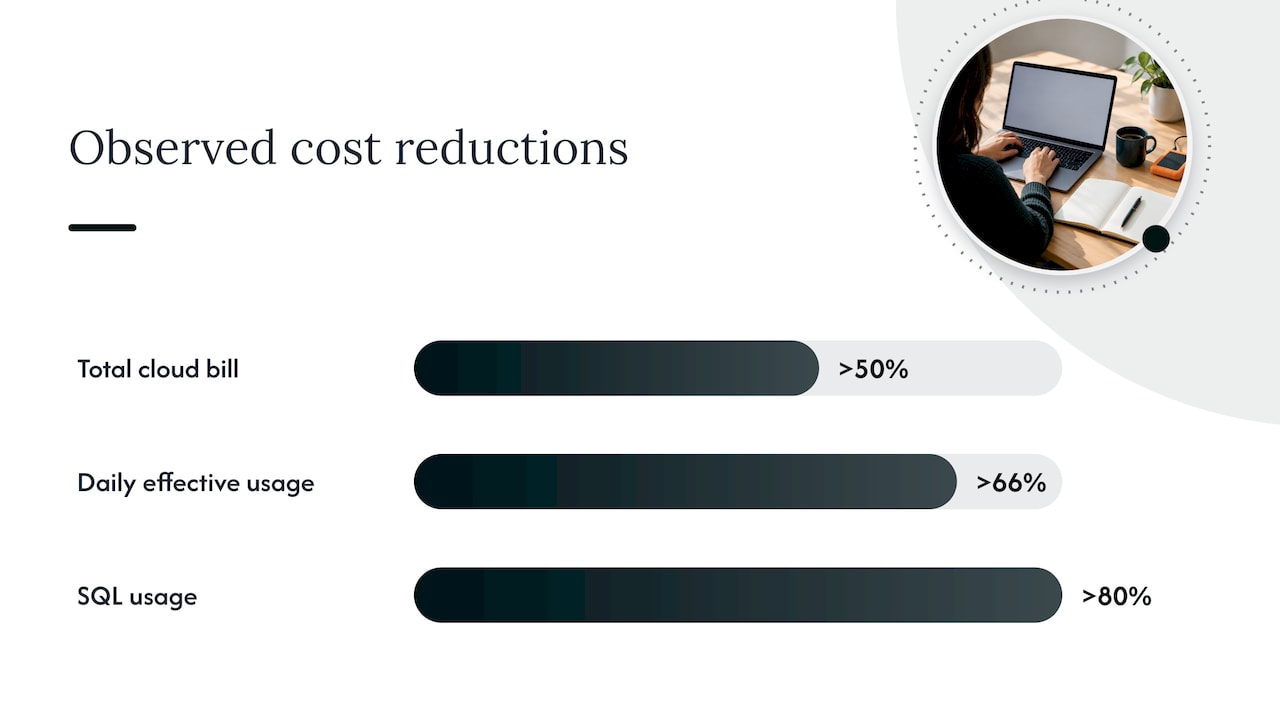
A real-world developer analysis found that a cloud data bill can drop by more than half once a team removes idle, oversized, and duplicate work from specific workloads rather than cutting broadly. In one documented account, targeted fixes cut daily effective-list-price usage by more than two-thirds, with SQL usage alone falling by over four-fifths, after the team tied billing data to workload and owner, as described in this workload attribution analysis.
| Signal to measure | Table to query | What it reveals |
|---|---|---|
| Daily DBU by workload | system.billing.usage | Which jobs or teams drive the most spend |
| Untagged usage | system.billing.usage | Spend with no accountable owner |
| Long-running clusters | system.compute | Idle or stuck compute |
| Warehouse uptime vs. query volume | system.query | SQL warehouses not auto-stopping |
Prioritize fixes by impact divided by effort: untagged high-spend workloads and idle clusters usually top the list because they take a config change, not a rewrite. Turn each finding into a ticket with an owner and a measurable target, then revisit the same queries 30 days later to confirm the number actually moved.
Optimize SQL workloads and Databricks SQL warehouses
Serverless SQL warehouses start almost instantly and scale automatically, which tends to reduce idle cost compared with classic warehouses that can take several minutes to spin up and often get left running “just in case.” For bursty, unpredictable query patterns, serverless usually wins on cost even before you factor in the idle minutes classic warehouses rack up during startup.
Photon and current runtime versions reduce the compute time and DBU consumption a given query needs, so keeping warehouses on current runtimes is close to a free optimization.
One underrated cost driver: tiny recurring queries that run every few minutes, often from dashboards or monitoring tools, can keep a warehouse from ever hitting its auto-stop threshold. A warehouse that should idle down after 10 minutes never gets the chance if something pings it every 8.
- Start warehouse sizing small and scale up only after measuring real concurrency and latency.
- Enable Photon and keep runtimes current to cut DBU per query.
- Audit query logs for polling patterns that defeat auto-stop.
- Prefer serverless for unpredictable or bursty SQL traffic.
Pro Tip: Cross-reference warehouse uptime against query timestamps. If a warehouse never stops but query volume is near zero most hours, you’ve found a polling problem, not a capacity problem.
Storage and data design: Delta Lake, file layout, and duplication avoidance
Storage and table design decisions compound into compute costs every time a query runs. Delta Lake with regular file compaction speeds up repeated reads, since poorly compacted tables force every query to scan more small files than necessary.
Predictive optimization for managed Unity Catalog tables can automate file-layout and statistics collection, improving query performance and lowering compute time for eligible tables, according to the same workload attribution analysis. That removes a maintenance task teams often skip until performance degrades.
- Enable Delta Lake table maintenance and statistics collection where eligible.
- Use predictive optimization instead of manual compaction schedules when available.
- Audit pipelines for duplicate output tables built by separate teams solving the same problem.
- Prefer AvailableNow incremental triggers over always-on streaming when near-real-time freshness isn’t required; this can cut compute dramatically for workloads that don’t need second-by-second updates.
More on file layout and lifecycle tradeoffs appears in our S3 cost optimization playbook, which covers similar storage principles outside Databricks specifically.
Governance and FinOps controls: tagging, budgets, policies, and response actions
Fixes that aren’t backed by governance tend to drift back to where they started within a quarter. Tagging and budgets are what make savings durable.
- Require tags on every workspace, cluster, job, and SQL warehouse at creation, not as an afterthought, since those tags are what let
system.billing.usageattribute spend accurately. - Build budgets filtered by team or project and attach explicit response actions, such as pausing nonproduction schedules or alerting the workload owner, rather than a passive dashboard nobody checks.
- Use cluster policies to block expensive instance types or prevent users from disabling autoscaling and auto-termination.
Allocation, mapping costs to the teams and projects that generate them, is one of the core capabilities in the FinOps Foundation’s framework, and it’s what turns a one-time cleanup into an accountable, repeatable practice.
- Tag at creation, not retroactively.
- Pair every budget with a response action, not just an alert.
- Review cluster policies quarterly as workloads evolve.
Operational playbook: 30-day baseline, prioritized remediation, and automation examples
A workable sequence looks like this:
- Week 1: run the system table queries above and extract daily DBU, untagged usage, cluster idle time, and warehouse uptime.
- Week 2: rank findings by impact divided by effort; untagged high-spend workloads and idle clusters usually rise to the top.
- Weeks 3 to 4: fix the top five items, typically auto-termination gaps, oversized clusters, polling queries, duplicate pipelines, and missing tags.
- Ongoing: automate what’s safe to automate, like enforcing tags at creation, auto-stopping idle clusters, and flagging downsize candidates for review.
A safer automation pattern separates a read-only audit stage from a proposed-change stage with explicit impact mapping, then a manual approval step before anything applies automatically, with rollback built in.
Pro Tip: Automate detection first and approval second. Teams that automate the fix before trusting the detection tend to roll back changes they didn’t fully understand.
This is close to how a modern FinOps platform approaches the same problem: continuous visibility into usage and billing data, automated actions like tag enforcement and idle-resource cleanup, and managed FinOps expertise for the parts that still need human judgment.
Implement workload isolation to prevent resource contention and unexpected costs
Mixing workloads on shared compute is a quiet cost multiplier. When a heavy batch job and a latency-sensitive dashboard query share the same cluster, one competes with the other for executors, memory, and shuffle capacity, and the usual fix is to throw more compute at the problem rather than separate the workloads.
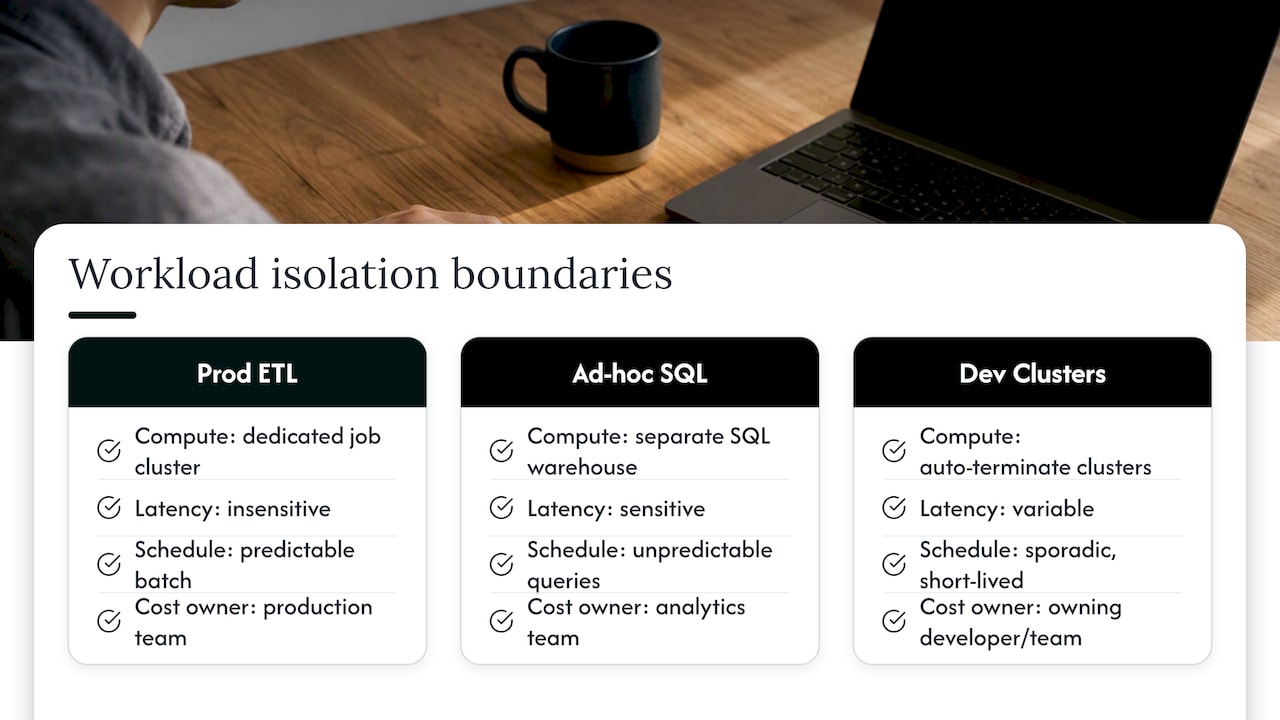
Isolation means giving distinct workload types their own compute: production ETL on dedicated job clusters, ad hoc analytics on separate SQL warehouses, and development work on clusters that auto-terminate aggressively since nobody is watching them closely. This prevents one team’s spike from inflating another team’s bill and makes cost attribution far more accurate, since usage no longer blends across unrelated jobs.
It also protects against a specific failure mode: a runaway or misconfigured job consuming shared capacity and forcing autoscaling to add workers that benefit no one. Isolated workloads contain that blast radius to a single cluster instead of letting it ripple into shared infrastructure.
Practical isolation doesn’t require a cluster per team. It requires matching compute boundaries to workload characteristics: separate clusters by latency sensitivity, by schedule predictability, and by who owns the cost. Pair isolation with the tagging and cluster policy work covered earlier, since isolated workloads are also easier to tag correctly and harder to misattribute. Teams that skip this step often discover contention only after a bill spikes, and by then the fix requires untangling months of blended usage instead of a straightforward cluster split.
Optimize data storage costs by managing data retention and cleaning up unused data
Storage costs rarely dominate a Databricks bill the way compute does, but unmanaged retention adds up, and it also inflates compute costs indirectly because queries scan more data than they need to.
Start by identifying tables nobody has queried in 90 days or longer. Orphaned tables from deprecated pipelines, abandoned experiments, or one-off analyses tend to accumulate quietly, and each one adds to both storage spend and the surface area a query planner has to consider.
Set retention policies explicitly rather than keeping data indefinitely by default. Raw landing zone data often doesn’t need the same retention as curated gold tables, and intermediate staging tables built during a pipeline run frequently don’t need to persist past the next successful run.
A practical cleanup cadence:
- Audit table access logs quarterly to find unused tables.
- Set explicit retention windows for landing, staging, and curated layers, based on actual business need rather than habit.
- Archive or delete staging tables once downstream consumption is confirmed.
- Document retention decisions so the next engineer doesn’t recreate a table “just in case.”
Cleaning up unused data also shrinks the blast radius for governance work: fewer tables means fewer things to tag, secure, and monitor, which compounds the benefit of the retention work itself.
Leverage cost-effective storage tiers and data lifecycle policies
Not all data needs to sit on the same storage tier. Frequently accessed curated tables belong on standard storage, but older partitions, historical snapshots, and compliance-driven archives are usually candidates for cooler, cheaper tiers.
Cloud object storage underneath Databricks typically offers tiered pricing based on access frequency. Data accessed daily costs more to store than data accessed rarely, and lifecycle policies automate the move between tiers so nobody has to remember to do it manually.
A sensible lifecycle approach follows the data’s actual access pattern over time: recent partitions stay on standard tiers where query performance matters most, older partitions move to infrequent-access tiers once query volume drops, and long-retired data moves to archive tiers if it needs to exist at all. This mirrors the lifecycle thinking covered in our S3 cost optimization playbook, where the same tiering logic applies to any object storage layer feeding a Databricks workspace.
The tradeoff to watch is retrieval cost and latency. Archive tiers are cheap to store but expensive and slow to retrieve, so lifecycle rules should match actual query patterns, not just age. A table that’s old but still queried occasionally for compliance reporting shouldn’t land in a tier that makes retrieval painful every time someone needs it.
Setting these policies once, at the bucket or container level, removes the need for manual intervention and keeps storage costs aligned with actual usage rather than growing unchecked as data ages in place.
Use query optimization techniques to reduce compute time and cost
Every inefficient query burns compute time that shows up directly as DBU consumption. Query optimization is one of the few levers that reduces cost without touching infrastructure at all.
Start with partition pruning. Queries that filter on partition columns scan dramatically less data than queries that don’t, and a missing filter on a large partitioned table can turn a seconds-long query into a minutes-long one.
Join strategy matters just as much. Broadcasting small tables instead of shuffling large ones across the cluster cuts both compute time and network overhead, and Databricks runtimes generally handle this automatically when table statistics are current, which is another reason table maintenance pays off twice.
A few habits catch most of the waste:
- Filter on partition columns whenever the query pattern allows it.
- Keep table statistics current so the query planner can choose efficient join strategies.
- Avoid
SELECT *on wide tables when only a handful of columns are needed. - Review query plans for full table scans on tables large enough to have partitions.
Photon and current runtime versions also reduce the compute time a given query needs, which compounds with query-level fixes rather than replacing them. The two together, better queries on a faster engine, tend to produce the largest drop in DBU consumption for analytics-heavy workloads.
Apply caching strategies to minimize repeated data scans
Caching prevents a cluster from re-reading and reprocessing the same data every time a query runs, which matters most for dashboards and repeated analytical queries hitting the same tables.
Delta cache keeps frequently accessed data on local cluster storage, so repeated reads skip the trip back to cloud object storage entirely. For dashboards refreshed every few minutes against the same underlying tables, this can cut compute time substantially since the expensive part, the initial scan and shuffle, happens once instead of on every refresh.
Query result caching works differently: it stores the output of a query so an identical subsequent query returns instantly without recomputing anything. This helps most with SQL warehouses serving repeated, predictable queries from BI tools or scheduled reports.
The tradeoff is staleness. Cached data doesn’t reflect changes made after the cache was populated, so caching fits workloads where near-real-time freshness isn’t the priority, dashboards refreshed hourly, recurring reports, reference tables that change rarely. For workloads where every second of freshness matters, caching needs a shorter invalidation window or shouldn’t be relied on at all.
Combining caching with the query optimization techniques above compounds the benefit: a well-written query that also benefits from cached intermediate data tends to show the largest drop in both latency and DBU consumption, particularly for BI and dashboard workloads that repeat the same access patterns throughout the day.
Schedule workloads during off-peak hours to take advantage of lower pricing
Shifting noncritical workloads to off-peak hours mostly helps by avoiding resource contention rather than hitting a different price point, since Databricks DBU pricing itself doesn’t typically vary by time of day the way some cloud provider spot markets do.
The real savings come from two places. First, scheduling batch jobs overnight or during low-traffic windows reduces contention with interactive workloads, which means clusters can run smaller and still finish on time, directly lowering compute cost. Second, off-peak scheduling pairs naturally with spot instance availability, since spot capacity and pricing in the underlying cloud provider can be more favorable during lower-demand windows, making the on-demand-driver, spot-worker pattern covered earlier even more cost-effective.
Practical scheduling moves:
- Push nonurgent ETL and batch jobs to overnight or weekend windows when interactive usage is lowest.
- Stagger job start times to avoid multiple large jobs competing for the same autoscaling pool simultaneously.
- Reserve peak business hours for interactive and latency-sensitive workloads that genuinely need them.
This works best for workloads without strict freshness requirements. A report that needs to be ready by 8 a.m. can run at 2 a.m. without anyone noticing the difference, while a workload feeding a live customer-facing dashboard can’t shift its schedule without changing what the business actually gets. Match the scheduling flexibility to the actual freshness requirement, not to what’s easiest to configure.
What actually goes wrong when teams try this
Savings vary widely, and the honest answer is that most of the variance comes from workload mix and governance maturity, not from which optimization technique a team picks first. A shop running mostly batch ETL has very different headroom than one running interactive SQL dashboards all day.
The most common mistake is aggressive right-sizing without a rollback plan. A team downsizes a cluster based on average utilization, misses a monthly peak job, and spends the next sprint firefighting instead of saving money. Ignoring tagging is a close second: without it, every other fix is a guess. And polling queries that quietly defeat auto-stop are the kind of thing nobody looks for until someone finally asks why a warehouse never seems to sleep.
Run changes behind a flag, test against a real workload, and watch the system tables for two weeks before calling it done.
— Dan
How EverythingCloud can help you operationalize this
Running the baseline, fixing the top offenders, and holding the line with tagging and budgets works, but it takes ongoing attention most teams can’t sustain alongside their actual jobs. A suitable platform can give continuous visibility into Databricks and broader cloud spend, automate actions like tag enforcement and idle-cluster cleanup, and pair that automation with managed FinOps expertise for the judgment calls software shouldn’t make alone.
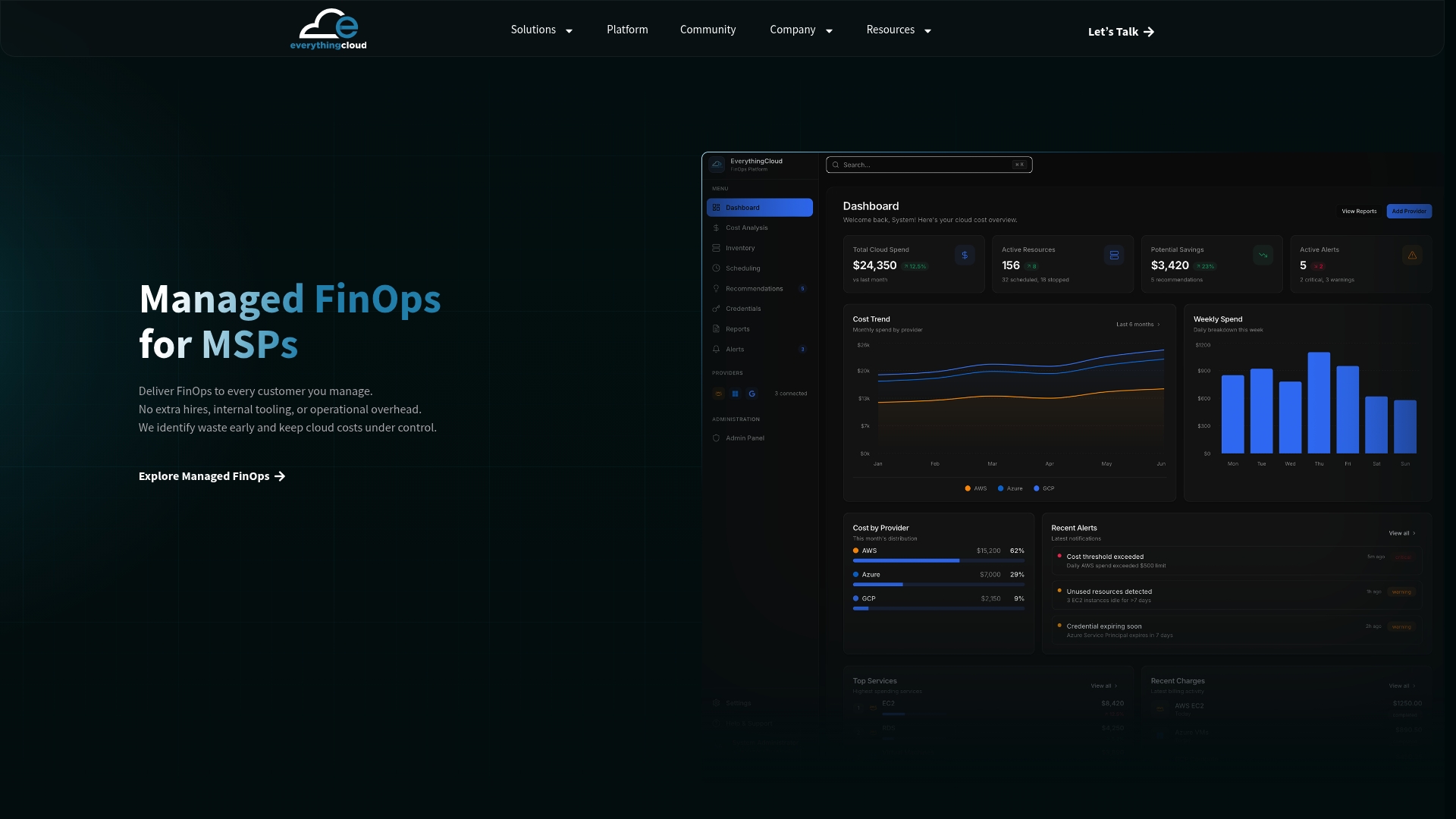
This fits mid-market and enterprise FinOps teams who want the playbook running continuously rather than revisited quarterly, and MSPs who want to offer it to clients without building it themselves. See our Managed FinOps services to get started.
FAQ
Why are Databricks bills often higher than expected?
Costs climb mainly from idle clusters, oversized compute, and duplicate pipelines running without attribution. A 30-day baseline using system tables usually reveals which specific workloads are driving the bulk of the spend.
What are the four pillars of cost optimization?
Definitions vary across frameworks, but a common version centers on visibility, allocation, optimization, and governance: knowing what you spend, attributing it to owners, actively reducing waste, and enforcing policies that keep savings in place.
How much can targeted fixes reduce Databricks costs?
Results depend heavily on workload mix, but one documented case showed daily effective-list-price usage falling roughly 68%, with SQL usage dropping 83.7%, after a team removed idle, oversized, and duplicate work identified through a workload attribution analysis. Results like this come from fixing specific workloads, not from a single universal setting.
What is the fastest first step toward lowering Databricks costs?
Query your system billing and usage tables to build a 30-day baseline by workload and owner before changing any configuration. That baseline tells you which clusters, warehouses, or pipelines are actually worth fixing first.
Can EverythingCloud help manage Databricks costs specifically?
Our platform and managed FinOps services provide cost visibility, automated optimization actions, and expert guidance across cloud, SaaS, and AI spend, which extends to Databricks workloads billed through connected cloud accounts. Pricing for Managed FinOps and Continuous Cloud Optimization is available on request.
Sources
- Attributing spend by workload is what cuts cloud data costs in half | Databricks Developer
- Usage and budget policies | Microsoft Learn (Azure Databricks)
- Allocation | FinOps Foundation