
What is Kubecost and what does it do?
Kubecost is a real-time Kubernetes cost monitoring and optimization tool built for engineering and DevOps teams who need to understand exactly where their cloud infrastructure spend is going. Rather than waiting for a monthly cloud bill with no context, Kubecost surfaces cost data continuously, mapped directly to the Kubernetes objects generating it. According to the AWS Workshop documentation, customers using Kubecost report saving up to 80% on Kubernetes cloud infrastructure costs by identifying the root causes of waste.
The tool operates on an open-core model. Its core cost allocation capabilities were open-sourced as OpenCost, a CNCF Sandbox project, while the full Kubecost product adds a richer UI, alerting, budgeting, and enterprise features on top. Here is what it tracks out of the box:
- Real-time cost visibility across clusters, namespaces, pods, and deployments
- Cost allocation tied to Kubernetes labels at the pod and namespace level
- Identification of idle resources and over-provisioned workloads
- Integration with cloud billing data for reconciled, accurate spend reporting
- Optimization recommendations including rightsizing and workload scheduling
How Kubecost fits into FinOps and Kubernetes cost governance
Kubecost functions as a two-stage FinOps engine. The first stage is visibility: it tells you which teams, workloads, and namespaces are driving spend. The second stage is action: it supports chargeback and showback workflows, automated rightsizing, and budget enforcement. That progression from “what is happening” to “what should we do about it” is what separates Kubecost from a basic metrics dashboard.
Finance and FinOps teams typically work with aggregate cloud billing data. DevOps engineers need granular, resource-level detail. Kubecost bridges that gap by combining native cloud billing data with Kubernetes metrics into a single, consistent view. The result is a shared language around cost efficiency that both teams can actually use. For organizations pursuing Kubernetes cost optimization, that alignment is often the hardest part to get right.
Key features and benefits for enterprise Kubernetes environments
Kubecost’s feature set is built around the practical needs of teams running Kubernetes at scale. A few capabilities stand out for enterprise environments:
- Cost allocation by Kubernetes object: Costs are broken down by namespace, deployment, service, label, and pod. Workloads without relevant labels appear as
__unallocated__, which immediately highlights tagging gaps in your metadata strategy. - Cloud bill reconciliation: Kubecost pulls in native cloud billing data and reconciles it against Kubernetes resource usage, so your reported costs match what you actually pay.
- Rightsizing recommendations: The tool surfaces over-provisioned containers and nodes, with automated request sizing available in paid tiers.
- Alerting and budgets: Spend anomaly alerts and budget threshold notifications prevent cost surprises before they compound.
- Role-based access controls: Cost data visibility is scoped by team or department, keeping sensitive financial data appropriately restricted.
- Free community tier: The 15-day metric retention free plan covers most core features for a single cluster, with the Enterprise plan adding unlimited retention, SSO/SAML, and unified multi-cluster views.
How Kubecost installation and configuration actually work
Installing Kubecost is straightforward. Deployment uses Helm, and the package includes Prometheus and Grafana bundled as dependencies, so you are not assembling a monitoring stack from scratch. The free community version is up and running in under five minutes on most clusters.

Configuration is where the real work begins. You will need to set cluster metadata, connect cloud billing integrations, and decide how to aggregate cost views. Kubecost supports both Single Aggregation (one concept at a time, such as namespace) and Multi Aggregation (filtering across namespace, label, deployment, and more simultaneously). The free tier retains metrics for 15 days; the Enterprise plan removes that ceiling entirely.
Pro Tip: Define your Kubernetes labeling scheme before you configure Kubecost. Labels for ownership, cost center, and project are what make cost allocation defensible. Without them, a large share of your spend will land in __unallocated__ and the chargeback data becomes unreliable.
Best practices for getting real value from Kubecost
Kubecost works best when your organization treats it as a continuous FinOps practice, not a one-time audit tool. A few practices make a consistent difference:
- Invest in labeling first. Consistent Kubernetes labels for team, product, and cost center are the foundation of accurate cost allocation. Retrofitting labels after deployment is painful.
- Interpret idle costs carefully. Idle capacity is not always waste. Some headroom is necessary for scheduling flexibility and availability buffers. Kubecost lets you distribute idle costs across active workloads rather than flagging all of it as inefficiency.
- Use recommendations as inputs, not mandates. Rightsizing suggestions should be reviewed against performance SLAs before acting on them.
- Align your teams. Engineering, FinOps, and finance need to review the same cost data together. Kubecost’s role-based reporting makes that possible without exposing sensitive data across the wrong groups.
Pro Tip: Connect Kubecost data to your broader enterprise FinOps platform for governance at scale. Kubecost handles Kubernetes-level granularity well; a platform layer handles multi-cloud aggregation, commitment management, and executive reporting.
Where Kubecost gets its cost data
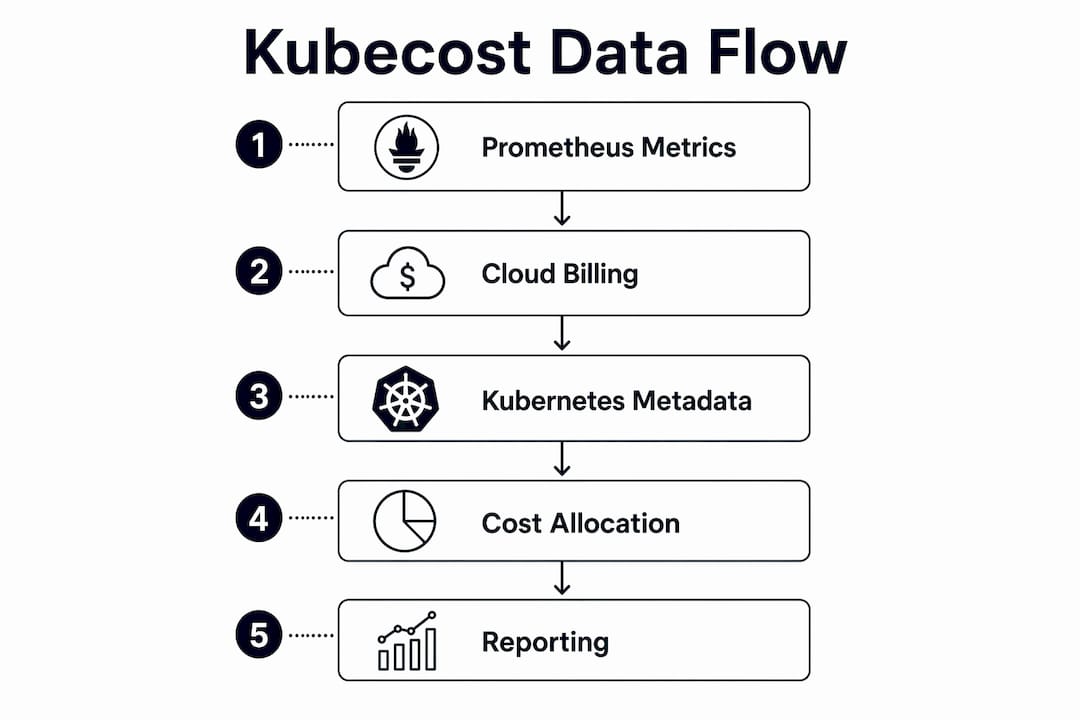
Kubecost pulls from three primary data sources. First, it collects real-time resource usage metrics from Prometheus and kube-state-metrics running inside your cluster. These metrics cover CPU, RAM, GPU, and storage consumption at the pod level. Second, it integrates with cloud provider billing APIs (AWS Cost and Usage Reports, Azure Cost Management, and Google Cloud Billing) to reconcile on-demand rates and committed use discounts against actual Kubernetes resource consumption. Third, it uses Kubernetes metadata, specifically labels and namespace annotations, to map raw resource costs to organizational constructs like teams, products, and departments. Idle cost is calculated as the difference between total cluster hardware cost and the sum of allocated CPU, RAM, and GPU costs, expressed as: idle_cost = sum(cluster_cost) - (cpu_allocation_cost + ram_allocation_cost + gpu_allocation_cost).
Typical use cases where Kubecost delivers measurable savings
Kubecost addresses three primary use cases: gaining visibility into what is consuming Kubernetes resources, understanding whether those resources are being used efficiently, and supporting FinOps workflows like chargeback and showback. In practice, teams use it to catch over-provisioned deployments that were sized for peak load but run at low utilization most of the time. Platform teams use the Allocations page to produce defensible chargeback reports for internal business units. FinOps teams use the savings recommendations to prioritize rightsizing efforts before committing to reserved capacity. The kubectl-cost CLI tool also lets engineers query workload costs directly from the terminal, which fits naturally into existing DevOps workflows.
Limitations and common challenges with Kubecost
Kubecost is not without friction. The labeling dependency is the most common pain point: teams with inconsistent or missing Kubernetes labels will see large portions of spend reported as __unallocated__, which undermines chargeback accuracy. Multi-cluster environments require the Enterprise plan for a unified view; the free tier shows one cluster at a time. Metric retention on the free plan is capped at 15 days, which limits trend analysis. Teams running on-premises or in air-gapped environments may also face additional configuration work to connect billing data sources. Finally, Kubecost measures Kubernetes-layer costs well but does not replace a full cloud cost management platform for organizations with complex multi-cloud commitments, SaaS spend, or AI workload governance needs.
Security and access control for cost data in Kubecost
Kubecost includes role-based access controls that scope cost data visibility to the appropriate teams. Engineering teams can see their own namespace costs without accessing finance-level aggregate data across the organization. The Enterprise plan adds SSO and SAML integration, which lets organizations enforce identity provider policies consistently across Kubecost access. Budget alerts and anomaly notifications can be routed to specific team owners rather than broadcast organization-wide. For teams in regulated industries, this scoping is not optional. Cost data often reveals organizational structure, headcount allocation, and product investment priorities, so treating it with the same access discipline as other sensitive operational data is the right posture.
Key Takeaways
Kubecost gives Kubernetes teams real-time cost visibility and allocation accuracy, but its full value depends on consistent labeling, organizational alignment, and integration with a broader FinOps practice.
| Point | Details |
|---|---|
| Savings potential | Kubecost customers report saving up to 80% on Kubernetes cloud infrastructure costs by identifying waste root causes. |
| Labeling is foundational | Without consistent Kubernetes labels, costs land in __unallocated__ and chargeback data becomes unreliable. |
| Free tier limitations | The community version retains metrics for 15 days and supports a single cluster view; Enterprise removes both constraints. |
| Idle cost interpretation | Not all idle capacity is waste; Kubecost lets you distribute idle costs across workloads to reflect true application spend. |
| FinOps integration | Kubecost handles Kubernetes-layer granularity; pair it with a platform layer for multi-cloud governance and commitment management. |