
The most effective approach to multi-cloud cost management combines unified cross-cloud visibility, a FinOps operating model, and targeted automation — and you can start closing the most expensive gaps this week.
Three actions you can take in the next 7 days:
- Visibility check: Connect all CSP billing exports (AWS Cost Explorer, Azure Cost Management + Billing, Google Cloud Billing) into a single reporting view so you can see total spend in one place.
- Tagging quick fix: Identify your top 10 untagged or mistagged resources by cost and apply environment, team, and application tags immediately.
- Budget and alert: Set at least one cross-cloud budget threshold with an alert at 80% of monthly target so finance gets a warning before overage, not after.
Within 30–90 days of executing these three steps, most organizations see measurable waste reduction, clearer cost allocation by team or product, and fewer billing surprises at month-end.
Pro Tip: Don’t wait for a perfect tagging taxonomy before you start. A 70% consistent tagging policy applied now beats a theoretically perfect one that ships in six months.
Key Takeaways
Effective multi-cloud cost management requires unified visibility, a FinOps operating model with named owners, and targeted automation — applied in sequence, not all at once.
| Point | Details |
|---|---|
| Start with visibility | Connect all CSP billing exports and enforce a tagging standard before attempting any optimization work. |
| Management before optimization | Tracking and allocation must come first; rightsizing and commitment purchases only deliver value when spend is visible and attributed. |
| Native tools have limits | AWS Cost Explorer, Azure Cost Management, and Google Cloud Billing cover single clouds well but require a third-party platform for cross-cloud normalization and automation. |
| Phase your automation | Apply guardrails and approval workflows before enabling automated actions on production resources to protect reliability. |
| Everythingcloud as turnkey option | Everythingcloud provides real-time cross-cloud visibility, automated optimization, AI workload governance, and managed FinOps expertise for organizations and MSPs. |
Table of Contents
- What is multi-cloud cost management, and how does it differ from optimization?
- Why do multi-cloud costs keep climbing?
- What capabilities must a multi-cloud cost management solution provide?
- When do native CSP tools fall short?
- How to build a FinOps playbook for multi-cloud environments
- What questions should you ask vendors during procurement?
- How Everythingcloud maps to the procurement checklist
- What does a 30/90/180-day implementation look like?
- Security and compliance in multi-cloud cost management platforms
- Why process matters more than the platform you choose
- Everythingcloud gives you managed FinOps without building it yourself
- Sources
What is multi-cloud cost management, and how does it differ from optimization?
Multi-cloud cost management is the ongoing practice of tracking, allocating, and governing cloud spending across two or more cloud service providers (CSPs). It covers visibility into what is being spent, by whom, on which resources, and under what billing model — across AWS, Azure, Google Cloud, and any other active provider. The FinOps Foundation is the governing practice community that defines the discipline and maintains tooling and terminology standards teams can use to translate equivalent FinOps functions across providers.
Cost management and cost optimization are related but distinct. Management is the continuous work of reporting, allocating, and governing spend — pulling billing exports, enforcing tags, setting budgets, and producing showback reports. Optimization is the active work of reducing spend while preserving outcomes: rightsizing an oversized VM, purchasing a Reserved Instance, or shutting down an idle environment. You cannot optimize what you cannot see, so management always comes first.
In practice, the distinction shows up like this. A billing export from AWS Cost Explorer feeding a shared dashboard is cost management. Tagging every resource to a product team so finance can allocate costs accurately is cost management. Identifying that a database tier is running at 12% average CPU and downsizing it is cost optimization. Purchasing a one-year Savings Plan after analyzing 90 days of usage patterns is also optimization. Both disciplines are necessary, and neither replaces the other.
Why do multi-cloud costs keep climbing?
The short answer: complexity compounds quietly. Each additional cloud provider introduces its own pricing model, billing format, discount mechanism, and resource taxonomy. Without deliberate controls, the gaps between those systems become places where spend accumulates unnoticed.
Gartner forecasts worldwide public cloud end-user spending to total $723 billion in 2025. At that scale, even a small percentage of unmanaged or misallocated spend translates into material dollars. For a large annual cloud budget, a significant waste rate translates into a substantial amount leaving the organization with nothing to show for it.
The primary cost drivers in multi-cloud environments are:
- Resource sprawl: Teams provision resources across clouds without a central inventory, leaving idle VMs, orphaned storage volumes, and forgotten test environments running indefinitely.
- Inconsistent tagging: Without a shared tagging standard, cost allocation breaks down at the cloud boundary. Finance cannot attribute spend to a product or team, and engineering cannot identify waste by owner.
- Cross-cloud egress: Moving data between clouds or out to the internet carries charges that are often the least visible but most expensive line items in a multi-cloud bill. Placing data close to compute and using interconnects or CDNs can reduce these charges materially.
- Commitment mismatches: Reserved Instances and Savings Plans purchased for one cloud do not transfer to another. Organizations running workloads across AWS and Azure often end up over-committed on one side and fully on-demand on the other.
- Workload placement decisions: Running a workload on the wrong cloud for its data locality or pricing tier adds cost without adding performance.
- AI and ML experimentation spikes: This is the fastest-growing risk category. AI workloads carry variable usage patterns and require continuous governance — iterative model training, GPU-intensive experiments, and token consumption can spike a bill in hours without experiment-level quotas or cost-aware guardrails in place.
Statistic callout: Gartner’s $723 billion public cloud spending forecast for 2025 underscores why even a modest improvement in cost governance produces significant financial returns at enterprise scale.
Pro Tip: Set a dedicated cost alert for AI and ML workloads separately from your general compute budget. GPU instance costs can exceed general-purpose compute costs by an order of magnitude, and a single runaway training job can distort your entire monthly view.
What capabilities must a multi-cloud cost management solution provide?
Before evaluating any platform, align your IT and finance teams on a shared capability checklist and consider solutions that offer custom internal tools and dashboards to integrate cost exports into your internal BI or reporting workflows. The table below maps each capability to why it matters and what to verify during a proof of concept.
| Capability | Why it matters | What to verify in a PoC |
|---|---|---|
| Visibility and normalization | Translates billing data from AWS, Azure, and GCP into a consistent cost model so you can compare spend across clouds | Confirm that unit costs normalize across billing formats; check that reserved and on-demand costs are separated correctly |
| Multi-account and multi-cloud support | Covers all accounts, subscriptions, and projects under a single pane without manual data joins | Test with at least two clouds and three accounts simultaneously |
| Tagging and allocation | Enables showback and chargeback by team, product, or environment | Verify tag inheritance, tag enforcement policies, and allocation of untagged spend |
| Rightsizing and automated actions | Identifies oversized resources and can act on recommendations automatically or with approval workflows | Run a dry-run rightsizing pass and confirm recommendation accuracy against actual utilization |
| Commitment and discount management | Tracks Reserved Instances, Savings Plans, and committed-use discounts across clouds and flags coverage gaps | Check that expiring commitments surface as alerts with lead time |
| Budgets and anomaly detection | Alerts finance and engineering before overage occurs; catches unexpected spend spikes early | Set a test budget and trigger a simulated anomaly to measure mean time to detection |
| AI/ML-aware forecasting | Models token consumption, GPU usage, and experiment costs separately from general compute | Confirm the platform can tag and forecast AI workloads at the experiment or model level |
| MSP and multi-tenant controls | Allows MSPs to manage multiple customer environments with isolated views, per-customer allocation, and white-label reporting | Verify tenant isolation: one customer’s data must not be visible to another |
| Integrations and APIs | Connects to BI tools, ticketing systems, CI/CD pipelines, and CMDBs so cost data flows into existing workflows | Test a billing export to a BI tool such as Power BI or Looker and confirm field fidelity |
| Security and compliance posture | Aligns with CIS and NIST frameworks to protect billing data and access credentials | Request evidence of CIS benchmark alignment and data encryption at rest and in transit |
| Transparent pricing model | Subscription, percentage-of-savings, or per-connector pricing should be predictable and auditable | Ask for a written pricing breakdown with no hidden per-API-call or per-account fees |
The FinOps Foundation’s multi-cloud tools and terminology matrix is a useful reference for mapping these capabilities to provider-specific names. AWS calls its discount mechanism “Savings Plans”; Azure calls a similar construct “Azure Reservations.” Without a normalization layer, your team will spend hours reconciling terminology rather than acting on data.
Pro Tip: During a PoC, ask the vendor to import three months of real billing data and produce a normalized cost-per-unit report across two clouds. If the numbers don’t reconcile with your actual invoices within a small margin, the normalization layer has a gap.
When do native CSP tools fall short?
Native tools — AWS Cost Explorer, Azure Cost Management + Billing, and Google Cloud Billing — are well-designed for their own ecosystems. Each provides billing exports, budget alerts, rightsizing recommendations, and commitment tracking within its own cloud. For organizations running workloads on a single provider, these tools are often sufficient.
The gaps appear when you need a cross-cloud view. Native tools do not normalize costs across billing formats. AWS uses Cost and Usage Reports (CUR); Azure uses billing exports in its own schema; GCP uses BigQuery billing exports. Joining these into a single cost model requires custom engineering — and that engineering needs ongoing maintenance as each provider updates its export schema.
Provider-native tools combined with process — reporting, tagging, governance, autoscaling, and rightsizing — form the foundation of cost optimization, but they stop short of cross-cloud automation and multi-tenant management. Features that typically require a third-party platform include:
- Normalized unit-costing across AWS, Azure, and GCP in a single view
- Cross-cloud reservation brokering that identifies where commitment coverage is thin across providers
- Centralized showback and chargeback that allocates costs to business units regardless of which cloud the resource lives on
- Multi-tenant MSP controls with per-customer isolation, white-label reporting, and per-customer billing
The decision point is straightforward. If your organization runs meaningful workloads on two or more clouds, needs to allocate costs to multiple teams or customers, or operates as an MSP managing client environments, a third-party platform closes gaps that native tools leave open. For a single-cloud shop with a small team, native tools plus a disciplined tagging policy may be enough for now.
For a deeper look at how cloud management systems integrate telemetry and billing exports across hybrid and multi-cloud environments, the operational architecture matters as much as the tool selection.
How to build a FinOps playbook for multi-cloud environments
The FinOps three-phase model — Inform, Optimize, Operate — is the practical maturity path for multi-cloud cost management. Here is how to execute each phase with concrete activities, roles, and cadence.
Phase 1: Inform (weeks 1–4)
- Connect billing exports from all active CSPs into a central data store or cost management platform.
- Unify your resource inventory across accounts, subscriptions, and projects.
- Enforce a tagging standard covering at minimum: environment, team, application, and cost center.
- Establish a cost allocation model that maps cloud resources to business units for showback reporting.
- Set baseline budgets for each team or product with alerts at 80% and 100% of monthly target.
Phase 2: Optimize (weeks 5–12)
- Run a rightsizing analysis across compute, database, and storage tiers. Prioritize resources with consistently low utilization over a 30-day window.
- Audit commitment coverage. Identify gaps where on-demand spend is high enough to justify Reserved Instances or Savings Plans.
- Address egress costs. Review cross-cloud data flows and evaluate whether workload placement changes or CDN routing can reduce transfer charges.
- Apply automated scheduling to non-production environments — dev and test instances that run 24/7 but are only used during business hours are a common source of waste.
Phase 3: Operate (ongoing)
- Automate rightsizing approvals for low-risk resource types with an approval workflow for production workloads.
- Govern AI and ML workloads with experiment quotas, model-cost tagging, and a production gating process that requires cost sign-off before a model moves from experiment to production.
- Run a monthly FinOps review with engineering, finance, and product owners present.
- Track and report KPIs monthly: cost per unit of output, commitment coverage rate, percentage of tagged resources, and anomaly mean time to detection (MTTD).
Roles and cadence
| Role | Weekly | Biweekly | Monthly |
|---|---|---|---|
| FinOps owner | Review anomaly alerts; triage new spend spikes | Review rightsizing queue; update commitment plan | Produce executive cost report; review KPIs |
| Cloud engineering | Remediate flagged idle resources | Apply approved rightsizing changes | Review tagging compliance; update automation rules |
| Finance | Monitor budget alerts | Reconcile actuals vs. forecast | Approve chargeback allocations; update annual plan |
| Product owners | Review team cost dashboards | Approve or defer rightsizing for owned services | Sign off on commitment purchases for owned workloads |
Pro Tip: Phase automation carefully. Start with guardrails — alerts and approval workflows — before enabling automated actions on production resources. An automated shutdown that kills a production database because it was mistagged as “dev” erodes trust in the entire FinOps program faster than any cost spike.
For a practical governance framework that covers tagging policies, spending limits, and quota enforcement across multi-cloud environments, the architecture decisions made early in the Inform phase determine how much automation is safely available later.
What questions should you ask vendors during procurement?
Use this scoring rubric during vendor evaluation. Score each capability 0–3 (0 = absent, 1 = partial, 2 = functional, 3 = best-in-class). A vendor should score at least 2 on visibility, tagging, anomaly detection, and security to reach your shortlist.
| Capability area | Procurement question | Minimum score to shortlist |
|---|---|---|
| Visibility and normalization | “Show me a normalized cost view across AWS and Azure billing exports for the same time period. How do you handle schema changes when a CSP updates its export format?” | 2 |
| Automation and rightsizing | “What automated actions can the platform take without human approval? What guardrails prevent actions on production resources?” | 2 |
| Reservation management | “How does the platform track commitment coverage across multiple clouds and alert on expiring reservations?” | 2 |
| AI/ML cost forecasting | “Can the platform tag and forecast GPU and token costs separately from general compute? Show an example forecast for an AI workload.” | 1 |
| Integration coverage | “Which BI tools, ticketing systems, and CI/CD platforms does the API support natively? What is the SLA for export latency?” | 2 |
| Security and compliance | “Provide evidence of CIS benchmark alignment and describe how billing credentials are stored and accessed.” | 3 |
| Pricing transparency | “Provide a written pricing breakdown. Are there per-account, per-API-call, or per-connector fees not included in the base subscription?” | 2 |
| MSP and multi-tenant | “How is tenant data isolated? Can one customer’s team access another customer’s cost data?” | 3 (for MSPs) |
During the PoC itself, verify four things specifically. First, import three months of real billing data and confirm the normalized totals match your actual invoices. Second, run a rightsizing dry-run and check whether the recommendations align with your own utilization data. Third, for MSPs, test tenant isolation by attempting to access one customer’s data from another customer’s login. Fourth, ask for a written pricing estimate based on your actual account count and cloud spend — verbal estimates become surprises at renewal.
The AWS Well-Architected Framework’s cost optimization pillar provides a useful benchmark for evaluating whether a vendor’s recommendations align with established best practices for workload design and cost governance.
How Everythingcloud maps to the procurement checklist
Everythingcloud is a continuous cloud, SaaS, and AI optimization platform built for organizations that need cross-cloud visibility and managed FinOps expertise without assembling the capability internally. The table below maps its capabilities directly to the procurement checklist.
| Checklist capability | Everythingcloud capability |
|---|---|
| Visibility and normalization | Real-time unified visibility across AWS, Azure, Google Cloud, SaaS, and AI spending in a single normalized view |
| Multi-cloud and multi-account support | Covers all accounts, subscriptions, and projects across major CSPs with no manual data joins |
| Tagging and allocation | Enforces tagging policies, allocates untagged spend, and produces showback and chargeback reports by team or customer |
| Rightsizing and automation | Automated rightsizing recommendations with approval workflows; automated scheduling for non-production environments |
| Commitment and reservation management | Tracks Reserved Instance and Savings Plan coverage across clouds; alerts on expiring commitments and coverage gaps |
| Anomaly detection and budgets | 24/7 monitoring with anomaly detection and budget alerts; MTTD tracked as an operational KPI |
| AI/ML-aware controls | Governs AI infrastructure and token consumption; supports experiment-level cost tagging and production gating |
| MSP and multi-tenant | “FinOps in a Box” for MSPs: multi-tenant isolation, per-customer allocation, white-label reporting, and managed services |
| Integrations and APIs | Connects to BI tools, ticketing systems, CI/CD pipelines, and CMDBs via billing export and API integrations |
| Security and compliance | CIS and NIST-aligned governance; data encryption at rest and in transit; role-based access controls |
| Pricing model | Subscription SaaS with transparent per-engagement pricing; managed FinOps option for organizations that want expert oversight |
Typical outcomes at 30–90 days include measurable waste reduction from rightsizing and idle resource cleanup, improved tagging compliance, and a functioning budget-and-alert structure across all active clouds. At 90–180 days, organizations typically see commitment coverage improve, AI workload costs become attributable and forecastable, and finance teams gain the cross-cloud reporting they need for accurate budget planning.
For MSPs, the “FinOps in a Box” model means launching a managed FinOps service without building the platform, the tooling, or the methodology from scratch. Multi-tenant isolation and per-customer reporting are built in, not bolted on.
Explore the full Everythingcloud platform to see how the monitoring, automation, and managed FinOps layers work together in practice.
What does a 30/90/180-day implementation look like?
A phased timeline prevents the common failure mode of trying to govern everything at once and governing nothing well.
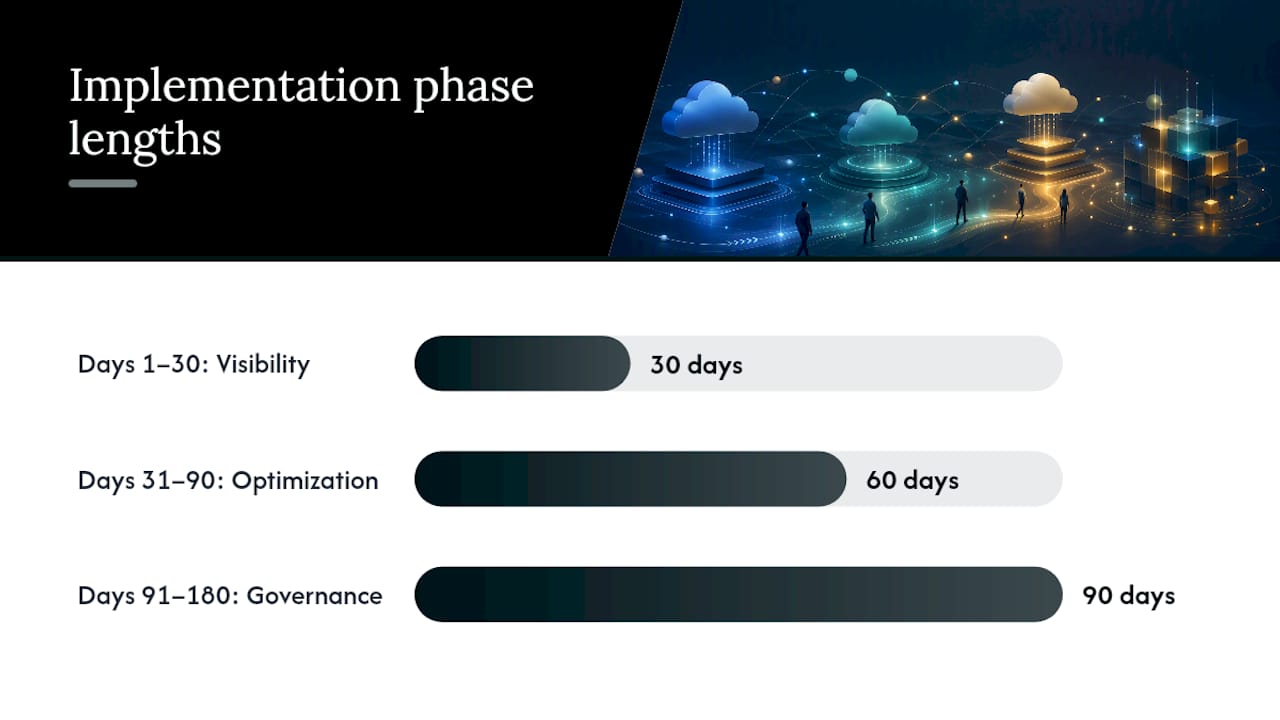
Days 1–30: Establish visibility and baseline controls
- Connect all CSP billing exports to your cost management platform.
- Complete a full resource inventory across all accounts and projects.
- Implement your tagging standard and remediate the top untagged resources by cost.
- Set cross-cloud budgets with alerts for each major team or product.
- Produce your first normalized cross-cloud cost report and share it with finance and engineering leads.
Expected outcome: full spend visibility, initial tag coverage above 70%, and no more billing surprises at month-end.
Days 31–90: Activate optimization
- Complete a rightsizing analysis and begin executing low-risk recommendations (dev and test tiers first).
- Analyze 60–90 days of usage data and build a commitment purchase plan for Reserved Instances and Savings Plans.
- Implement automated scheduling for non-production environments.
- Address the top three egress cost sources identified in the billing data.
- Establish a monthly FinOps review cadence with defined owners.
Expected outcome: measurable spend reduction from rightsizing and scheduling, improved commitment coverage, and a functioning FinOps operating rhythm. Savings ranges vary by environment, but organizations with significant idle or oversized resources commonly see material reductions in this phase.
Days 91–180: Govern and scale
- Automate the rightsizing approval workflow for production workloads with appropriate guardrails.
- Implement AI and ML workload governance: experiment quotas, model-cost tagging, and production gating.
- Build a full showback or chargeback model and begin distributing cost reports to product owners.
- Integrate cost data into CI/CD pipelines so engineers see cost impact before deployment.
- Review and optimize your commitment portfolio based on 90 days of actual usage data.
Expected outcome: a self-sustaining optimization pipeline, accountable cost ownership across teams, and a governance model that scales as cloud usage grows.
For a detailed look at managing multi-cloud environments through each of these phases, including stakeholder alignment and rollback planning, the operational detail matters as much as the timeline.
Security and compliance in multi-cloud cost management platforms
Cost management platforms handle sensitive data. Billing exports contain resource names, account structures, usage patterns, and sometimes workload identifiers that reveal architecture decisions. A platform with weak access controls or poor credential management is a security risk, not just a governance tool.

The key security requirements for any cost management platform are role-based access control (RBAC) that limits who can see which accounts or customers, encryption of billing data at rest and in transit, and secure storage of CSP API credentials and billing export access keys. Platforms that store credentials in plaintext or use overly permissive IAM roles to pull billing data introduce risk that outweighs the cost savings they deliver.
Compliance alignment matters most for regulated industries. CIS benchmark alignment means the platform’s own infrastructure follows hardened configuration standards. NIST framework alignment means the platform’s access, monitoring, and incident response practices map to a recognized control set. Both are worth requesting as documented evidence during procurement, not just as marketing claims.
For MSPs, the compliance bar is higher. Multi-tenant platforms must demonstrate that one customer’s billing data is completely isolated from another’s — at the data layer, not just the UI layer. Tenant isolation failures in cost management platforms have exposed customer account structures and spending patterns in the past. Ask for a written description of the isolation architecture, not just a checkbox on a security questionnaire.
Cross-cloud environments also expand the attack surface for credential compromise. Each CSP billing integration requires its own set of access credentials. A platform that centralizes those credentials needs to demonstrate how it protects them: hardware security modules, secrets management services, and regular credential rotation are the baseline. Platforms that require overly broad permissions — such as full account administrator access to pull billing data — should be treated as a red flag.
Why process matters more than the platform you choose
The organizations that get the most from multi-cloud cost management are not necessarily running the most sophisticated platform. They are the ones that have assigned clear ownership, built a regular cadence, and treated cost governance as an operational discipline rather than a one-time project.
The platform matters, but it is an enabler, not the answer. A well-configured cost management tool with no accountable owner produces dashboards that nobody acts on. A disciplined FinOps team with even a basic toolset will outperform a passive team with an enterprise platform every time. The FinOps Foundation’s Inform → Optimize → Operate model is useful precisely because it frames the work as a continuous operating loop, not a deployment project with a finish line.
The practical tip that separates effective programs from stalled ones: assign a named FinOps owner with the authority to escalate unresolved waste. Without that accountability, rightsizing recommendations sit in a queue, commitment purchases get deferred, and the optimization work becomes a game of whack-a-mole where each month’s savings are offset by new waste elsewhere. The platform surfaces the opportunities. The process determines whether anyone acts on them.
Everythingcloud gives you managed FinOps without building it yourself
For organizations that need cross-cloud cost control now, without a six-month platform build or a new internal team, Everythingcloud delivers the platform and the expertise together.
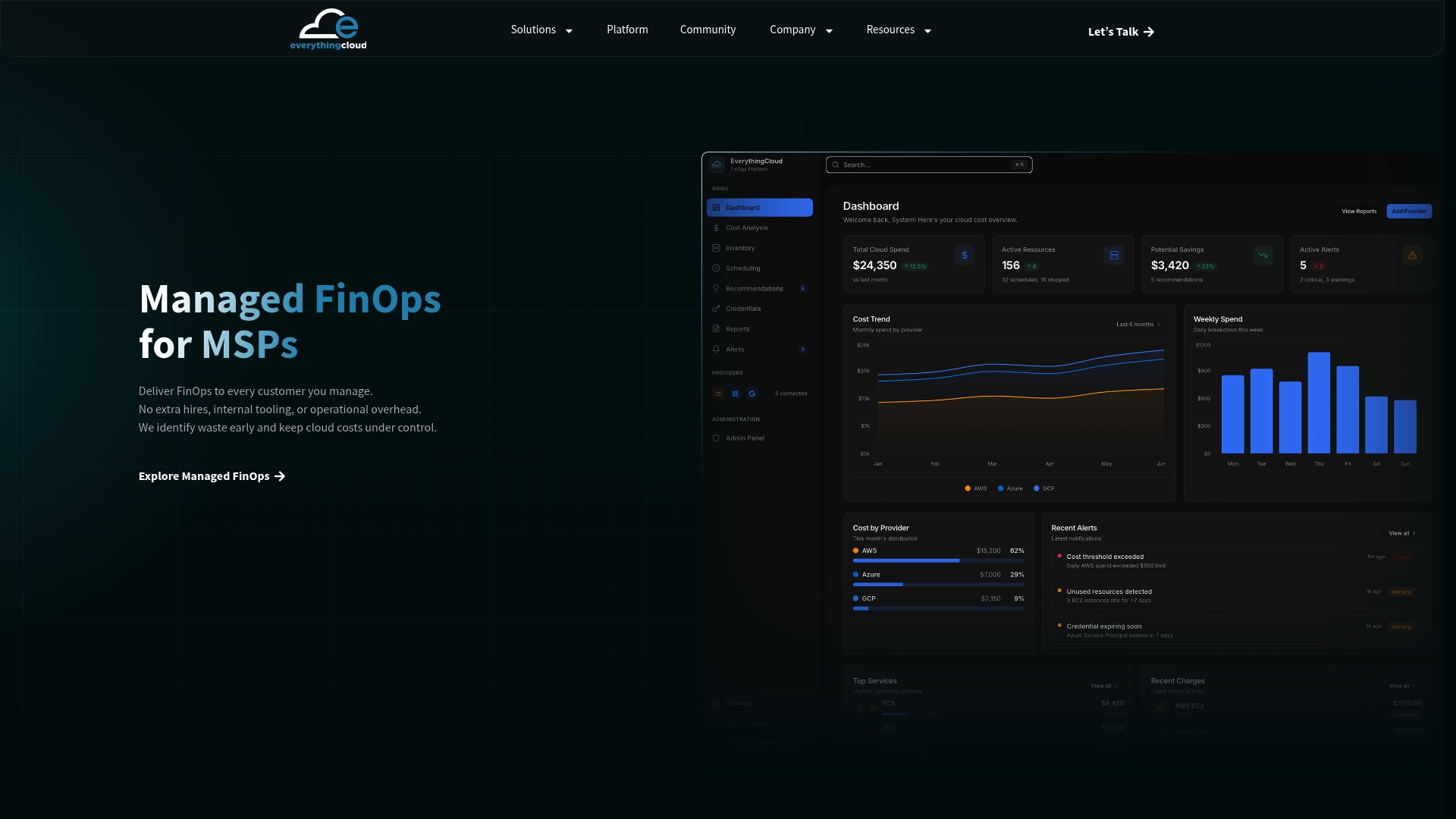
Everythingcloud’s managed FinOps service is built for mid-market and enterprise organizations running AWS, Azure, and Google Cloud, and for MSPs that want to offer FinOps as a managed service to their clients. You get real-time visibility across all active clouds from day one, automated optimization that acts on rightsizing and scheduling opportunities continuously, and a team of FinOps experts who deliver measurable improvements every month, not just a report.
For MSPs, the “FinOps in a Box” model means your clients get a white-labeled, multi-tenant managed FinOps service without you building the platform or the methodology. It creates a new recurring revenue stream while improving client retention.
The next step is straightforward: schedule a conversation with the Everythingcloud team to see how the platform maps to your current environment and where the fastest savings opportunities are.
Sources
The sources below back the claims in this article and are worth bookmarking for your own FinOps program.
- Gartner
- Finops
- Cloud Cost Optimization Strategies: The Complete 2026 Guide | Rackspace Spot
- What Is Cloud Cost Optimization? | Oracle
- FinOps Across Clouds | CloudToolStack