
GCP committed use discounts (CUDs) trade a 1- or 3-year usage commitment for lower prices on Compute Engine, GKE, and related services. Resource-based CUDs fit steady, machine-specific workloads with a known baseline. Compute-flexible commitments and Flexible Savings Plans fit variable or multi-service spend that shifts month to month. The right choice depends on how predictable your usage actually is, not on which discount percentage looks biggest on paper.
TL;DR:
- Resource-based CUDs offer the deepest discounts, up to roughly 55% for general-purpose series and 70% for memory-optimized, but only if utilization matches the commitment well.
- Flexible Savings Plans provide more adaptability for variable workloads, allowing drawdown within a monthly entitlement for about 10–20% savings but with less discount depth.
- Proper sizing of commitments requires analyzing at least 12 months of usage data and buying at hour boundaries to avoid coverage gaps, with ongoing monitoring critical to prevent waste.
- Oversized or poorly matched commitments lead to underused discounts, especially when usage shifts across projects or regions, making governance vital for cost efficiency.
- Continuous oversight and a structured FinOps approach maximize savings by adjusting or releasing commitments as workload patterns evolve.
Table of Contents
- What Are GCP Committed Use Discounts and Which Types Exist?
- How Does GCP Apply CUDs Each Hour?
- What Discount Rates Should You Expect on 1- and 3-Year Terms?
- How Do You Size and Purchase a CUD?
- How Do You Monitor CUD Utilization and Avoid Waste?
- Which CUD Should You Buy: Resource-Based, Flex, or FSP?
- What Pitfalls Cause CUDs to Lose Money?
- A FinOps Lens on Committed Use Discounts
- How EverythingCloud Helps Manage GCP Commitments
- Sources
What Are GCP Committed Use Discounts and Which Types Exist?
A CUD is a contract, not a coupon. You commit to a minimum level of usage, either in resources or in dollars, for a fixed term, and Google Cloud bills that portion at a reduced rate whether you use it or not. That last clause is the one MSPs and finance teams tend to forget until the invoice arrives.
Committed use discounts come in three structures, and each one applies to a different slice of your environment.
Resource-based CUDs commit to a specific quantity of vCPUs, memory, GPUs, Local SSD, or sole-tenant node capacity in a particular region. These are tied to machine family and region, which makes them precise but inflexible. Move a workload to a different region or a different machine series, and the commitment stops covering it. This model works best for the database server, the core Kubernetes node pool, or the legacy application that has run the same shape of infrastructure for two years running.
Compute-flexible (spend-based) commitments work differently. Instead of locking in specific hardware, you commit to a minimum hourly dollar amount, and Google Cloud automatically applies that commitment to whatever eligible Compute Engine usage you incur, across projects, regions, and machine families, within the same Cloud Billing account. That flexibility costs you a few points of discount depth compared to resource-based CUDs, but it removes the risk of committing to infrastructure that moves.
Flexible Savings Plans (FSPs) extend that flexible model further, covering a broader set of services under a single monthly entitlement window rather than an hourly one. Instead of losing an hour’s worth of unused commitment forever, FSPs let you draw down the entitlement anytime within the month. For teams running spiky batch jobs, seasonal AI inference workloads, or unpredictable multi-service usage, that monthly window matters far more than the headline discount rate.
How Does GCP Apply CUDs Each Hour?
Google Cloud evaluates every billable hour and applies discounts in a fixed sequence: resource-based commitments first, then compute-flexible commitments, and only after both are exhausted does the remaining usage hit on-demand pricing. Any usage still uncovered at that point may still qualify for sustained use discounts, which are automatic and scale with how much of the month a resource ran, but SUDs never stack on top of usage already covered by a CUD.
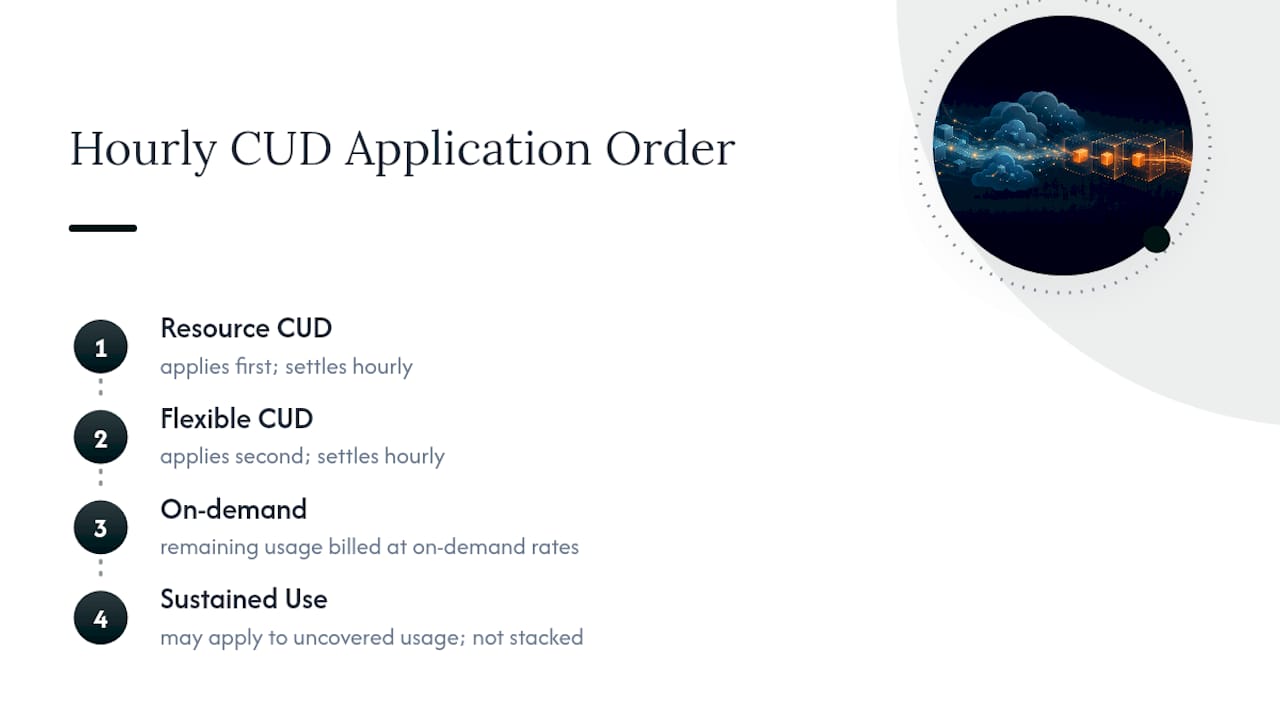
That priority order has a practical consequence: if you oversize a resource-based commitment, the flexible commitment behind it has less eligible usage to absorb, and you end up with two underused discounts instead of one well-matched one.
Entitlement windows compound the effect. Resource-based and compute-flexible commitments settle hourly, so an hour with no matching usage is an hour of discount you never get back. Flexible Savings Plans use a proportional, greedy application order within the monthly window, meaning unused entitlement on Tuesday can still cover a spike on Friday, as long as both fall in the same billing month.
CUDs also share across every project linked to the same Cloud Billing account, which is either a relief or a liability depending on your governance. A commitment purchased for one team’s workload can silently cover another team’s usage elsewhere in the account, masking which project is actually driving the spend.
Timing matters more than most billing admins expect. Purchases can activate at the start of the next hour depending on when in the current hour you buy, which means a commitment bought at 2:53 PM might not start earning discounts until 3:00 PM. Buy near the top of the hour to avoid a coverage gap you didn’t know you created.
What Discount Rates Should You Expect on 1- and 3-Year Terms?
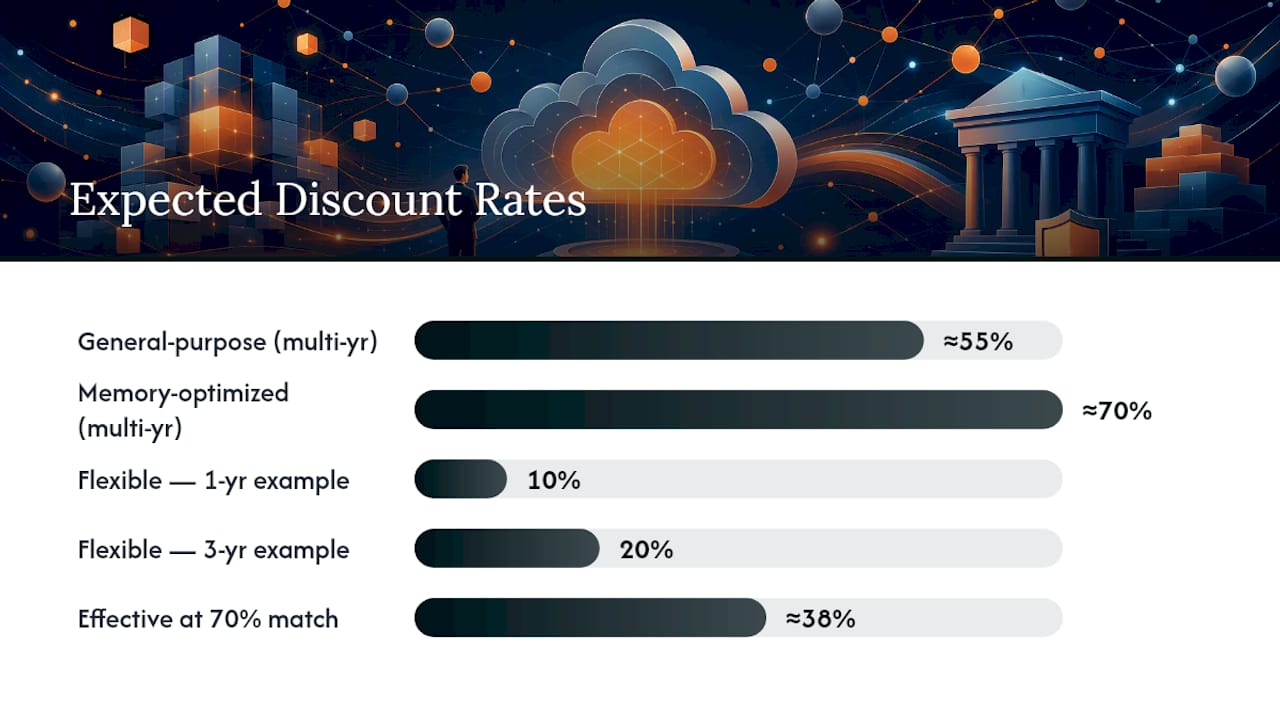
Resource-based CUDs deliver the deepest discounts Google Cloud offers for committed compute. According to Google’s Compute Engine documentation, general-purpose machine series can reach up to roughly 55% off on-demand pricing on multi-year terms, while memory-optimized series can reach up to roughly 70%. Flexible Savings Plans vary by eligible SKU; Google’s own example shows a 10% rate for certain 1-year Gemini-eligible SKUs and 20% on a comparable 3-year plan.
Here’s the math that actually matters. A team running $100 an hour of eligible on-demand compute that commits to a 3-year Flex CUD at 46% pays a locked hourly fee of $54 for that covered portion, saving $46 an hour on every hour the commitment is fully matched to usage. Over a year, that is roughly $402,960 in on-demand equivalent value covered for about $472,860 in committed spend, a savings of roughly $46 an hour multiplied by every hour the commitment actually gets used.
A resource-based example: Committing to a specific amount of vCPUs and memory on a general-purpose series for three years at a significant discount means paying a reduced rate for that footprint for the full term, regardless of scaling changes.
The gap between the advertised percentage and your real savings comes down to match rate. FinOps practitioner guidance recommends calculating effective savings from actual SKU-level consumption, not the headline rate, because a 55% discount on a commitment that only sees 70% utilization nets out closer to 38% in real terms.
How Do You Size and Purchase a CUD?
Sizing a commitment correctly is a data exercise before it’s a purchasing decision, which aligns with guidance on choosing a prediction market data provider for production systems emphasizing proper data sizing and selection. Skip the analysis and you’re guessing with a three-year contract attached.
- Pull historical usage from BigQuery. Export your detailed billing data and query at least 90 days, ideally 12 months, of usage by SKU, project, and region to establish a real baseline rather than a snapshot.
- Separate stable usage from variable usage. Usage that holds steady across weekly and monthly cycles is a candidate for resource-based CUDs; usage that swings by service or by week points toward compute-flexible or FSP.
- Convert usage into the right unit. For resource-based CUDs, translate historical vCPU and memory hours into a committed quantity. For spend-based models, convert uncovered on-demand spend into a target hourly commitment amount.
- Preview the purchase in the console under Billing, which shows the estimated discount and commitment total before you confirm. Purchasing requires the Billing Account Administrator IAM role.
- Buy near the top of the hour. Because activation can roll to the next hour boundary depending on purchase timing, buying at 1:58 versus 2:02 can shift when coverage actually starts.
- Confirm coverage in the billing reports within the first billing cycle to catch sizing errors before the commitment term locks you in.
Teams comfortable with automation can script steps 1 through 3 using the gcloud billing commands and the Cloud Billing API, which is worth doing if you’re sizing commitments across dozens of projects rather than one.
How Do You Monitor CUD Utilization and Avoid Waste?
It’s a fixed cost with a discount attached to only part of it. The metric that matters most is commitment utilization percentage, tracked alongside covered versus uncovered spend and how that ratio trends month over month.
The fix is usually rightsizing the workload back toward the commitment, migrating the commitment’s coverage to where usage actually landed, or accepting the mismatch and letting a resource-based commitment expire into a flexible one at renewal.
Pro Tip: Set a recurring monthly check on commitment utilization tied to your billing export, not just a quarterly review, because a two-month drift in a 3-year commitment can quietly cost tens of thousands of dollars before anyone notices.
Manual review works until you have commitments spread across a dozen billing accounts and three cloud providers. Some platforms automate that monitoring layer: continuous checks against SKU-level consumption, anomaly detection when utilization drops, and recommendation workflows that flag rightsizing or reallocation before a commitment renews on autopilot. EverythingCloud’s work managing AWS commitment usage shows that organizations with active monitoring routinely sustain utilization in the 85–90% range, versus commitments left unmonitored, which tend to decay well below that over a multi-year term.
Which CUD Should You Buy: Resource-Based, Flex, or FSP?
Match the commitment type to the shape of your usage, not to whichever discount percentage looks highest on the pricing page.
- Choose resource-based CUDs when a workload has run on the same machine family and region for six months or more with minimal variance.
- Choose compute-flexible commitments when usage is steady in total spend but spread across shifting projects, regions, or machine types.
- Choose Flexible Savings Plans when usage spikes seasonally or includes services beyond core Compute Engine, since the monthly entitlement window absorbs volatility that hourly models waste.
- Favor a 1-year term when you expect meaningful architecture changes, a migration, or workload consolidation within 18 months.
- Favor a 3-year term only when historical utilization has held above roughly 85% for a full year, since that’s the threshold where the deeper discount reliably outpaces the flexibility you’re giving up.
- Treat any environment with active cost optimization projects underway as a flex-first candidate until the dust settles, then reassess for resource-based coverage once the footprint stabilizes.
What Pitfalls Cause CUDs to Lose Money?
Not every SKU that draws down a Flexible Savings Plan actually earns a discount. Some eligible services consume entitlement without qualifying for the reduced rate, a subscription nuance that catches teams who assumed “eligible” and “discounted” meant the same thing. Check the current FSP eligible SKU list before assuming broad coverage.
Moving projects between billing accounts breaks CUD sharing instantly, since commitments are scoped to the billing account, not the organization. And commitments generally renew or lapse based on the plan you set at purchase, so a forgotten 3-year commitment can auto-renew into terms nobody re-evaluated. Support escalation through your Google Cloud account team is available, but it won’t undo a signed commitment term after the fact.
A FinOps Lens on Committed Use Discounts
Buying a CUD without a governance process behind it is a bet, not a strategy. The math in this guide only holds if someone is actually watching utilization every month, not just at renewal time. That’s the gap I see most often: teams get the sizing math right on day one, then let the commitment run unattended for two years while the workload underneath it drifts.
Treat CUDs as a FinOps program input, not a one-time purchase. Start with a small resource-based commitment on your most stable workload, layer in a flexible commitment for the rest, and build monitoring before you scale up the dollar amount. Continuous optimization consistently outperforms a “buy and forget” approach, because the discount only pays off when usage keeps matching the commitment.
— Dan
How EverythingCloud Helps Manage GCP Commitments
Some platforms provide what the console alone doesn’t: continuous, cross-cloud visibility into commitment utilization instead of a monthly billing surprise. These platforms track covered versus uncovered spend in real time across major clouds, flag underused commitments before renewal locks you in, and automate rightsizing recommendations so you’re not relying on someone remembering to check a dashboard.
Onboarding starts with a cloud waste assessment that maps your current commitment utilization against actual usage, followed by a pilot on a defined set of workloads, then a full managed FinOps engagement once the model proves out. For MSPs and technology partners, that same infrastructure runs as a white-label service, letting you offer commitment management to clients without building the tooling yourself. Start with a cloud waste valuation to see what your current commitments are actually costing you, or explore managed FinOps for MSPs to see how the full engagement works.
Sources
For deeper technical detail, consult Google Cloud’s CUD overview, the Compute Engine CUD documentation, the Flexible Savings Plans guide, and the FinOps Foundation’s working group on GCP commitment purchasing. EverythingCloud’s FinOps insights library covers additional commitment management tactics across cloud providers.
- Committed use discounts | Get started | Google Cloud Documentation
- Spend-based committed use discounts | Get started | Google Cloud Documentation
- Purchasing Commitment Discounts in GCP — FinOps Foundation working group