
To reduce CloudFront costs, start with the three levers that move the bill most: match price classes to where your users actually are, raise your cache hit ratio, and shrink what you transfer. Then decide whether pay-as-you-go, a flat-rate plan or a commitment fits your traffic. Most of the rest is auditing configuration you set once and never revisited.
CloudFront rarely looks like the biggest line on an AWS invoice. That is exactly why it leaks. Small defaults compound quietly, and nobody owns them until the monthly total jumps.
TL;DR
- Data transfer out is the main cost driver for most distributions, so image formats, compression and long cache lifetimes pay back first.
- Price classes restrict delivery to cheaper edge locations. They suit audiences concentrated in a few regions, and the effect takes a billing cycle or two to show.
- Origin Shield, invalidations and WAF add charges that are easy to overlook. Audit them per cache behavior, not globally.
- Flat-rate plans make spend predictable but hide per-request and per-GB usage in billing reports, so tagging and your own telemetry matter more.
- A savings commitment can cut CloudFront charges by up to 30% for steady usage, but only if the commitment matches what you really use.
Table of Contents
- Where CloudFront costs actually come from
- Choose price classes that match your audience
- Raise your cache hit ratio
- Reduce the bytes you transfer
- Know what Origin Shield really charges
- Watch invalidations and security add-ons
- Pay-as-you-go, flat-rate plans or a commitment
- Move more traffic behind CloudFront, deliberately
- Tag CloudFront so someone owns the spend
- Our perspective: optimization is a loop, not a project
- When this becomes a managed service
- A practical order of operations
- FAQ
- Sources
Where CloudFront costs actually come from
Before you change anything, know what you are paying for. Under pay-as-you-go, CloudFront bills mainly for data transferred out to viewers and for HTTP/HTTPS requests. Both vary by the edge location that serves the viewer, not by where your origin lives.
An independent egress pricing tracker lists the headline rate as $0.085 per GB for the first 10 TB a month in North America and Europe, falling in tiers as volume grows. Those tiers are calculated per edge-location region, not pooled across the globe. Check AWS’s own pricing page before you model anything, because rates change.
Other charges stack on top: invalidations past the free allowance, Origin Shield, field-level encryption, real-time logs, and AWS WAF if you attach it. None is large alone. Together they explain why two distributions with identical traffic can have very different bills.
Pull the last three months of CloudFront spend in Cost Explorer, grouped by usage type. If one usage type dominates, that tells you which section below to read first.
Choose price classes that match your audience
By default, CloudFront serves each viewer from the lowest-latency edge location in its global network, including regions that cost more per GB. The AWS media whitepaper notes that if your customers sit in a limited geographic area, price classes let you restrict delivery to cheaper locations.
There are three choices: Price Class 100, Price Class 200 and All. The narrower classes exclude the most expensive regions. Viewers in excluded regions are still served, but from a more distant edge, so latency rises for them.
This is a business decision more than a technical one. A US-focused B2B application with a few international users can often accept slightly slower delivery abroad. A consumer streaming service with a large audience in South America or Asia usually cannot.
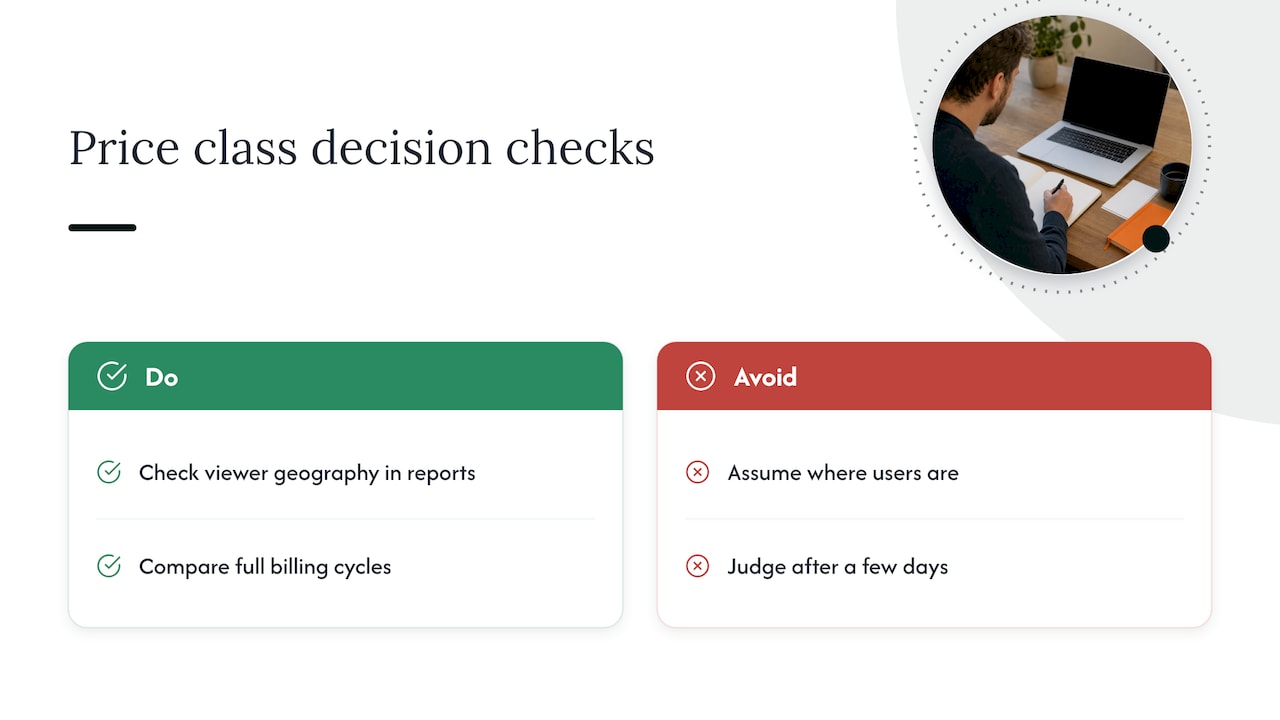
Two cautions. First, look at your actual viewer geography in CloudFront reports before switching, not at where you assume users are. Second, do not judge the change after a few days. Traffic patterns and billing report timing mean you should compare full billing cycles before declaring a result.
Raise your cache hit ratio
Every cache miss is a request to your origin, and often a data transfer your origin pays for too. Improving the hit ratio lowers origin load, origin egress and latency at once.
The most common fixes are plain:
Version your static assets with file names such as a hash or version number, then set long cache lifetimes. An AWS re:Post answer on request costs recommends a header like Cache-Control: public, max-age=31536000, immutable together with versioned file names. It also points out that the immutable directive only affects the browser, so the long max-age is what lets CloudFront cache effectively.
Trim your cache keys. If your cache policy forwards every query string, header and cookie, nearly every request looks unique. Forward only the values your origin needs to vary the response. This one change is often the biggest hit ratio gain on dynamic sites.
Use a custom cache policy per path pattern. Static assets, API responses and personalized pages deserve different behaviors. One policy for everything is a margin leak.
Reduce the bytes you transfer
Since data transfer out is the dominant cost for many large distributions, shrinking payloads beats almost every other tweak. The same AWS re:Post thread recommends modern image formats such as WebP or AVIF to cut transfer volume sharply.
Practical steps, in order of effort:
Enable CloudFront compression for text content such as HTML, CSS, JavaScript and JSON, and make sure your cache policy accepts the compression headers it needs.
Convert images at the edge or at build time. If you serve many image variants, an on-demand transformation setup helps, but remember it adds its own compute and storage costs, which AWS’s cost guidance for dynamic image transformation suggests tracking with a budget in Cost Explorer.
Stop serving full-size media to small screens. Responsive image sets and adaptive bitrate for video prevent paying for pixels nobody sees.
Know what Origin Shield really charges
Origin Shield adds a caching layer in front of your origin. AWS describes it as a way to reduce origin load, improve availability and lower operating costs. That is true when many edge locations request the same objects.
It is not free, and it does not help every request. Dynamic requests (PUT, POST, PATCH, DELETE) and GET or HEAD requests with short TTLs or caching disabled still pass through and add charges. Enabling it globally on a distribution full of uncacheable API traffic can raise the bill instead of lowering it.
The fix is to audit by cache behavior. Turn Origin Shield on where objects are cacheable and requested from many regions, such as video segments or large downloads. Leave it off for API paths with short lifetimes.
Watch invalidations and security add-ons
Invalidations feel harmless until a deployment script invalidates /* on every release. AWS includes the first 1,000 paths a month, then, per the flat-rate plan documentation, charges $0.005 per path beyond that. Versioned file names remove most of the need to invalidate at all.
Security features deserve the same scrutiny. AWS WAF charges add up with rule counts and request volume. A CloudFront security savings bundle, covered next, is aimed at exactly this overlap.
Pay-as-you-go, flat-rate plans or a commitment
CloudFront now has three ways to pay, and picking the right one can matter more than any tuning.
Flat-rate plans
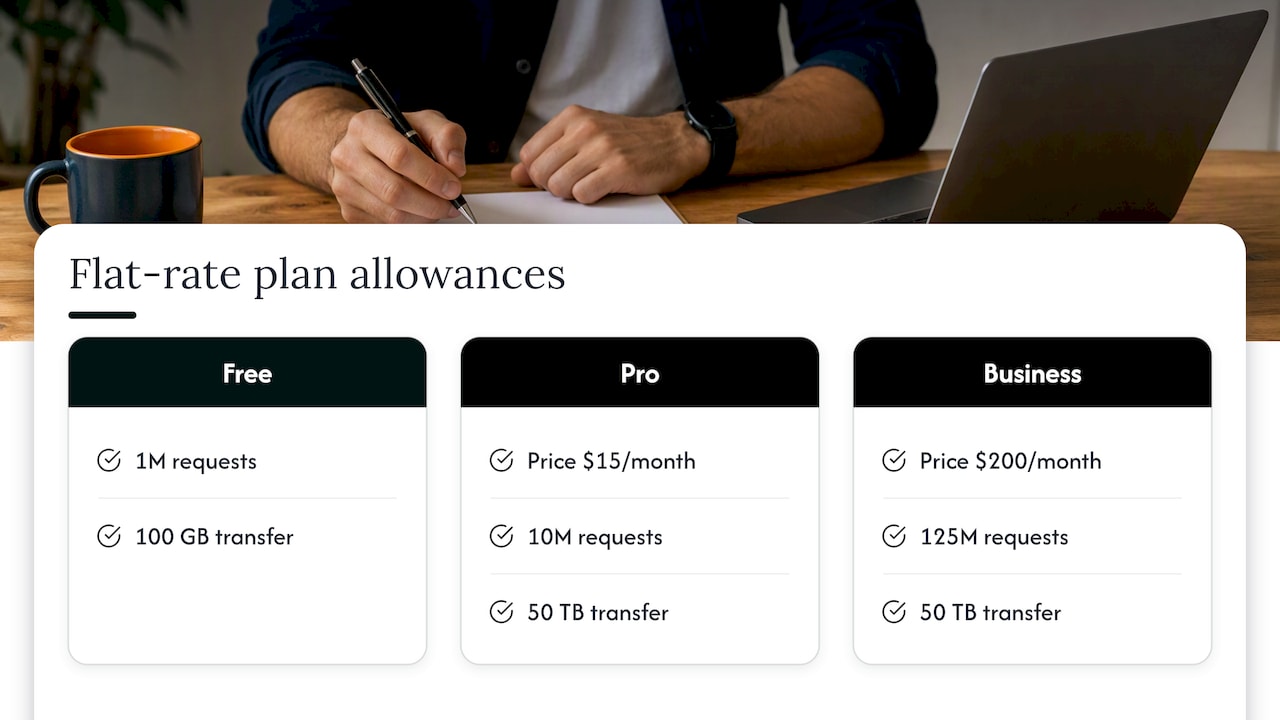
AWS offers flat-rate pricing plans that bundle CloudFront with other services for a monthly price and no overage charges, even during traffic spikes or attacks. The Free plan includes 1M requests and 100 GB of transfer. Pro is $15 a month with 10M requests and 50 TB of transfer. Business is $200 a month with 125M requests and 50 TB of transfer. AWS also notes that accounts already using the standard AWS Free Tier are not eligible, so read the eligibility terms before planning around them.
The plan descriptions show these plans combine delivery with WAF, DDoS protection, Route 53 DNS, CloudWatch Logs ingestion, S3 storage credits and serverless edge compute. For a small or spiky workload, a fixed price removes bill shock.
The trade-off is visibility. The AWS guide to monitoring plan costs shows flat-rate plans appearing in Cost Explorer as a single charge line. Request and transfer volumes disappear from the line items, so you can no longer see which tenant, product or distribution drives usage from billing data alone.
Pay-as-you-go
Still the right answer when traffic is highly variable or very large, since tiered per-GB rates fall as volume grows. It rewards every optimization in this article directly, because each byte and request you avoid is a dollar you do not spend.
Savings commitment
For steady usage, the CloudFront Security Savings Bundle offers savings of up to 30% in exchange for a one-year monthly usage commitment. It also covers AWS WAF protection free up to 10% of the commitment. Size it from historical usage, and optimize first. If you commit to today’s bloated traffic and then cut it by 25%, you are paying for usage you no longer have.
| Model | Best for | Main risk |
|---|---|---|
| Pay-as-you-go | Variable or very high volume | Bill grows with every inefficiency |
| Flat-rate plan | Small, spiky or predictability-first workloads | Less usage detail in billing reports |
| Savings commitment | Steady, well-understood traffic | Over-committing before optimizing |
Move more traffic behind CloudFront, deliberately
Counterintuitively, CloudFront can lower your total AWS bill. The AWS networking blog on cost-optimizing architectures with CloudFront argues for putting dynamic content and APIs behind it too, not just static files. Serving through the CDN can reduce load and transfer charges at the origin.
The condition is that the origin savings must exceed the CloudFront charges you add. Model one distribution before migrating the lot.
Tag CloudFront so someone owns the spend
Optimization without ownership decays. CloudFront supports resource tags, and once you activate them in the Billing and Cost Management console they appear in cost allocation reports, usable in Cost Explorer and Athena.
Pick a small set of keys: team, application, environment and customer or tenant. For a deeper walkthrough of getting allocation coverage high, see our guide to cost allocation tags.
If you moved to flat-rate plans, tag the plan’s primary billable resource and attribute usage to tenants with your own telemetry, such as CloudFront logs. MSPs billing multiple customers from one account feel this most. Spikes that look alarming in raw views may also be artifacts of how commitments are shown, which our piece on amortized views in Cost Explorer explains.
Our perspective: optimization is a loop, not a project
We see the same pattern again and again. A team tunes CloudFront once, saves a visible amount, and then the distribution drifts. New paths ship with default cache policies. A new region gets traffic. A plan renews at last year’s size. The pattern starts compounding quietly, and the margin leak reopens.
Two things separate teams that keep their savings. First, they verify savings against invoice-level billing, not against a dashboard estimate. A recommendation is not a result until the invoice moves. Second, they automate execution. A list of recommendations that nobody has time to act on is only a more detailed way to watch waste.
CloudFront is also never alone. Its charges sit next to S3, data transfer, WAF, and increasingly AI workloads and SaaS licenses. Tuning one service in isolation misses where the money actually goes, so we look at the whole cloud, SaaS and AI bill together. If you want a forecasting view to go with it, our practical guide to cloud cost forecasting is a good next step.
— Dan
When this becomes a managed service
If you run CloudFront for one application, the steps above are a weekend of work. If you manage dozens of accounts or customers, the checklist becomes a recurring operation: review price classes, audit cache behaviors, size commitments, verify results, repeat every month.
That is the work our Managed FinOps service takes on for organizations, and our Continuous Cloud Optimization offering is built to monitor environments continuously and act on findings. MSPs who want to deliver this to their own customers can look at The Platform or the Founding Partner Membership, listed at $500 per month.
A practical order of operations
If you want a sequence rather than a menu, use this one.
- Group last quarter’s CloudFront spend by usage type and distribution. Find the top two.
- Check viewer geography. If it is concentrated, test a narrower price class on one distribution.
- Audit cache policies for query string, header and cookie forwarding. Fix the widest ones.
- Version static assets and lengthen their cache lifetimes.
- Enable compression and convert images to WebP or AVIF.
- Review Origin Shield per behavior, and replace wildcard invalidations with versioned files.
- Tag every distribution, then choose between pay-as-you-go, a flat-rate plan or a commitment based on the new, lower baseline.
- Recheck the invoice after one or two full billing cycles.
The order matters. Optimizing before committing keeps you from locking in waste.
FAQ
How do I reduce CloudFront costs quickly?
Start with cache policy and compression, because they take hours and lower both transfer and request volume. Then review price classes against your real viewer geography. Compare full billing cycles afterward, since short windows can mislead.
Is CloudFront free?
Not fully. AWS publishes a Free flat-rate plan with 1M requests and 100 GB of transfer a month, per the plan documentation. Eligibility rules apply, including that accounts already using the standard AWS Free Tier are not eligible. Beyond the free allowance you need a paid plan or pay-as-you-go.
Are CloudFront flat-rate plans cheaper than pay-as-you-go?
It depends on volume and variability. A Pro plan at $15 a month covers 10M requests and 50 TB of transfer, which can beat per-GB billing for steady mid-sized traffic. The cost is less usage detail in billing data, so plan for tags and your own logs.
Does Origin Shield always lower my bill?
No. It helps for cacheable objects requested from many regions. Dynamic requests and short-TTL requests still add charges, so enable it per cache behavior after checking what those behaviors serve.
Sources
- AWS Edge Services cost optimization, AWS Builder Center
- Amazon CloudFront for Media, AWS Whitepaper
- CloudFront flat-rate pricing plans
- Use Amazon CloudFront Origin Shield
- Monitoring and Managing Costs, AWS Flat-Rate Plans
- Available Plans, AWS Flat-Rate Plans
- Tag a CloudFront resource
- How to reduce CloudFront request costs as SaaS grows, AWS re:Post
- Cost-Optimizing your AWS architectures with CloudFront features
- CloudFront Security Savings Bundle, AWS re:Post
- AWS CloudFront Pricing 2026, egresscost.com
- Cost, Dynamic Image Transformation for Amazon CloudFront