
The fastest safe route to lower your EKS bill follows a strict order: deploy visibility first through in-cluster and invoice-linked allocation, then right-size workloads, remove idle capacity, and only then optimize purchase models. Skip ahead to Spot and Savings Plans before fixing requests and you lock in waste at a discount. Done in sequence, this approach cuts spend meaningfully while protecting the resilience your workloads depend on.
TL;DR:
- Pair AWS’s Kubecost bundle for EKS with CUR split cost allocation to reconcile pod level estimates against invoiced costs, including amortized discounts.
- Measure 14 to 30 days of pod usage, adjust requests in stages, and test changes with canaries and rollback triggers before broad deployment.
- After requests match usage, use Savings Plans for steady workloads, Spot for interruption tolerant jobs, and On Demand for bursts or fallback.
- Audit version support and Provisioned Control Plane tiers quarterly; upgrading out of extended support can cut fees while restoring access to newer instance families.
- Check cross AZ traffic, NAT gateway routing, and unattached EBS volumes; use VPC endpoints and gp3 volumes where they fit your availability needs.
Table of Contents
- Where your EKS bill actually comes from
- Visibility and cost allocation: Kubecost, CUR split-cost data, and amortized views
- Right-size workloads: requests, limits, HPA and VPA best practices
- Node provisioning and autoscaling: Karpenter, Cluster Autoscaler, EKS Auto Mode, Spot and Savings Plans
- Control plane pricing, Kubernetes version support, and high-ROI housekeeping
- Networking and storage levers that frequently cause surprise costs
- Operational playbook: prioritized 30/60/90 day checklist with owners and KPIs
- How EverythingCloud helps automate and scale continuous EKS cost optimization
- Cost implications of EKS add-ons and integrations
- Optimizing multi-cluster EKS deployments for cost efficiency
- Best practices for tagging and cost allocation specific to EKS workloads
- Automation strategies for continuous EKS cost optimization using AI-powered tools
- Security and compliance considerations impacting EKS cost optimization
- Balancing cost cuts with platform reliability
- Turn this playbook into continuous savings with EverythingCloud
- FAQ
- Sources
Where your EKS bill actually comes from
Most EKS invoices break down into a handful of predictable buckets, and knowing which ones are fixed versus variable changes how you prioritize your time.
- Control plane fees: fixed per cluster, per hour, regardless of workload size.
- Worker compute (EC2 or Fargate): almost always the largest line item and fully variable based on instance mix and utilization.
- EBS storage: variable, driven by volume type, size, and orphaned volumes left behind after pod churn.
- Data transfer: variable and often invisible until cross-AZ traffic or NAT gateway usage spikes.
- Add-ons and integrations: variable, scaling with the number of agents, sidecars, and monitoring daemons you run per node.
Worker compute dominates because every pod request, however inflated, reserves capacity you pay for whether or not it’s used. A cluster running a four-way node mix with no bin-packing discipline, paired with an unnecessarily high control plane tier, can inflate a bill by a wide margin before a single workload issue shows up in logs.
Visibility and cost allocation: Kubecost, CUR split-cost data, and amortized views
You cannot right-size what you cannot see, and this is where most teams stall. Amazon EKS ships an EKS-optimized Kubecost bundle at no additional charge, giving you pod, node, and namespace-level cost breakdowns alongside right-sizing recommendations. Pairing that in-cluster view with AWS Cost and Usage Report split-cost allocation data lets you reconcile predicted costs against actual invoiced amounts, which matters once Reserved Instances or Savings Plans discounts enter the picture.
Build the pipeline in three steps:
- Collect pod-level CPU and memory usage, node utilization, and Spot usage patterns over a rolling window.
- Pull invoice-level discount and amortization data from CUR to see what you actually paid, not list price.
- Combine both data sets to produce an amortized cost per pod, factoring in shared node overhead and unused capacity.
The EKS-optimized Kubecost bundle integrates with AWS billing APIs to reconcile in-cluster cost predictions with actual billed usage, closing the gap between what your dashboards estimate and what finance sees on the invoice. For a deeper comparison of allocation tools, our breakdown of Kubecost versus OpenCost covers which fits different cluster sizes, and our Kubecost explainer walks through deployment options in more detail.
Right-size workloads: requests, limits, HPA and VPA best practices
Inaccurate resource requests are the root cause behind most overprovisioned clusters. Clusters commonly run at 20 to 30% actual utilization while you pay for 100% of provisioned capacity, and no autoscaler can fix that on its own: Cluster Autoscaler, Karpenter, and the Horizontal Pod Autoscaler all act on requests and limits, not real usage.
The fix is a repeatable loop, not a one-time cleanup:
- Measure 14 to 30 days of historical pod usage before touching a single request value.
- Set conservative, data-backed targets rather than guessing at round numbers.
- Let the Vertical Pod Autoscaler (VPA) recommend adjustments and the Horizontal Pod Autoscaler (HPA) handle replica counts based on real load.
- Validate every change with canaries before rolling it cluster-wide.
Guardrails matter here. Reduce requests in staged waves, alert on latency or error-rate regressions, and define a rollback trigger before you start, not after something breaks.
Pro Tip: Apply request changes to your lowest-traffic namespace first so you build confidence in the loop before touching production-critical workloads.
Node provisioning and autoscaling: Karpenter, Cluster Autoscaler, EKS Auto Mode, Spot and Savings Plans
Once requests are accurate, autoscalers can finally do their job: consolidating workloads onto fewer, better-packed nodes. Karpenter and Cluster Autoscaler both aim for tighter bin-packing, but Karpenter provisions nodes directly against workload shape rather than fixed node group templates, which tends to produce leaner fits. EKS Auto Mode shifts node lifecycle management to AWS entirely, trading some configuration control for less operational overhead.
Consolidation often stalls for avoidable reasons:
- A
do-not-disruptannotation left on long-running pods blocks node replacement indefinitely. - Overly strict Pod Disruption Budgets (PDBs) prevent the scheduler from safely draining nodes.
- Node pool limits set too conservatively cap how aggressively Karpenter can consolidate.
EKS Auto Mode documentation outlines these blockers directly and recommends loosening them selectively rather than removing them entirely.
| Capacity type | Best fit | Cost behavior |
|---|---|---|
| Savings Plans baseline | Steady-state, predictable workloads | Committed discount in exchange for usage commitment |
| Spot | Fault-tolerant, interruption-tolerant jobs | Lowest per-hour cost, variable availability |
| On-Demand | Burst capacity, fallback | Highest per-hour cost, no commitment |
A practical mix sets your steady baseline on Savings Plans, uses Spot opportunistically for CI/CD runners and batch jobs, and limits instance family sprawl so Karpenter doesn’t fall back to expensive, oversized options when preferred types are unavailable.
Control plane pricing, Kubernetes version support, and high-ROI housekeeping
Control plane fees are easy to ignore because they’re small per cluster, but they add up fast across multi-cluster fleets. Amazon EKS pricing separates standard version support from extended support, which carries a higher per-cluster hourly rate once a Kubernetes version ages out of standard coverage. Provisioned Control Plane tiers go further still, scaling hourly charges with control plane size: XL runs $1.65/hr, 2XL $3.40/hr, 4XL $6.90/hr, and 8XL $13.90/hr, according to AWS.
Run this checklist quarterly:
- Audit every cluster’s Kubernetes version against the standard support window.
- Flag clusters paying extended support fees that could upgrade instead.
- Confirm any Provisioned Control Plane tier matches actual API load, not a legacy default.
- Decommission test or staging clusters left running after a project ends.
Upgrading out of extended support is frequently the single highest-ROI action available, since it cuts per-cluster fees immediately and unlocks newer, more cost-efficient instance families.
Networking and storage levers that frequently cause surprise costs
Cross-AZ traffic and misconfigured load balancers quietly inflate bills long after the workload itself is optimized. Setting internalTrafficPolicy: Local keeps traffic within the originating AZ where possible, and switching load balancers to IP mode reduces unnecessary hops, both detailed in AWS’s networking cost guidance.
- Deploy a NAT gateway per AZ only where availability requirements justify the added cost; a single shared NAT gateway is cheaper but creates a cross-AZ dependency.
- Use VPC endpoints for S3, ECR, and other AWS services to avoid routing traffic through a NAT gateway at all.
- Default new volumes to gp3 over gp2 for better baseline performance per dollar, and schedule regular sweeps for unattached EBS volumes.
Our guide on cutting AWS data transfer costs ranks these fixes by return on effort if you want a deeper sequence.
Operational playbook: prioritized 30/60/90 day checklist with owners and KPIs
Turning this guidance into lasting savings requires owners and dates, not just good intentions.
- Days 1 to 30: Deploy Kubecost and CUR allocation; baseline your top 10 spending namespaces or clusters. Owner: platform engineer. Artifact: baseline report.
- Days 31 to 60: Right-size the top spenders identified in month one; implement Karpenter or Cluster Autoscaler configuration changes. Owner: app owner plus platform engineer. Artifact: merged pull requests and updated resource requests.
- Days 61 to 90: Convert your stabilized baseline usage to Savings Plans; clean up orphaned volumes, idle clusters, and unused Provisioned Control Plane tiers. Owner: FinOps practitioner. Artifact: savings estimate validated against invoice data.
| Milestone | KPI | Target signal |
|---|---|---|
| 30 days | Visibility deployed | Top 10 spenders identified |
| 60 days | Average node utilization | Upward trend from baseline |
| 90 days | Spot and Savings Plans coverage | Increased share of committed/discounted spend |
How EverythingCloud helps automate and scale continuous EKS cost optimization
Running this playbook by hand works, but it takes recurring engineering hours every month, and waste creeps back in the moment attention shifts elsewhere. Our platform provides real-time visibility into AWS, Azure, Google Cloud, SaaS, and AI spending, and we go a step further than dashboards:
- We automate the execution of optimization actions, not just the recommendations behind them.
- We monitor environments continuously, catching drift between right-sizing and reality before it compounds.
- Our Managed FinOps service pairs automation with expert review for teams that want the playbook executed, verified, and reported on.
- For MSPs and technology partners, our “FinOps in a Box” approach turns this entire sequence into a service you can offer clients without building it yourselves.
Scale is the deciding factor: a handful of clusters is manageable in-house, but a growing fleet across multiple accounts benefits from automated, continuously verified execution.
Cost implications of EKS add-ons and integrations
Every add-on you install carries a compute and operational cost, and that cost compounds across a fleet. A service mesh sidecar injected into every pod adds CPU and memory overhead per instance, which shows up as a tax on your entire cluster rather than a line item you can isolate easily. Monitoring agents, log shippers, and security scanners behave the same way: individually cheap, collectively significant once multiplied across hundreds or thousands of pods.

The right question isn’t whether to run these tools, since most are necessary for observability or compliance, but whether their footprint is sized correctly. A DaemonSet-based monitoring agent should carry requests proportional to actual resource consumption, not a default template copied from a vendor’s quick-start guide. Service meshes in particular deserve scrutiny: sidecar proxies can add a meaningful percentage to per-pod resource consumption, and that overhead gets amortized into every cost calculation you run in Kubecost.
Before adding a new integration, ask what it replaces and whether an existing tool already covers the gap. Redundant monitoring stacks, overlapping security agents, and duplicate logging pipelines are common in clusters that grew through multiple team ownership changes. Auditing your add-on list alongside your namespace cost allocation report surfaces these overlaps quickly, often revealing an integration nobody remembers approving.
Optimizing multi-cluster EKS deployments for cost efficiency
Multi-cluster architectures solve real problems, isolation, blast-radius containment, team autonomy, but they multiply fixed costs in ways a single-cluster setup never does. Every additional cluster carries its own control plane fee, its own baseline node overhead for system pods, and its own visibility tooling deployment if you’re not careful about centralizing it.
The first lever is consolidation where it makes sense. Dev and staging environments for low-traffic teams rarely need dedicated clusters; shared clusters with strong namespace isolation and resource quotas often deliver the same safety at a fraction of the control plane overhead. Production workloads with genuine compliance or blast-radius requirements are the clearer case for dedicated clusters.
The second lever is centralized visibility. Running Kubecost or CUR allocation per cluster independently creates fragmented reporting that makes fleet-wide decisions harder. Aggregating cost data across clusters into a single view lets you spot the one cluster quietly running an oversized Provisioned Control Plane tier or sitting on outdated Kubernetes versions paying extended support fees.
Finally, standardize your autoscaler and node pool configuration across clusters rather than letting each team reinvent its own Karpenter setup. Configuration drift between clusters is where consolidation blockers like overly strict PDBs or missing instance family limits tend to accumulate unnoticed.
Best practices for tagging and cost allocation specific to EKS workloads
Cost allocation is only as good as your tagging discipline, and EKS adds a layer of complexity that plain EC2 tagging doesn’t face: a single node often hosts pods from multiple teams, so node-level tags alone can’t attribute cost accurately.
Start with consistent Kubernetes labels on every namespace and workload: team, environment, and cost center at minimum. These labels feed directly into Kubecost’s allocation engine and into CUR split-cost allocation data, letting you move from “this node costs $40 a day” to “this namespace’s actual share of that node is $12.”
Enforce tagging at admission time rather than hoping teams remember. An admission controller or policy engine that rejects untagged deployments catches the problem before it becomes a reporting gap. Retroactively tagging a cluster that’s been running untagged for months is a much harder cleanup project than preventing the gap from the start.
Keep your tag taxonomy small and stable. A proliferation of inconsistent tags, “team,” “Team,” “squad”, defeats the purpose and forces manual reconciliation every reporting cycle. Align your Kubernetes labels with the same cost center and business unit structure your finance team already uses in CUR, so a chargeback report doesn’t require a translation layer between engineering and finance.
Automation strategies for continuous EKS cost optimization using AI-powered tools
Manual optimization works for a baseline sweep, but EKS environments shift constantly as deployments scale, teams ship new services, and traffic patterns change week to week. Static right-sizing goes stale within weeks of being set, which is why continuous automation matters more than a single cleanup project.
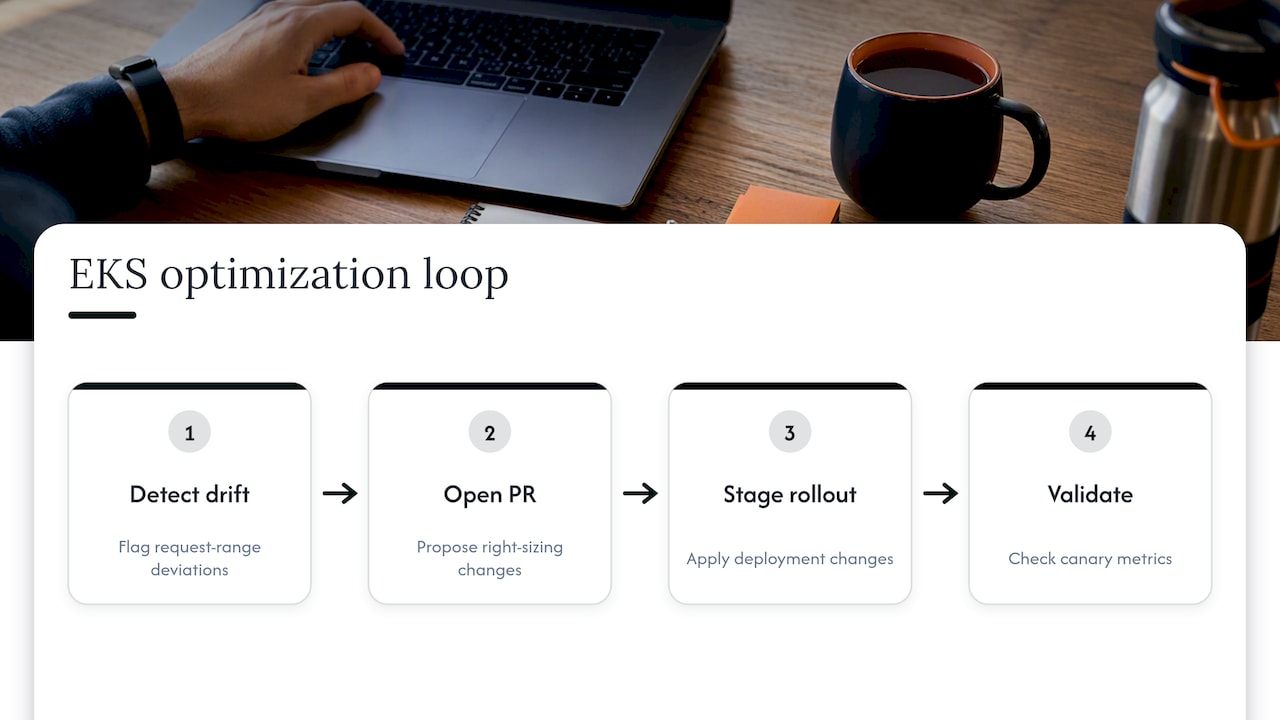
AI-powered recommendation engines, including the right-sizing suggestions built into the Kubecost bundle, analyze historical usage patterns to flag workloads drifting out of their optimal request range before a human notices the trend in a dashboard. The value isn’t in replacing engineering judgment but in surfacing the signal faster than a weekly manual review would catch it.
The next step beyond recommendations is automated execution: a system that doesn’t just flag an oversized deployment but opens the pull request, applies the staged rollout, and validates against your canary metrics automatically. This is the gap between tools that tell you what to fix and platforms that fix it, and it’s the difference between a one-time savings event and a continuously shrinking waste line. Automation also closes the loop on anomaly detection, catching a sudden Spot price spike or an unexpected node scale-out before it shows up as a surprise on next month’s invoice rather than after the fact.
Security and compliance considerations impacting EKS cost optimization
Cost optimization and security aren’t competing priorities, but a few optimization tactics need a compliance lens before you apply them broadly. Reducing Pod Disruption Budgets to unblock node consolidation, for example, can conflict with availability requirements mandated by a service-level agreement or regulatory framework, so loosen them deliberately and document the change rather than relaxing them fleet-wide.
Multi-tenant clusters built for cost efficiency through shared infrastructure also raise isolation questions. Namespace-level resource quotas help control cost, but they don’t substitute for network policies and RBAC boundaries that keep workloads from different teams or compliance scopes properly separated. A cluster consolidated purely for cost savings without those controls in place can create an audit finding that costs more to remediate than the consolidation saved.
Extended Kubernetes version support has a security dimension too: clusters running older versions to avoid an upgrade project are often also missing security patches, not just paying a higher control plane fee. Treating version upgrades as a combined cost and security action, rather than two separate projects, tends to get both done faster. Governance frameworks aligned with standards like CIS and NIST give teams a structure for applying these controls consistently across a fleet rather than cluster by cluster.
Balancing cost cuts with platform reliability
The teams that sustain savings treat visibility as a habit, not a project, and they measure before they cut. Reversible, small changes beat sweeping ones, and the best FinOps work happens when platform engineers and finance sit at the same table from day one. Prioritize repeatable wins over one-off cuts.
— Dan
Turn this playbook into continuous savings with EverythingCloud
Running the full visibility-to-purchase-model sequence by hand takes recurring attention that most platform teams don’t have spare capacity for. Our Managed FinOps service and Continuous Cloud Optimization offering apply this same prioritized approach automatically, with real-time visibility, automated optimization actions, and expert oversight built in rather than bolted on.
If you manage cloud spend for clients as an MSP or technology partner, our Founding Partner Membership gives you a turnkey way to launch managed FinOps services without building the platform yourself. Explore Managed FinOps to see how continuous optimization works in practice, or look into the Founding Partner Membership to learn more about membership details.
FAQ
What tools does AWS offer for cost optimization?
AWS offers the Cost and Usage Report (CUR) for detailed billing data, the EKS-optimized Kubecost bundle for in-cluster visibility, and native autoscalers like Cluster Autoscaler and Karpenter for compute efficiency. These tools work together: CUR shows what you paid, Kubecost shows where it went inside the cluster, and autoscalers act on right-sized requests to reduce waste.
How much is an EKS cluster?
The Amazon EKS control plane carries a per-cluster hourly fee under standard version support, with higher rates for extended support, and separate Provisioned Control Plane tiers priced at $1.65/hr for XL up to $13.90/hr for 8XL. Worker compute, storage, and data transfer are billed separately and typically make up the largest share of total EKS spend.
What is the difference between cost optimization and cost cutting?
Cost optimization follows a measured sequence, visibility, right-sizing, removing idle capacity, then purchase models, aimed at eliminating waste without harming performance, as AWS Prescriptive Guidance recommends. Cost cutting skips that sequence and reduces spend directly, often by shrinking capacity or commitments without first confirming the workload can safely handle it.
What should I check before choosing a cost optimization approach?
Confirm the approach starts with visibility into actual pod and node usage rather than jumping straight to discounted purchase models, since purchasing commitments against overprovisioned workloads locks in waste. Check whether the tool or service verifies savings against invoice-level billing data, not just in-cluster estimates, to avoid overstating results.