
Reducing Azure costs fastest means working in order: get accurate visibility with Azure Cost Management, act on Azure Advisor recommendations, rightsize or remove idle resources, then lock in discounts through Reservations or Savings Plans. Each step compounds on the last. Teams that skip visibility end up committing to the wrong baseline, and teams that skip Advisor waste time hunting for savings that are already flagged. For organizations that want this cycle automated rather than managed by hand, platforms like EverythingCloud build it into a continuous loop.
TL;DR:
- Accurate cost visibility through tagging, exports, and cost analysis is essential before making savings or rightsizing decisions.
- Azure Advisor recommendations should be validated against actual usage and business needs, focusing on shutting down or resizing low-utilization VMs.
- Rightsizing and cleanup efforts are most effective for non-production environments, especially with persistent low-resource utilization.
- Selecting the appropriate discount mechanism relies on workload stability; Reservations suit predictable usage, while Savings Plans work better for dynamic workloads.
- Continuous monitoring, automation, and strategic governance are necessary to sustain ongoing Azure cost optimization efforts.
Table of Contents
- Cost visibility: use Cost Analysis, exports, and tagging to know where you spend
- Azure Advisor and automated recommendations: validate before acting
- Rightsizing and cleanup: a step-by-step checklist to reclaim wasted spend
- Rate optimization: when to use Reservations, Savings Plans, and Azure Hybrid Benefit
- Autoscaling and scaling patterns: guardrails to stop runaway spend
- Storage and data optimization: tiering, lifecycle, and retention rules
- Governance, budgets, anomaly detection, and automation
- Operationalizing cost discipline: FinOps roles, cadence, and KPIs
- Practitioner perspective: common pitfalls and trade-offs
- Continuous optimization and managed FinOps with EverythingCloud
- Authoritative Microsoft docs and EverythingCloud resources
- Sources
- FAQ
Cost visibility: use Cost Analysis, exports, and tagging to know where you spend
You cannot fix what you cannot see, and Azure spend hides in more places than most teams expect: orphaned test environments, forgotten snapshots, cross-region transfer fees. Cost Analysis in the Azure portal is the starting point for any organization, giving a breakdown by resource, subscription, and tag. But the portal view has limits once your environment grows past a handful of subscriptions.
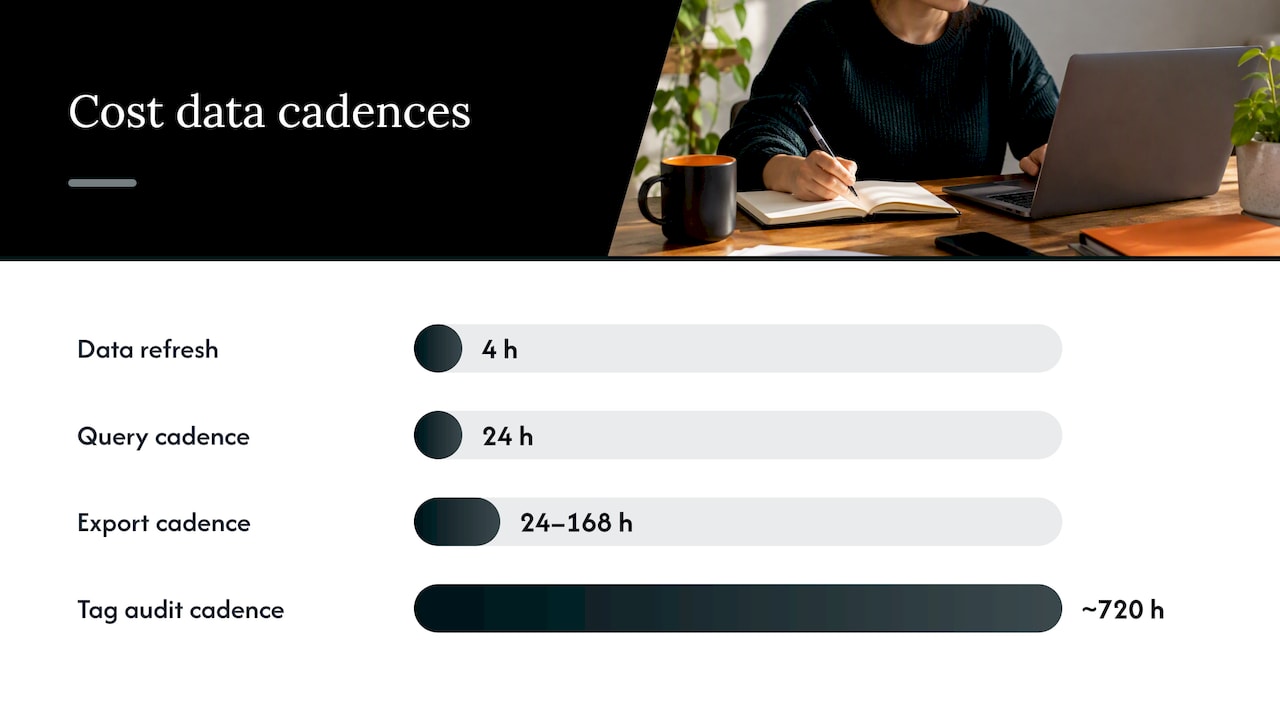
For larger datasets, exports and the Cost Details API scale better than manual portal checks; understanding enterprise mobility cost reduction principles can also help avoid hidden charges that complicate cost management. Cost Management exports and the Query API are recommended once monthly data exceeds roughly 2GB, since daily queries are sufficient given that cost data refreshes every four hours. Feeding exports into a Power BI connector turns raw billing data into dashboards that finance and engineering can both read without portal access.
None of this works without consistent tagging. A few practices make the difference between usable data and noise:
- Tag every resource group with a cost center, environment, and owner at creation time, not after the fact.
- Scope subscriptions by business unit or environment so chargeback reports do not need manual reconciliation.
- Set an export cadence of daily or weekly depending on team size, feeding the same dashboard used in monthly reviews.
- Audit tag compliance monthly, since untagged resources are the most common blind spot in chargeback models.
Get this layer right and every later optimization step, from Advisor to budgets, rests on numbers people trust.
Azure Advisor and automated recommendations: validate before acting
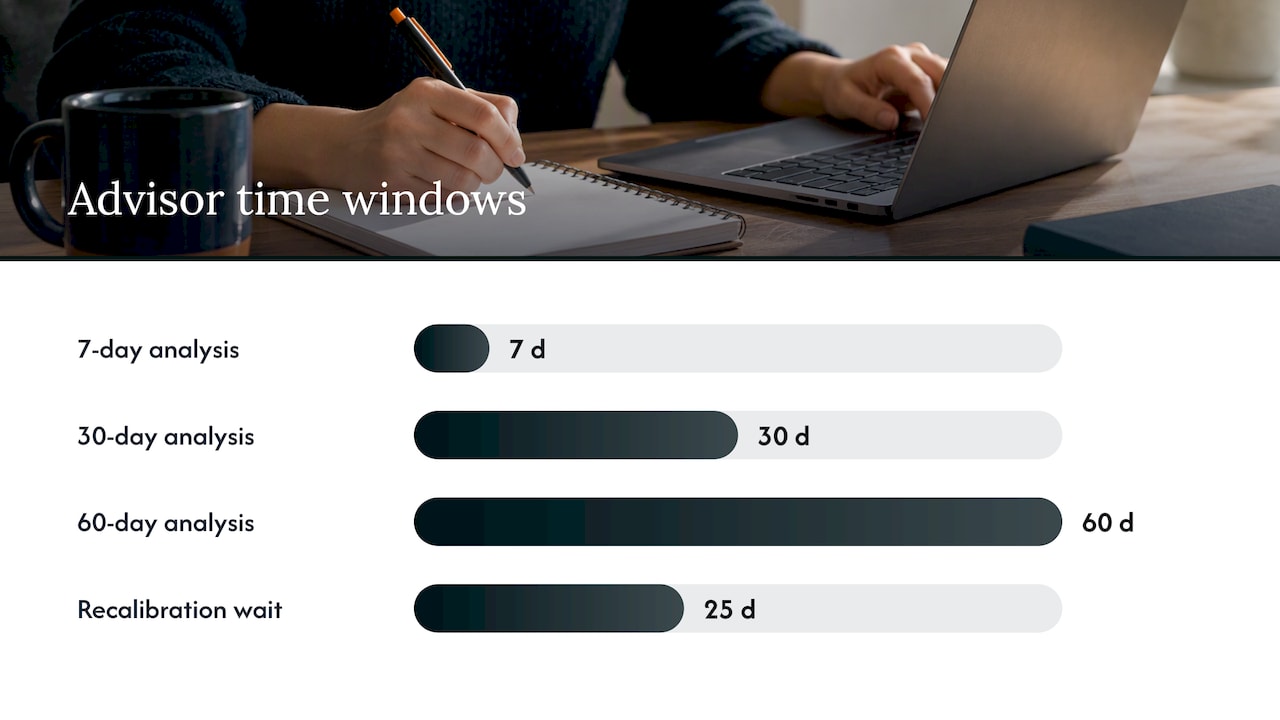
Azure Advisor is Microsoft’s built-in recommendation engine, and it is the fastest way to find savings without building your own analysis. Advisor generates cost recommendations by analyzing usage over 7, 30, and 60 day windows, flagging virtual machines with CPU utilization at or below 5% over those periods as candidates for resizing or deallocation.
The recommendations worth prioritizing first:
- Right-size or shut down low-utilization VMs, the single most common Advisor finding.
- Buy reservations or Savings Plans for workloads with stable, predictable usage patterns.
- Delete unattached managed disks, which quietly accumulate charges after a VM is removed.
Advisor is not infallible. A VM with low average CPU might still be running a memory-intensive or bursty workload that a CPU-only metric misses, so cross-check with actual application behavior before touching anything in production.
The safe sequence: pull the Advisor list, verify utilization against your own monitoring, confirm the resource owner and its business purpose, then schedule the change during a maintenance window rather than mid-shift. After the change, check the next billing cycle to confirm the savings actually materialized rather than assuming the estimate was accurate.
Pro Tip: Recommendation engines can take up to 25 days to fully recalibrate after a major resource or commitment change, so wait a full cycle before judging a fix as ineffective.
Rightsizing and cleanup: a step-by-step checklist to reclaim wasted spend
Rightsizing is the lowest-risk, fastest-paying lever available, because it touches resources you already own rather than requiring new purchases. The work is mechanical once you have a checklist.
- Pull the list of VMs with sustained low CPU or memory utilization from Advisor and your monitoring tool.
- Cross-reference with unattached managed disks and orphaned network interfaces, both common leftovers from decommissioned VMs.
- Before deleting anything, confirm with the resource owner: is this used for disaster recovery, compliance archiving, or a seasonal workload that looks idle right now?
- Apply autoshutdown schedules to development and test VMs outside business hours rather than deleting them outright.
- Resize confirmed candidates one tier down and monitor performance for a full week before resizing further.
- Record the before-and-after cost in your tracking sheet to build a running total of verified savings.
Non-production environments are where the checklist pays off fastest. A dev VM running 24/7 but only used during business hours can be scheduled down to roughly a third of its runtime hours, and that reduction shows up directly on the next invoice.
Pro Tip: Treat autoshutdown schedules as a default setting for every new non-production resource, not an afterthought applied later.
Rate optimization: when to use Reservations, Savings Plans, and Azure Hybrid Benefit
Once usage is trimmed, the next lever is pricing. Azure offers three distinct discount mechanisms, and picking the wrong one either locks you into inflexible terms or leaves savings on the table.
- Reservations suit stable, predictable workloads where you know the VM size and region for the next one or three years. Azure Reservations can reduce compute costs by up to 72% compared to pay-as-you-go pricing, but the discount is scoped to specific SKUs and regions, and it does not cover networking, storage, or software licensing.
- Savings Plans fit dynamic or multi-service usage where workload shapes shift over time. Azure Savings Plans let you commit to an hourly spend for one or three years and can save up to 65% over pay-as-you-go rates, applying broadly across compute services rather than a single SKU.
- Azure Hybrid Benefit reduces licensing costs separately from compute discounts, letting organizations apply existing Windows Server or SQL Server licenses toward Azure usage, and it stacks with both Reservations and Savings Plans for additional savings on the same resource.
The decision rule is simple: commit through Reservations when you are certain of the shape, use Savings Plans when you are not, and layer Hybrid Benefit on top whenever you hold eligible licenses. For a deeper breakdown of one-year versus three-year terms, see our guide on Reservations versus Savings Plans and the Azure Hybrid Benefit guide for licensing specifics.
Autoscaling and scaling patterns: guardrails to stop runaway spend
Autoscaling is meant to save money by matching capacity to demand, but a poorly tuned configuration can do the opposite, scaling up aggressively and down slowly. The fix is guardrails, not abandoning autoscale altogether.
- Design scale units around actual demand patterns rather than defaulting to CPU-only triggers; event-driven autoscaling tools like KEDA reduce unnecessary instance counts compared to naive CPU-based scaling.
- Set conservative cooldown periods between scale-out events to avoid thrashing, and cap the maximum instance count so a traffic spike cannot balloon into an unbounded bill.
- Use queueing and rate limiting to smooth demand peaks instead of scaling out for every burst.
- Tie autoscale behavior to budget alerts so a scaling event that pushes spend past a threshold triggers a notification, not a silent overage.
Pro Tip: Review your autoscale caps every quarter. A limit set for last year’s traffic is often too high or too low for this year’s.
Storage and data optimization: tiering, lifecycle, and retention rules
Storage costs creep up quietly because data rarely gets deleted, only forgotten. Aligning storage tier to data value is one of the more overlooked levers in Azure cost reduction.
- Inventory your data by access frequency and classify it as hot, cool, or archive candidate.
- Build lifecycle rules that automatically move cold data to Cool or Archive tiers after a defined inactivity period, rather than relying on manual review.
- Set backup retention policies based on actual compliance or recovery needs, and apply compression where backup size allows it.
- Apply deduplication and time-to-live rules on log data, which otherwise accumulates indefinitely in storage accounts.
- Minimize cross-region replication to only the data that genuinely needs geographic redundancy, and use caching for frequently accessed data to avoid repeated retrieval costs.
The Well-Architected Framework’s guidance on data costs treats this as a lifecycle discipline: tiering, retention automation, and deduplication together, not a one-time cleanup project.
Governance, budgets, anomaly detection, and automation
Visibility and rightsizing solve today’s waste. Governance stops tomorrow’s from accumulating unnoticed.
- Enable anomaly detection in Cost Analysis, which evaluates daily costs against a 60-day forecast and runs roughly 36 hours after each day closes, surfacing spikes before they show up as a surprise on the invoice.
- Route anomaly alerts through Logic Apps or Action Groups so a spike automatically creates a ticket or triggers an investigation runbook instead of sitting in an inbox.
- Set budgets tied to action groups so spend approaching a threshold triggers a notification or, for stricter environments, blocks further provisioning until approved.
Alerts only earn their keep when they feed a workflow. An anomaly email nobody reads is the same as no alert at all.
Operationalizing cost discipline: FinOps roles, cadence, and KPIs
Sustainable savings come from a cycle, not a one-time cleanup. Assign clear roles: engineering owns rightsizing and architecture decisions, finance owns budget targets, and cloud operations owns the tooling and reporting.
- Run a monthly cost review sprint that compares actual spend against the prior baseline and flags new drift.
- Adopt a value-allocation mindset: prioritize critical application flows for performance and apply cheaper configurations to lower-value workloads instead of cutting everywhere equally.
- Track a simple scorecard: savings realized, showback or chargeback accuracy by team, and an executive summary each quarter.
This is the same continuous discipline the Well-Architected Framework describes: cost optimization as an ongoing practice, not a project with an end date.
Practitioner perspective: common pitfalls and trade-offs
The mistake I see most often is treating a reservation as a purchase you make once and forget. Usage patterns shift, and a reservation bought for last year’s workload can sit underutilized while nobody notices. Reservations should be reviewed quarterly and converted to Savings Plans when the shape of usage changes.
The second mistake is acting on a recommendation without confirming who owns the resource or why it exists. A low-utilization VM might be a disaster recovery standby, not waste. Automation earns trust only when it pairs execution with verification, which is exactly where managed FinOps outperforms tooling alone.
— Dan
Continuous optimization and managed FinOps with EverythingCloud
Most of what this article covers, visibility, Advisor triage, rightsizing, commitment management, is work that has to happen every month, not once. EverythingCloud runs that cycle continuously: real-time visibility into Azure spend, automated execution of optimization actions rather than just a list of recommendations, and unified reporting for teams managing multiple environments or multiple clients.
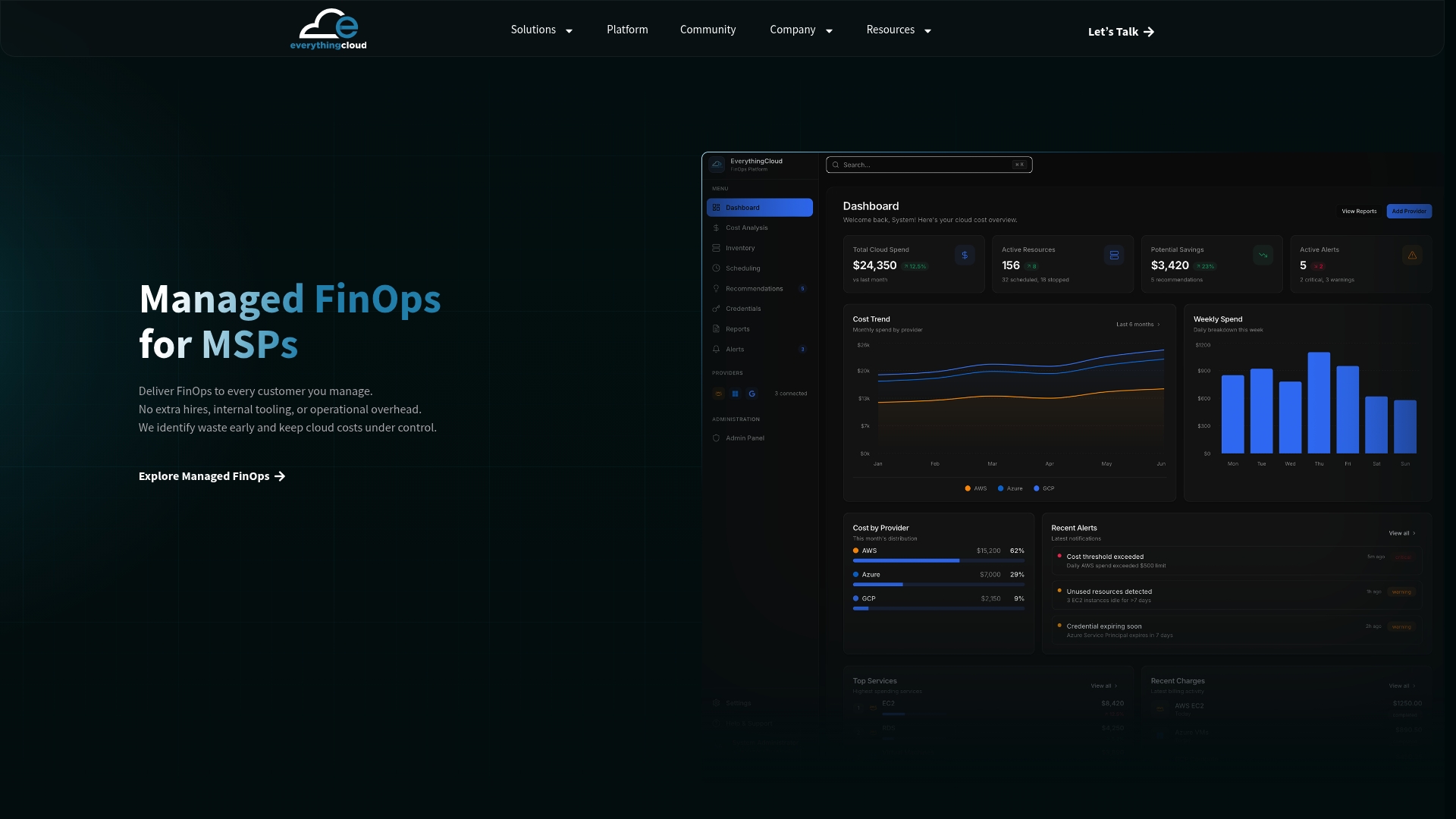
For MSPs and technology partners who want to offer managed FinOps without building the tooling themselves, the Founding Partner Membership provides a turnkey path to launch the service under your own brand. Enterprises looking for hands-on execution rather than another dashboard can look at Managed FinOps directly. Either way, savings outcomes get verified against invoice-level billing, not estimates.
Authoritative Microsoft docs and EverythingCloud resources
- Azure Reservations overview for compute discount terms and scope.
- Cost Management best practices covering Savings Plans and reporting.
- Azure Well-Architected cost optimization checklist for governance discipline.
- EverythingCloud’s enterprise Azure guide for deeper implementation detail.
Sources
- What are Azure Reservations? – Microsoft Cost Management | Microsoft Learn
- Optimize your cloud investment with Cost Management – Microsoft Cost Management | Microsoft Learn
- Azure Well-Architected Framework: cost optimization – Microsoft Learn
FAQ
How can I avoid unexpected charges on an Azure Free account?
Set a spending limit and budget alert before deploying anything, and monitor Cost Analysis weekly rather than waiting for the monthly invoice. Free account charges usually come from resources left running past the trial period, so schedule a reminder to review or delete unused resources before the free credit expires.
What alternatives to Microsoft Azure exist for cloud workloads?
Amazon Web Services and Google Cloud are the two largest alternatives, alongside smaller providers and on-premises or hybrid setups for specific workloads. No single platform has replaced Azure broadly, and the right choice depends on existing licensing, team expertise, and workload requirements.
Will Azure prices change in 2026?
Azure pricing changes periodically by service and region, and Microsoft communicates updates through its own pricing and billing channels rather than a single annual announcement. Check the official Azure pricing pages for your specific services rather than relying on a general forecast.
Is Azure or AWS cheaper?
Neither provider is universally cheaper, since pricing depends heavily on workload type, region, committed-use discounts, and existing licensing such as Azure Hybrid Benefit. Compare actual invoice-level costs for your specific workload rather than list prices, since discount programs on each platform can shift the real cost significantly.
What is the fastest way to reduce Azure costs?
Start with visibility through Cost Analysis, then act on Azure Advisor recommendations for rightsizing and cleanup, since these require no new purchase and typically show savings within the next billing cycle. Locking in Reservations or Savings Plans afterward compounds the savings once your usage baseline is accurate.