
Scheduling non-production instances typically cuts nonprod compute spend by roughly 50 to 70%, and the fastest path is tag-based vendor scheduling or serverless orchestration with EventBridge Scheduler and SSM Automation. Target resources with a consistent Environment and Schedule tag, add a KeepRunning override for exceptions, and route everything through an auditable, retry-capable pattern rather than a cron job someone will forget about in six months.
TL;DR:
- Tag-based scheduling can reduce nonproduction compute costs by roughly 70% when moving from continuous to business-hours schedules.
- The recommended automated setup pairs EventBridge Scheduler with SSM Automation for flexible, multi-resource, timezone-aware orchestration.
- Scheduling should exclude stateful production systems and resources needing continuous availability to prevent disruptions or data loss.
- Implementation requires careful dependency management, graceful shutdown procedures, and policy enforcement to preserve system stability and savings.
- Managed FinOps solutions automate execution, monitor compliance, and enforce policies to ensure long-term savings and governance across multi-cloud environments.
Table of Contents
- What to Schedule and Why It Matters
- AWS Patterns: Quick Setup, Instance Scheduler, and EventBridge + SSM
- Azure Patterns: Auto-Shutdown, DevTest Labs, and Start/Stop VMs v2
- GCP Patterns: Compute Engine Instance Schedules and Constraints
- Which Orchestration Pattern Fits Your Environment?
- How Do You Avoid Breaking Dependencies When Stopping Instances?
- How Do You Measure the Savings From Nonprod Scheduling?
- How Should You Roll Out Nonprod Scheduling in Phases?
- What Managed FinOps Adds to Nonprod Scheduling
- Why Scheduling Only Works if Someone Owns It
- Let Everythingcloud Handle Enforcement so Savings Actually Stick
- Sources
- FAQ
What to Schedule and Why It Matters
Not every non-production resource belongs on a schedule, and getting this wrong is how teams end up with a broken staging environment on a Monday morning. The safe targets are the ones that don’t hold irreplaceable state: dev and staging virtual machines, CI/CD runners, test database instances, ephemeral clusters, dev-tier RDS or Aurora instances, and analytics clusters that aren’t feeding a live dashboard.
Some resources should stay off the schedule entirely. Stateful production databases, the primary nodes in an Auto Scaling group, VMs backed by Local SSDs (which lose their data on stop), and any system that needs continuous availability for compliance or monitoring reasons are poor scheduling candidates.
Tagging is what makes the whole system work without a spreadsheet. Three tags do most of the job: Environment (dev, staging, qa), Schedule (the named schedule a resource follows, like business-hours or weekday-9to6), and KeepRunning (a boolean override an engineer can flip when they need an instance up overnight for a demo or an incident). Your scheduler reads these tags to decide what to touch and what to leave alone.
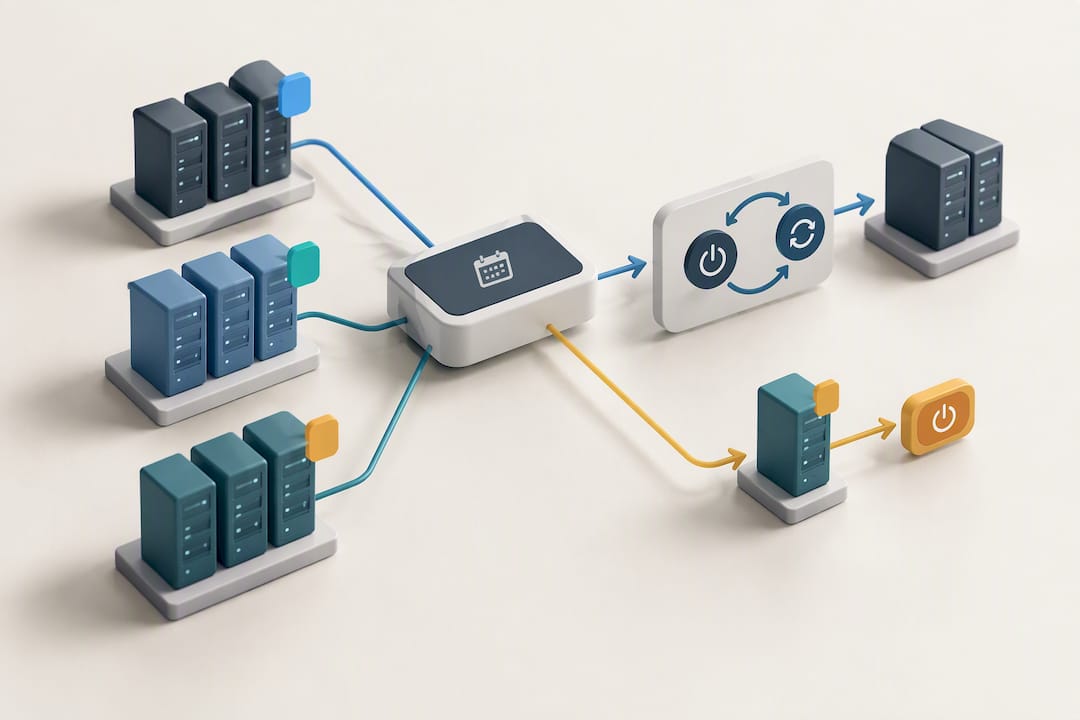
The math behind the savings is straightforward. A VM running all 168 hours in a week, scheduled down to 50 hours of business-day uptime, drops runtime significantly. This matches the ratio AWS documents for its Quick Setup Resource Scheduler when moving workloads from always-on to a business-hours pattern.
Statistic Callout: Moving a fleet of nonprod instances from 168 hours/week to a 50-hour business-day schedule reduces scheduled runtime by roughly 70%, as indicated by AWS’s Quick Setup documentation.
AWS Patterns: Quick Setup, Instance Scheduler, and EventBridge + SSM
AWS gives you three real options, and they scale differently. Quick Setup Resource Scheduler is the fastest to stand up. It’s tag-driven, works across regions and multiple accounts, and AWS notes a practical guidance limit around 5,000 instances per configuration, which covers most mid-market fleets without modification.
Instance Scheduler on AWS is the more mature, more customizable route. It runs on Lambda and DynamoDB, maintains a schedule registry, and ships with a CLI for managing periods and schedules across accounts. Teams already running CloudFormation-based infrastructure tend to fit this one into existing pipelines with less friction, per the official implementation guide.
The pattern we recommend for most teams building fresh is EventBridge Scheduler paired with SSM Automation. It requires zero custom infrastructure, handles native timezone logic, retries failed actions automatically, and covers EC2, RDS/Aurora, Redshift, EKS node groups, and OpenSearch, according to AWS re:Post’s implementation walkthrough.
Building it out looks like this:
- Create EventBridge schedules using cron or rate expressions with an explicit IANA timezone.
- Deploy an SSM Automation runbook per resource type (EC2, RDS, EKS).
- Add the
KeepRunningoverride tag and have your runbook check it before every action. - Attach IAM roles scoped narrowly to SSM and EventBridge actions, nothing broader.
- Wire CloudWatch and CloudTrail into every run so failed starts and stops show up in logs, not in a Slack complaint.
Pro Tip: If an instance uses an EBS volume encrypted with a customer-managed KMS key, your automation role needs explicit decrypt permissions or the start action will fail silently. Test this in your pilot before you scale it.
Azure Patterns: Auto-Shutdown, DevTest Labs, and Start/Stop VMs v2
Azure splits scheduling into three tiers depending on how complex your environment is. For a handful of one-off VMs, auto-shutdown configured through the portal or the az vm auto-shutdown CLI command is enough, and it’s the option most teams reach for first, per Microsoft’s documentation.
DevTest Labs handles group-based scheduling for structured test environments, letting you manage a whole lab’s start and stop policy rather than configuring VMs one at a time.
For anything involving dependencies across subscriptions, Start/Stop VMs v2 (built on Azure Functions) is the right tool. It supports sequencing tags, sequencestart and sequencestop, so you can guarantee your database VM comes up before the application tier tries to connect to it, as Microsoft’s Start/Stop v2 overview describes.
A few implementation notes that save headaches later:
- Use Azure Automation accounts and Runbooks for tag-driven, JSON-based schedule definitions rather than hardcoding schedules per resource.
- Apply CLI loops when toggling auto-shutdown across dozens of VMs instead of clicking through the portal one at a time.
- Monitor runbook execution history weekly. A silently failing runbook looks identical to a working one until the bill arrives.
GCP Patterns: Compute Engine Instance Schedules and Constraints
Google Cloud handles this through resource policies, specifically the instance-schedule type, which you create with gcloud, the API, or the console and then attach to a VM. It’s a clean model, but it comes with constraints that trip people up on the first attempt.
Local SSD-backed VMs cannot be scheduled at all, because a stop wipes the disk, and Compute Engine blocks the attachment outright. Each VM can also follow exactly one instance schedule, so you can’t layer a weekday schedule on top of a maintenance-window schedule and expect both to apply.
Timing matters too. Scheduled stop and start operations can take up to 15 minutes after the scheduled time to actually execute, according to Google Cloud’s documentation. If your team needs an instance live at 9:00 AM sharp for a standup demo, schedule the start for 8:45.
Statistic Callout: GCP’s own documentation puts the execution buffer at up to 15 minutes past the scheduled trigger time, which matters for any workflow with a hard start deadline.
Best practices worth following from day one:
- Attach the resource policy in the same region as the target VM; cross-region attachment isn’t supported.
- Use full IANA timezone names (
America/New_York, notEST) to avoid daylight saving time drift. - Test attach and detach behavior on a throwaway instance before rolling the policy out fleet-wide.
Which Orchestration Pattern Fits Your Environment?
Picking between vendor-native scheduling, serverless orchestration, and a dedicated scheduler solution comes down to five decision axes: which resource types you need covered, whether you operate across multiple accounts or subscriptions, how timezones and daylight saving time get handled, how auditable the runs are, and how much ongoing maintenance your team can absorb.
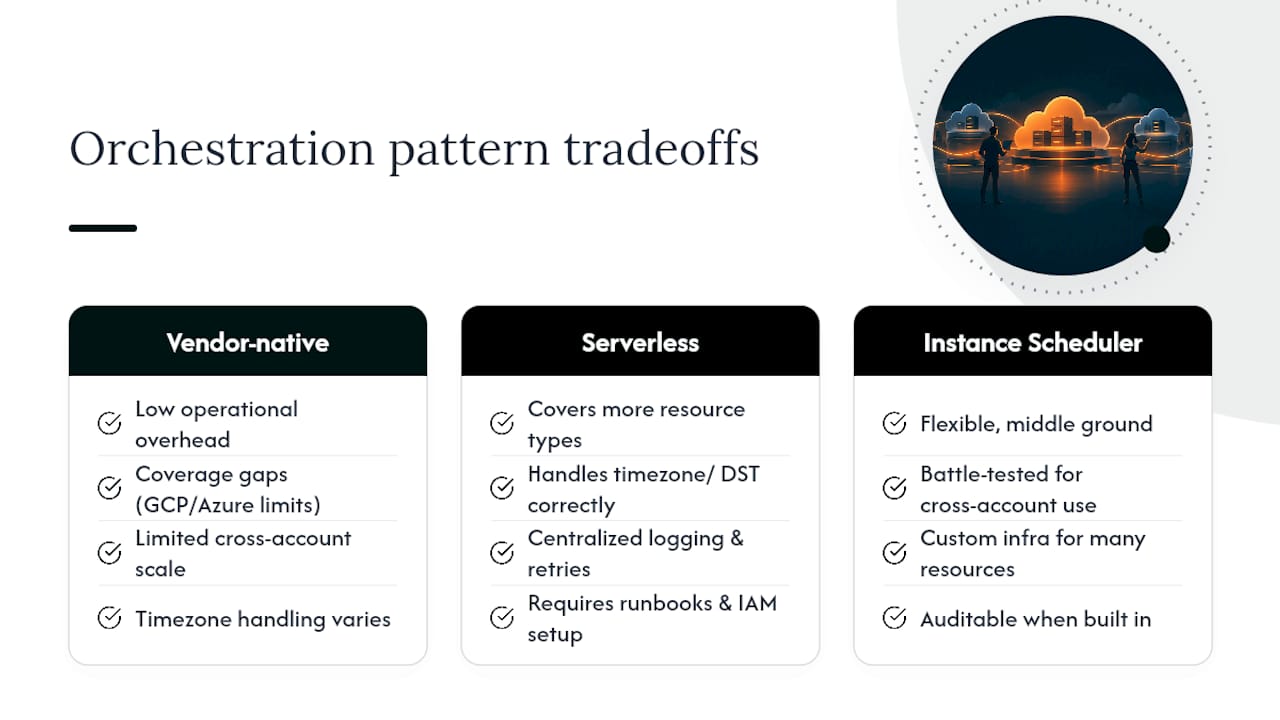
Vendor-native schedulers (Quick Setup, Azure auto-shutdown, GCP instance schedules) win on low operational overhead. You’re using something the cloud provider built and supports directly, with no custom code to maintain. The tradeoff is coverage gaps. GCP’s one-schedule-per-instance limit and Azure auto-shutdown’s single-VM scope mean these tools don’t scale cleanly to complex, multi-resource environments.
Serverless orchestration (EventBridge Scheduler + SSM Automation, Azure Start/Stop VMs v2) covers more resource types in one system, handles native timezone logic correctly, and gives you retries and centralized logging for free. The cost is upfront setup: you’re writing and maintaining runbooks and IAM policies instead of flipping a toggle.
Instance Scheduler-style solutions (Lambda plus DynamoDB, with a CLI-managed registry) sit in between. They’re flexible and battle-tested for large, cross-account deployments, but the custom infrastructure means someone owns its patching and upgrades over time. Instance scheduling isn’t a set-and-forget project in any of these three models. It needs periodic runbook health checks regardless of which pattern you choose.
Pro Tip: If you’re managing more than one cloud provider, standardize your tag names (Environment, Schedule, KeepRunning) across all three before you build anything. Retrofitting tag consistency after you’ve deployed 40 automation rules is far more painful than doing it up front.
How Do You Avoid Breaking Dependencies When Stopping Instances?
A scheduler that stops a database mid-transaction or kills a CI runner mid-build doesn’t save money. It creates an incident. Graceful shutdown has to be part of the runbook, not an afterthought.
- Send a shutdown signal to the application layer first and let it drain active connections instead of force-killing the process.
- Wait for in-flight jobs to reach a checkpoint or finish, and confirm the file system has flushed writes and the database has committed pending transactions.
- Sequence the stop order: application servers shut down first, databases and caches last, reversing the order on startup so the database and cache are ready before the app tier reconnects.
- Query your CI/CD job queue before issuing a stop command. If a runner is mid-build, either apply a temporary
KeepRunningexemption or delay the stop until the queue clears. - Run pilot stop/start cycles against a non-critical resource and confirm health checks and test suites pass cleanly before expanding the schedule to more of the fleet.
This lines up with Google Cloud’s own graceful shutdown guidance, which treats sequencing and drain steps as standard operational practice, not an edge case.
Pro Tip: Build the dependency check into the runbook itself rather than relying on a human to remember it. A runbook that queries the job queue automatically before stopping a CI runner will save you from at least one 2 AM page.
How Do You Measure the Savings From Nonprod Scheduling?
Track four things: scheduled runtime hours reduced, the cost delta by resource type, the start/stop failure rate, and how often the KeepRunning override gets used. That last metric matters more than people expect. If half your dev fleet has the override flipped on, your schedule isn’t actually saving anything.
Instrument this by exporting billing data to BigQuery or AWS Cost and Usage Reports, tagging resources for cost allocation, and pulling operational logs from CloudWatch or Cloud Monitoring. Set up alerts for schedule drift, failed start attempts, and tag noncompliance, each of which should generate a ticket for someone to fix, not just a dashboard nobody checks.
The ROI formula is simple: baseline weekly runtime hours times hourly cost, minus scheduled weekly runtime hours times hourly cost, equals your weekly savings. Multiply by 52 for an annual projection you can put in front of a finance team.
Statistic Callout: AWS’s own scheduling documentation shows a fleet moving from 168 hours to 50 hours per week captures close to 70% of the runtime cost for the scheduled portion of that fleet.
How Should You Roll Out Nonprod Scheduling in Phases?
Rolling out scheduling across an entire organization on day one is how pilots turn into incidents. A phased approach catches problems while the blast radius is still small.
- Pick a noncritical cohort of 5 to 10 instances, document any dependencies between them, and apply your
Scheduletag values. - Run test stop/start cycles on that cohort and collect real metrics: did anything fail to start, did any job get interrupted, how much did the bill actually drop.
- Expand within the account, adding more resource types and confirming the same runbooks handle databases and clusters as cleanly as they handled VMs.
- Extend across accounts, adding cross-account IAM roles and integrating tagging policy enforcement so new resources don’t slip through untagged.
- Enforce with policy tooling: AWS Config rules, Azure Policy, or GCP organization policy can require the
Scheduletag on any new nonprod resource, closing the gap that manual tagging always leaves open.
A realistic timeline looks like two weeks for the pilot, two more to expand within the account, two to bring in databases and stateful services, and ongoing enforcement after that. Your runbook skeleton at every phase stays the same: discover resources by tag, check the KeepRunning override, call the start or stop API, log the result, and notify the team through SNS or a webhook.
What Managed FinOps Adds to Nonprod Scheduling
Building and maintaining your own scheduling infrastructure works, right up until someone leaves the team and the runbooks stop getting reviewed. Some managed FinOps solutions automate the execution of cost-saving actions instead of just flagging them in a dashboard for someone to act on later.
Everythingcloud’s own data on non-production scheduling for MSP and FinOps customers shows the same range you’d expect from vendor-native tools: cutting 50 to 70% of cloud costs once scheduling is paired with tagging enforcement and automated execution rather than a one-time setup.
The difference between a homegrown scheduler and managed FinOps shows up in the exceptions. Exceptions like a KeepRunning override that never gets reviewed, a runbook that silently stops retrying after an IAM permission change, or a new AWS account missing tagging policy application need continuous governance rather than periodic audits.
- Continuous monitoring can catch schedule drift and tag noncompliance as it happens rather than weeks later.
- Automated execution can enable recommendations to turn into actions without manual intervention.
- Multi-tenant controls can help manage scheduling and governance across multiple client accounts.
- Regular reporting can link savings back to invoice-level billing, helping ground ROI calculations in actual charges.
Statistic Callout: Everythingcloud’s data on MSP-managed nonprod fleets points to the same 50 to 70% cost reduction range documented by AWS’s own scheduling tools, achieved through the combination of scheduling, enforcement, and automated execution.
Why Scheduling Only Works if Someone Owns It
Most nonprod scheduling projects fail quietly, not loudly. They launch, the finance team sees a good number in the first month’s report, and then the tagging discipline erodes as new engineers join and skip the Schedule tag on resources they spin up. Six months later, half the “scheduled” fleet is running 24/7 again, and nobody notices until someone reruns the cost report.
The automation itself is rarely the hard part. Any of the patterns covered here, whether that’s Quick Setup, EventBridge and SSM, or Start/Stop VMs v2, will run reliably once configured. What breaks down is enforcement. A schedule with no policy backing it is a suggestion, not a control. Teams that pair scheduling with a policy engine that blocks untagged resource creation see savings that hold. Teams that rely on tribal knowledge about which tags to apply see savings that decay within two quarters.
If you’re weighing whether to build this in-house or hand it to a managed FinOps partner, the real question isn’t whether you can build the automation. It’s whether you have the bandwidth to review runbook health and tagging compliance every month for the next three years.
— Dan
Let Everythingcloud Handle Enforcement so Savings Actually Stick
Some platforms offer an alternative to building and babysitting your own scheduler stack by providing automated execution, continuous monitoring, and governance aligned to CIS and NIST standards running in the background every day.
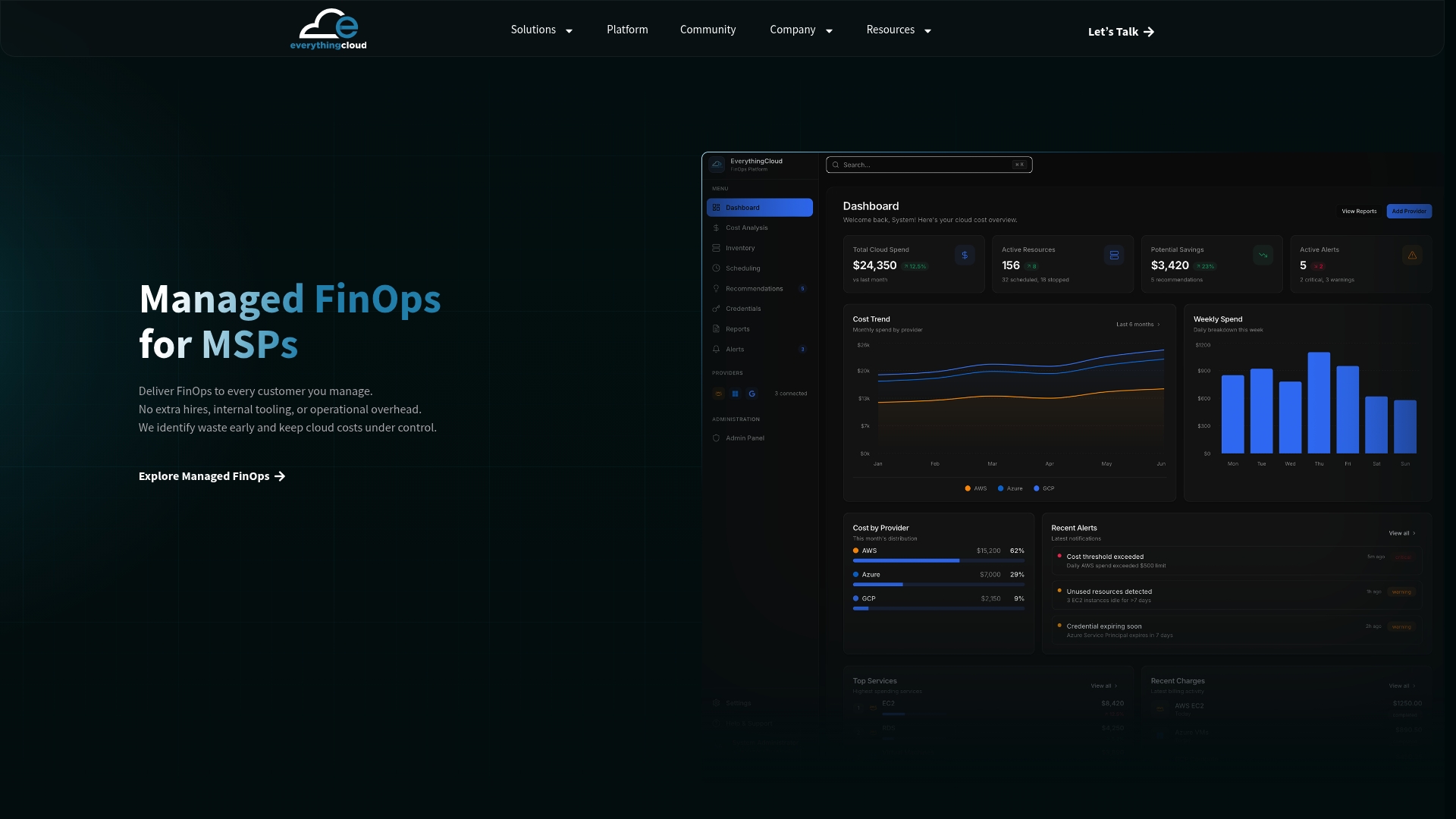
The platform doesn’t stop at flagging idle nonprod instances. It executes the start/stop actions, tracks the override usage that quietly erodes savings, and reports outcomes verified against your actual invoice-level billing, not an estimate. For MSPs managing this across multiple client accounts, Managed FinOps delivers that as a turnkey service instead of a project you staff internally, and Continuous Cloud Optimization extends the same automated enforcement to enterprise environments running across AWS, Azure, Google Cloud, and Microsoft 365.
If you’re a partner looking to package this as a recurring service, the Founding Partner Membership at $500 per month gives you the platform to launch managed FinOps without building the orchestration yourself. Get a cloud waste valuation to see what your current nonprod fleet is actually costing before you decide which route fits your team.
Sources
- Stop and start EC2 instances automatically on a schedule using Quick Setup – AWS Systems Manager
- How to Automate Start/Stop Scheduling for Non-Production AWS Resources Using EventBridge Scheduler and SSM Automation | AWS re:Post
- Scheduling a VM instance to start and stop | Compute Engine | Google Cloud Documentation
FAQ
Does AWS Bill for Stopped Instances?
AWS stops charging for EC2 compute time once an instance is fully stopped, but attached EBS volumes, Elastic IPs, and snapshots keep billing regardless of instance state. This is exactly why scheduling nonprod instances captures real savings: the compute charge, usually the largest line item, drops to zero during stopped hours.
What Does Reserved Instance Mean, and Does It Conflict With Scheduling?
A Reserved Instance is a billing commitment where you prepay or commit to steady usage in exchange for a discount off On-Demand rates. Reserved Instances make sense for workloads that run continuously, not nonprod environments you’re actively scheduling down, so the two strategies apply to different parts of your fleet rather than competing with each other.
What Are On-Demand Instances and How Do They Work?
On-Demand Instances bill by the second or hour with no upfront commitment, which is exactly the pricing model that makes scheduling worthwhile. Since you only pay while the instance runs, stopping a dev or staging instance outside business hours directly reduces the bill, unlike a Reserved Instance where you’ve already committed to paying regardless of usage.
How Much Does an EC2 Instance Cost per Hour?
Hourly EC2 pricing varies by instance type, region, and operating system, so there’s no single rate to quote. What stays consistent is the leverage scheduling gives you: cutting a nonprod instance’s runtime from 168 hours to roughly 50 hours a week reduces its compute cost by close to 70%, regardless of which instance type you’re running.
Can Everythingcloud Manage Scheduling Across Multiple Cloud Providers?
Yes. Everythingcloud provides visibility and automated optimization across AWS, Azure, Google Cloud, and Microsoft 365, which lets MSPs and enterprise teams manage nonprod scheduling and enforcement from a single platform instead of maintaining separate tools per cloud. Pricing for the Managed FinOps service is available on request through the site.