
Use Spot Instances for anything stateless and interruption-tolerant, and default your allocation strategy to price-capacity-optimized for production. That single decision covers most of what goes wrong with Spot: teams either avoid it out of fear or throw it at the wrong workload and get burned. The tradeoff is real. Spot Instances carry a two-minute interruption notice, and every workload you put on Spot has to be architected for a clean, fast shutdown in that window.
The best candidates share one trait: losing an instance mid-task costs you nothing but a retry.
- Batch processing and data pipeline jobs that checkpoint or restart cleanly
- CI/CD runners spinning up fresh for every build
- Stateless web and API workers behind a load balancer
- Preview environments and ephemeral dev/test stacks
Pro Tip: If a workload can’t tolerate losing an instance without a customer-facing error, it’s not a Spot candidate yet. Fix the architecture first, then move it to Spot.
Key Takeaways
A production-grade spot instances strategy combines price-capacity-optimized allocation, deep instance and AZ diversification, and automated interruption handling, then gets verified through continuous FinOps monitoring rather than a one-time setup.
| Point | Details |
|---|---|
| Default to price-capacity-optimized | Balances cost savings with lower interruption risk for most production workloads. |
| Diversify aggressively | Define 10 or more instance types across multiple AZs to avoid correlated reclaims. |
| Automate the drain | Use lifecycle hooks and Node Termination Handler so interruptions require no manual intervention. |
| Pilot before scaling | Measure interruption rate and realized discount over 30 days before expanding Spot’s fleet share. |
| Pair engineering with governance | EverythingCloud’s managed FinOps and platform tools track realized savings and interruption risk continuously after launch. |
Table of Contents
- Building a Spot Instances Strategy That Actually Holds Up
- How Do You Handle Spot Instance Interruptions Gracefully?
- Should You Diversify Instance Types and Availability Zones?
- Wiring Spot Into Auto Scaling and EC2 Fleet
- Running Kubernetes Node Pools on Spot
- Measuring Whether Your Spot Strategy Is Actually Saving Money
- A 30-Day Pilot for Rolling Out Spot Safely
- What Enterprise Teams Get Wrong About Spot Adoption
- Managed FinOps That Keeps Your Spot Strategy Honest Over Time
- Frequently Asked Questions
- Sources
Building a Spot Instances Strategy That Actually Holds Up
A Spot Instances strategy is only as good as its allocation logic. AWS gives you four allocation strategies, and picking the wrong one is the most common reason teams say “we tried Spot and it didn’t work.”
- Price-capacity-optimized: looks at both price and available capacity, and picks pools with the best balance of the two. Lower interruption risk, still meaningfully cheaper than On-Demand.
- Capacity-optimized: picks the deepest capacity pools regardless of price. Good for large, steady fleets where availability matters more than shaving the last few cents.
- Diversified: spreads requested capacity evenly across all specified pools. Useful when you want predictable distribution rather than AWS picking winners.
- Lowest-price: chases the cheapest pools only. Highest interruption exposure, best reserved for jobs that are fully time-flexible and cheap to restart.
AWS recommends price-capacity-optimized as the default for production because it balances availability against cost rather than optimizing for one at the expense of the other. Reach for capacity-optimized when you’re running a large, long-lived batch fleet where a mid-run reclaim is expensive to recover from. Lowest-price earns its place only in genuinely time-flexible jobs, like a nightly report that can slip by a few hours without anyone noticing.
Pro Tip: Set price-capacity-optimized as your organization-wide default in your Auto Scaling group templates and EC2 Fleet configs, then require an explicit justification for anyone who wants to override it.
A quick example: a fintech client running overnight risk calculations moved from lowest-price to price-capacity-optimized and cut their interruption rate by more than half, with pricing that stayed within a few percentage points of the cheaper option.

How Do You Handle Spot Instance Interruptions Gracefully?
Spot interruption handling is where most production incidents actually happen, and it’s fixable with a fairly small set of patterns.
- Consume the interruption notice. AWS gives you a two-minute warning through the instance metadata service, plus earlier EC2 instance rebalance recommendations that fire before the hard notice when AWS detects elevated interruption risk. Poll for both.
- Wire in lifecycle hooks. Auto Scaling lifecycle hooks and capacity rebalancing let you pause termination just long enough to drain connections and deregister from a load balancer before the instance disappears.
- Automate the drain for containers. For workloads on ECS or EKS, the AWS Node Termination Handler paired with ASG lifecycle hooks handles the drain automatically in most setups, without custom interruption code.
- Design for statelessness and idempotency. Externalize session state to something like ElastiCache or DynamoDB, and make jobs safe to rerun from the last checkpoint rather than from scratch.
- Set realistic termination grace periods. Give containers and processes enough of the two-minute window to flush logs and close connections, but not so much that the drain itself risks missing the deadline.
- Choose stop, hibernate, or terminate deliberately. If an instance holds meaningful local state you can’t easily externalize, stop or hibernate semantics preserve EBS volumes; if it’s truly stateless, terminate and let the fleet replace it.
Pro Tip: Test your termination handling by manually triggering a rebalance recommendation in a staging environment. Most teams discover their “graceful shutdown” takes 90 seconds longer than they assumed.
Should You Diversify Instance Types and Availability Zones?
Yes, and this is the single highest-leverage lever in any spot instances strategy. A fleet defined with one or two instance types in one AZ is fragile by design: when that specific pool tightens, every instance in it can get reclaimed at once. Practitioner guidance consistently points to fleets with 10 or more instance options spread across multiple AZs to break that correlation.
- Define a diverse set of instance types with similar vCPU and memory profiles rather than relying on only one or two exact matches.
- Use attribute-based instance type selection so you specify vCPU, memory, and generation requirements instead of hardcoding instance names, which also means new instance generations get pulled in automatically.
- Query Spot placement scores before launching a large fleet. The score, from 1 to 10, tells you how likely a Region or AZ is to fulfill your requested capacity right now.
- Cross-check with Spot Instance Advisor, which shows historical interruption frequency by instance type and Region so you’re not diversifying blindly.
A configuration example: a batch fleet requesting multiple instance types across several Availability Zones gives you multiple distinct pools, instead of one. If any single pool spikes in demand, the other eleven absorb the shortfall without anyone noticing.
Wiring Spot Into Auto Scaling and EC2 Fleet
For most services, a mixed-instance Auto Scaling group is the right vehicle. For batch jobs that run to completion rather than serving live traffic, EC2 Fleet or Spot Fleet in request mode is often the simpler fit.
- Configure a mixed-instance policy with your diversified instance list and price-capacity-optimized allocation, then let the ASG manage aggregate desired capacity rather than per-instance-type counts.
- Set instance weighting if your instance types have different capacity profiles, so a larger instance counts proportionally toward your capacity target.
- Attach health checks at the ELB level, not just EC2 status checks, so a Spot replacement only gets traffic once it’s actually healthy.
- Build in capacity headroom, typically 10 to 20 percent above steady-state demand, so a reclaim doesn’t immediately push you below the threshold your service needs.
- Attach lifecycle hooks for both launch and terminate transitions, giving new instances time to warm up and departing ones time to drain, per AWS’s Spot best-practices guidance.
- Set an On-Demand base capacity for the floor of traffic you can’t risk losing, then let Spot absorb everything above that baseline.
Run a load test that deliberately kills a percentage of your fleet mid-test. If your ASG replaces capacity and your load balancer reroutes traffic without a latency spike, your configuration is production-ready. If it doesn’t, you’ve found the gap before a customer did.
Running Kubernetes Node Pools on Spot
Kubernetes teams get some of the best economics from Spot because the scheduler already assumes pods move between nodes. The pattern that works: run a Karpenter or Cluster Autoscaler configuration with a diversified node template, and let it provision across many instance types and AZs automatically rather than pinning specific instance families. That approach pairs well with broader Kubernetes cost optimization patterns around right-sizing and bin-packing.
- Set PodDisruptionBudgets so critical services always keep a minimum number of pods running during voluntary evictions.
- Tune
terminationGracePeriodSecondsto fit inside the two-minute interruption window, not beyond it. - Use node affinity or taints to keep stateful or latency-sensitive workloads on On-Demand nodes, and let stateless worker pools live on Spot.
- Treat CI runners and ephemeral preview environments as default Spot targets inside the cluster. They’re disposable by nature.
Pro Tip: Label your node pools by workload tolerance (spot-safe, on-demand-only) at the namespace level. It makes the affinity rules self-documenting for anyone new to the cluster.
Measuring Whether Your Spot Strategy Is Actually Saving Money
Cost-effective cloud computing on Spot isn’t just “cheaper instances.” It’s a strategy you measure, or you’re guessing.
Two numbers matter most: your interruption rate (reclaims divided by total Spot instance-hours over a period) and your realized discount (the actual price paid versus On-Demand for the same instance type and Region, not the headline discount). Spot Instances can run up to roughly 90% cheaper than On-Demand in favorable pools, but your realized number will usually land lower once you factor in diversification across less-discounted pools.
- Pull historical pricing with the Spot price history tool, queryable by instance type and AZ for up to 90 days.
- Build a Cost Explorer or Cost and Usage Report (CUR) dashboard that breaks Spot spend out separately from On-Demand and Reserved usage.
- Layer in Savings Plans or Reserved Instance commitments on your On-Demand baseline. Spot savings compound with commitment discounts rather than replace them, so report both in absolute dollars and as a percentage of total compute spend.
- Set alerting on interruption spikes tied to customer-facing services specifically, not just aggregate fleet-wide reclaim counts, since that’s the number that actually predicts incident risk.
A 30-Day Pilot for Rolling Out Spot Safely
Don’t roll Spot out fleet-wide on day one. A short, measured pilot tells you what your interruption rate actually looks like before you bet production traffic on it.
- Pick one interruption-tolerant workload, ideally something already stateless or already retried on failure.
- Set an On-Demand base capacity that covers your non-negotiable floor.
- Configure a diversified, mixed-instance ASG with price-capacity-optimized allocation.
- Enable full interruption handling: rebalance recommendations, lifecycle hooks, and drain automation.
- Run it for 30 days and log every reclaim, every replacement time, and every incident tied to the pilot workload.
Track interruption rate, time-to-replacement, realized discount, and incident count. If the numbers hold, expand Spot’s share of that workload’s fleet in stages, typically in 20 to 30 percent increments, rather than flipping everything at once.
Pro Tip: Write your rollback criteria before the pilot starts, not after a bad week. A simple rule, like “roll back if incident rate tied to Spot exceeds twice the On-Demand baseline,” keeps the decision objective when things get stressful. For workloads that fail the pilot, a combination of alternative discount mechanisms may fit better than forcing Spot where it doesn’t belong.
What Enterprise Teams Get Wrong About Spot Adoption
Most enterprises don’t fail at the Spot engineering. They fail at the governance layer around it. Teams build a solid allocation strategy, wire up interruption handling correctly, and then let it drift, no one revisits instance pool diversification as new generations launch, no one reconciles realized savings against what Savings Plans already cover, and the “pilot” workload from eighteen months ago never actually scaled past its original 20 percent.
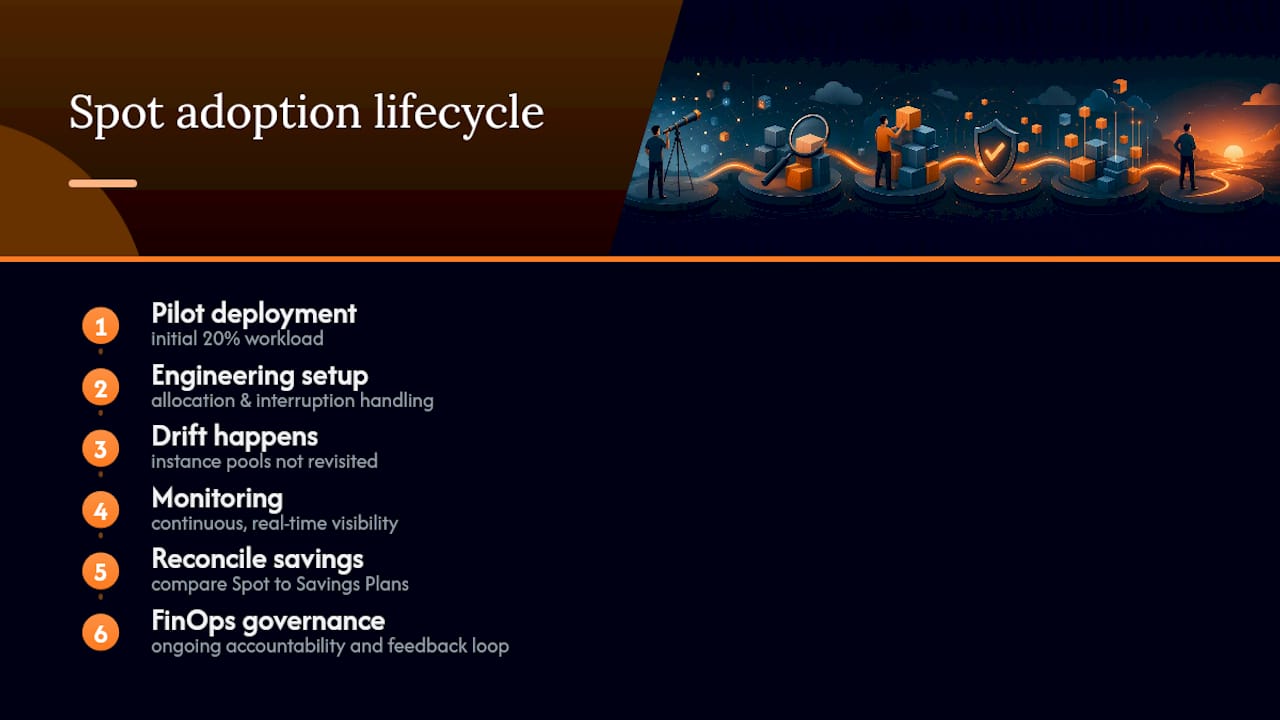
That’s not an engineering failure. It’s a monitoring and accountability gap. EverythingCloud’s platform gives cloud teams continuous, real-time visibility into AWS spend, including how Spot usage is actually performing against interruption and savings targets, so the pilot’s discipline doesn’t quietly evaporate. Pair the engineering work in this guide with ongoing FinOps governance, and Spot stops being a one-time cost project and becomes a permanent, measured part of your infrastructure.
Managed FinOps That Keeps Your Spot Strategy Honest Over Time
Getting the allocation strategy right on day one is the easy part. Keeping interruption rates in check, realized savings visible, and instance pools current as new generations ship is the part most engineering teams don’t have bandwidth for six months in.
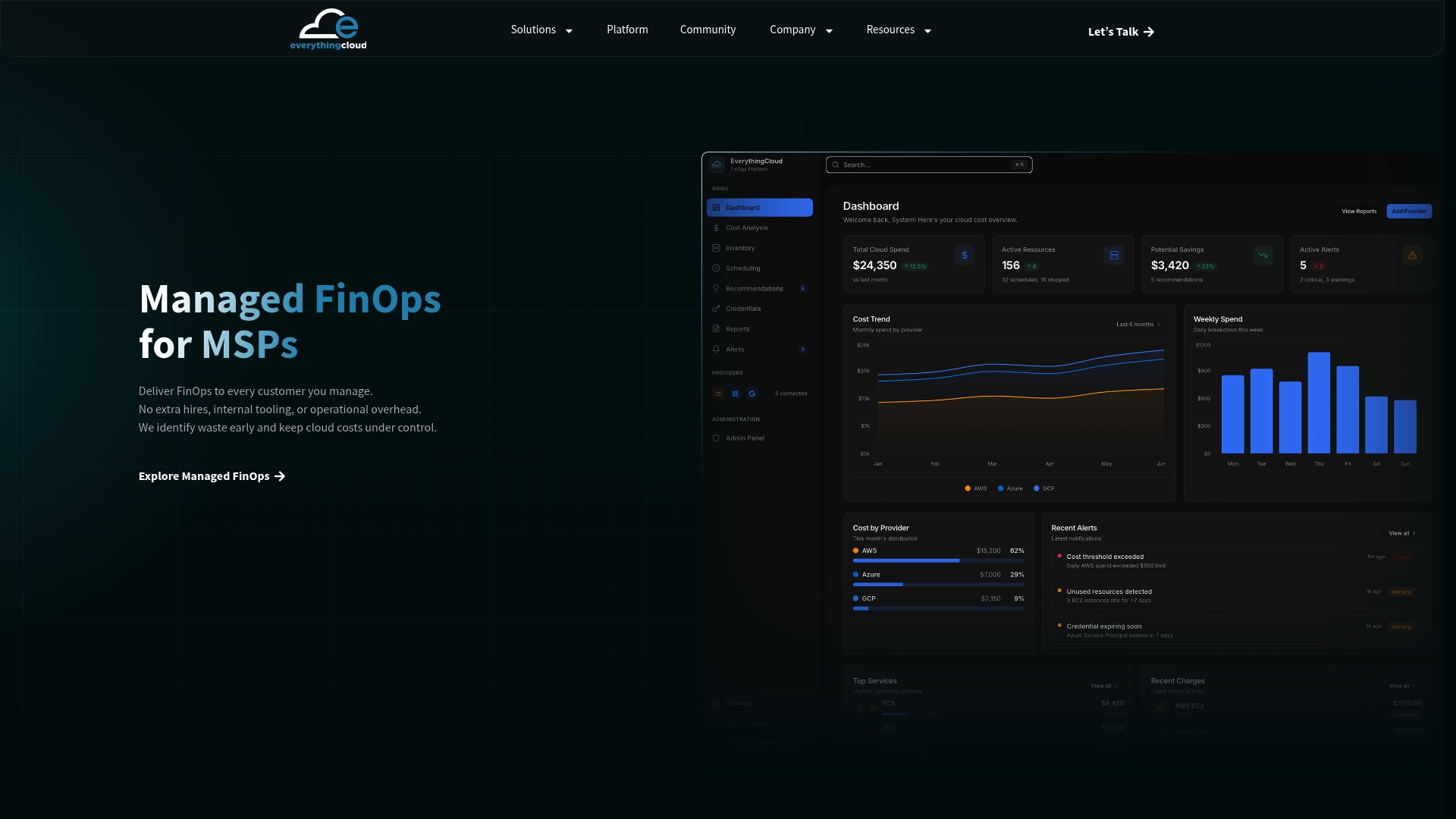
EverythingCloud’s managed FinOps service monitors your AWS environment around the clock, tracking Spot interruption patterns, realized discounts, and diversification gaps automatically, and surfaces optimization opportunities before they turn into either a cost problem or an availability incident. If you’d rather see it in a platform you control directly, the EverythingCloud platform gives you real-time visibility into Spot usage alongside your Reserved Instances, Savings Plans, and broader cloud spend in one dashboard, with automated actions and executive-ready reporting built in. Expect continuous savings tracking, governance aligned to standard frameworks, and monthly reporting that shows exactly what your Spot strategy is returning, not just what it’s supposed to return. Reach out to discuss your FinOps needs and get a concrete read on where your current Spot setup stands.
Frequently Asked Questions
What is the best allocation strategy for a Spot instances strategy in production?
Price-capacity-optimized is the recommended default because it balances available capacity against price, which lowers interruption risk without giving up most of the cost savings.
How much warning do you get before a Spot Instance is interrupted?
AWS gives a two-minute interruption notice, plus an earlier rebalance recommendation in many cases when interruption risk is elevated for a given pool.
Which workloads should never run on Spot Instances?
Stateful services that can’t tolerate sudden termination, long-running database primaries, and anything without a retry or checkpoint mechanism are poor fits for Spot.
How many instance types should a diversified Spot fleet include?
Most production fleets benefit from 10 to 20 instance types with similar vCPU and memory profiles, spread across multiple Availability Zones.
Can you combine Spot Instances with Reserved Instances or Savings Plans?
Yes. Spot savings compound with Reserved Instance and Savings Plan commitments rather than replacing them, so report savings across both layers for an accurate picture.
Sources
- Introducing the price-capacity-optimized allocation strategy for EC2 Spot Instances — AWS Compute Blog
- Best practices for Amazon EC2 Spot — Amazon EC2 User Guide