
If your access pattern is unknown, start with S3 Intelligent-Tiering. For data you hit constantly, use S3 Standard. For records you rarely touch but must keep for years, use S3 Glacier Deep Archive. Everything else on the menu is a variation built around one trade-off: latency versus cost versus how long AWS forces you to commit before deleting or transitioning an object.
TL;DR:
- Moving objects smaller than 128 KB into infrequent access or archive classes can increase costs due to minimum billable size and early-deletion charges.
- Lifecycle rules are effective but can incur request and early-deletion fees if objects are transitioned or deleted before minimum durations expire.
- Intelligent-Tiering automates data movement without manual rules but relies on AWS’s access pattern detection, which may not always align with actual use cases.
- Glacier Deep Archive offers the lowest storage costs but requires large minimum storage durations and has slow retrieval times, suitable for long-term compliance data.
- Proper analysis of object size, access frequency, and retrieval needs is essential before migrating data to ensure cost savings outweigh the associated fees and constraints.
Table of Contents
- What Do S3 Storage Classes Actually Control?
- Breaking Down Every S3 Storage Class
- How Do Lifecycle Rules and Intelligent-Tiering Automate Transitions?
- What Cost Traps Should You Check Before Migrating?
- How Do You Choose the Right S3 Storage Class?
- How Do You Migrate to New S3 Storage Classes Safely?
- Where Managed FinOps Fits Into S3 Storage Optimization
- Automation or Manual Rules: Which Should Govern Your Storage Classes?
- Get Help Operationalizing Your S3 Storage Strategy
- Sources
- FAQ
What Do S3 Storage Classes Actually Control?
A storage class in Amazon S3 is a per-object setting that determines cost, retrieval latency, and durability posture without changing how you interact with the object. The StorageClass attribute sits on the object itself, and every class shares the same API surface: the same PUT, GET, and LIST calls work regardless of which class you pick. What changes is what happens behind the scenes.
All S3 storage classes except the single-AZ options are engineered for 99.999999999% durability, often described as eleven nines. S3 One Zone-IA and S3 Express One Zone are the exceptions. They store data in a single availability zone, which lowers durability and availability guarantees in exchange for lower cost or faster performance.
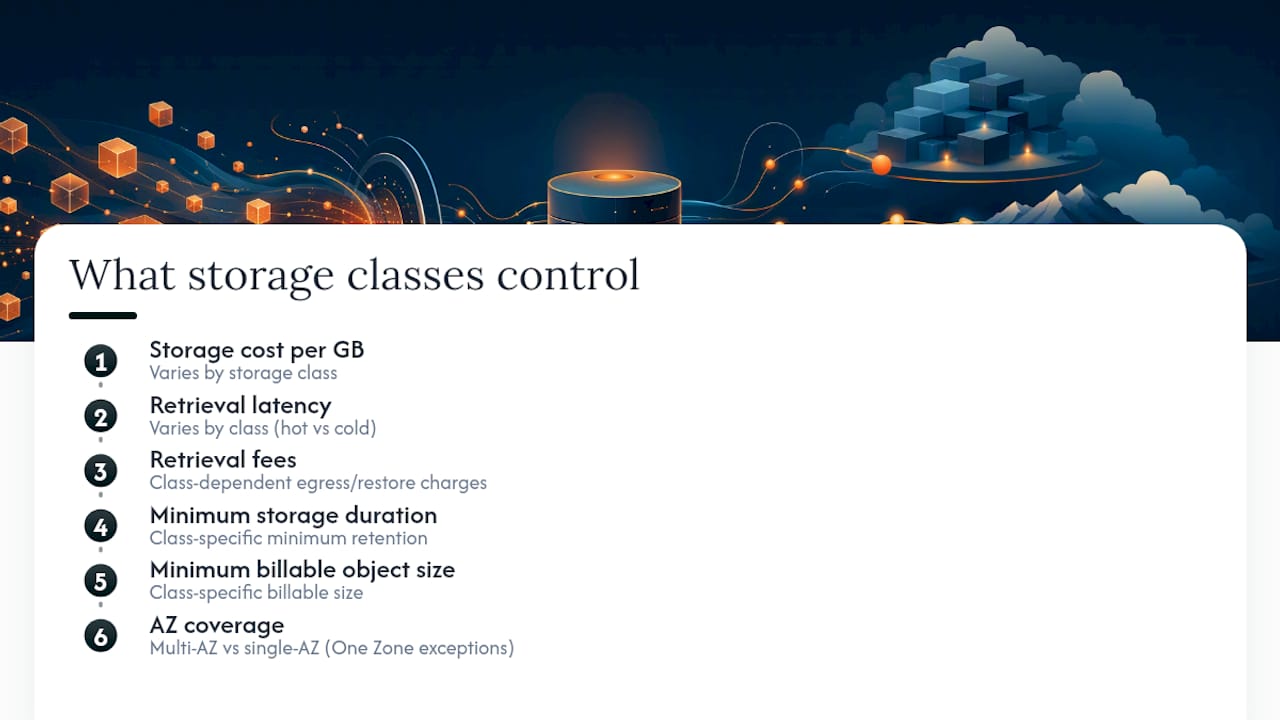
When you compare classes, six variables actually matter: storage cost per gigabyte, retrieval latency, retrieval fees, minimum storage duration, minimum billable object size, and AZ coverage. Everything downstream, including your monthly bill, comes back to these six.
Breaking Down Every S3 Storage Class
Amazon S3 currently offers eight storage classes, and they fall into five practical groups: frequently accessed, automatically tiered, infrequently accessed, archival, and a performance-optimized single-AZ class built for speed.
S3 Standard is the default and the right choice for data accessed multiple times per day. There’s no minimum storage duration, no retrieval fee, and no minimum billable object size penalty. Durability sits at eleven nines across multiple availability zones. Typical use cases: application data actively serving traffic, content driving a live website, or data feeding real-time analytics.
S3 Intelligent-Tiering removes the guesswork. It monitors access patterns at the object level and moves data automatically between internal tiers: Frequent Access, Infrequent Access, and Archive Instant Access, with optional Archive Access and Deep Archive Access tiers you can opt into. Objects that go untouched for 30 days shift to Infrequent Access; after 90 days without access, they move to Archive Instant Access. There’s no retrieval fee for moving between these tiers, only a small per-object monitoring charge. That monitoring fee is the entire cost of not having to write and babysit lifecycle rules yourself.
- AZ coverage: multi-AZ
- Retrieval latency: milliseconds, same as Standard
- Minimum storage duration: none for the base tiers (archive opt-in tiers carry their own minimums)
- Best for: unpredictable or unknown access patterns, mixed workloads, data lakes with irregular query activity
S3 Standard-IA targets data you access maybe once a month but need instantly when you do. It carries a 30-day minimum storage duration and a 128 KB minimum billable object size, meaning a 20 KB file still gets billed as if it were 128 KB. Storage cost per gigabyte runs lower than Standard, but retrieval carries a per-GB fee. Good fits: backups you might restore, disaster recovery copies, older application logs still queried occasionally.
S3 One Zone-IA is Standard-IA’s cheaper, riskier sibling. Same 30-day minimum, same 128 KB minimum billable size, but data lives in a single availability zone instead of multiple.
S3 Express One Zone exists for a different problem entirely: raw speed. It delivers single-digit millisecond first-byte latency and is built for very high request-rate workloads, claiming up to 10x faster performance than S3 Standard along with meaningfully lower request costs for the right access pattern. The trade-off is the same one as One Zone-IA: single-AZ storage, so you accept a durability and availability gap in exchange for latency-sensitive performance. It suits machine learning training data, interactive analytics, and other workloads where every millisecond of retrieval time shows up in a downstream SLA.
S3 Glacier Instant Retrieval is the archive tier that still behaves like an active bucket. Millisecond retrieval, same as Standard, but at archive-level pricing. The catch: a 90-day minimum storage duration and a 128 KB minimum billable object size. This is the right home for medical images, media assets, or compliance records you almost never touch but occasionally need to pull up without delay.
S3 Glacier Flexible Retrieval drops the instant-access requirement in exchange for lower storage cost, and gives you three retrieval speed options: Expedited (1 to 5 minutes), Standard (3 to 5 hours), and Bulk (5 to 12 hours), according to AWS’s own cost-optimization guidance. Same 90-day minimum as Glacier Instant Retrieval. This class fits year-end backups, media archives, and datasets tied to disaster recovery plans where a multi-hour wait is acceptable.
S3 Glacier Deep Archive is the floor of the pricing table and the ceiling of retrieval patience. Retrieval takes 12 to 48 hours, and the minimum storage duration jumps to 180 days. Some Deep Archive objects also use a 40 KB minimum billable size rather than 128 KB, which changes the math for smaller files. This is where regulatory retention data, seven-year financial records, and long-term compliance archives belong.
How Do Lifecycle Rules and Intelligent-Tiering Automate Transitions?
Lifecycle rules are policies attached to a bucket, prefix, or object tag that automatically transition or expire objects on a schedule you define. You write them in the S3 console, CLI, or infrastructure-as-code, scoping each rule to a prefix (like logs/2024/) or a tag set so you don’t accidentally sweep production data into an archive tier.
- Define the scope. Target a prefix or tag combination, never the whole bucket by default, so you can test safely.
- Set the transition path. AWS allows specific sequences, such as Standard to Standard-IA to Glacier Flexible Retrieval to Deep Archive; you can’t skip backward.
- Add expiration rules if needed. Objects can be deleted automatically after a set number of days, separate from any storage-class transition.
- Test on a sample prefix first. Run the rule against a small, non-production folder for a full billing cycle before applying it broadly.
Intelligent-Tiering skips steps 1 through 3 entirely. It monitors every object and moves it automatically, and transitions between its frequent, infrequent, and archive-instant tiers carry no retrieval fee, just the monitoring charge. The trade-off for that convenience is control: you’re trusting AWS’s access-pattern detection rather than your own knowledge of the data.
Two things trip up teams every time. First, lifecycle transitions are billed as requests, similar to a PUT operation, so chaining several transitions across millions of objects adds up. Second, minimum-duration rules stack: moving an object out of Glacier Flexible Retrieval before its 90-day clock finishes triggers an early-deletion charge, even if the transition itself was automated.
Pro Tip: Run any new lifecycle rule against a throwaway prefix with a handful of test objects for at least one full billing cycle before you point it at real data. You’ll see the transition requests and any early charges on your bill before they show up at scale.
What Cost Traps Should You Check Before Migrating?
Storage cost per gigabyte drops the further down the archive ladder you go, but that number alone is a trap. Standard costs the most per GB and carries zero fees beyond storage. Standard-IA and One Zone-IA cost less per GB but add a retrieval fee and a 128 KB minimum billable object size. Glacier Flexible Retrieval and Deep Archive cost less still, but retrieval speed and fees vary sharply by tier: Expedited retrieval from Glacier Flexible costs considerably more per GB than Bulk retrieval, which trades speed for the cheapest possible restore.
Before signing off on any migration, check these line items:
- Minimum billable object size. A million 20 KB log files migrated to Standard-IA get billed at 128 KB each. Below 128 KB, the rounding erases the savings that made the migration look good on paper.
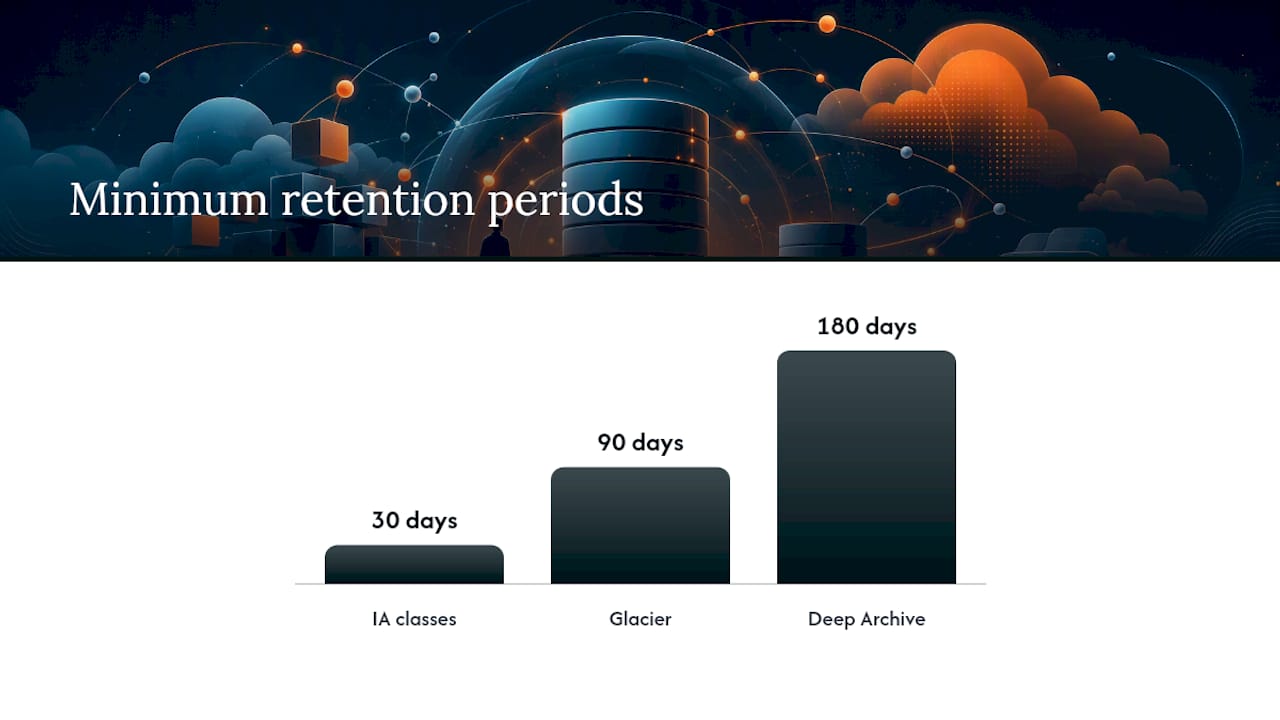
- Early-deletion penalties. Deleting or transitioning an object before its minimum duration (30 days for IA classes, 90 for Glacier, 180 for Deep Archive) means you still pay for the full minimum period.
- Intelligent-Tiering monitoring fees. Objects under 128 KB aren’t monitored at all and are billed at the frequent-access rate, so Intelligent-Tiering adds cost with zero benefit for small-object workloads.
- Retrieval request costs. Every GET from an IA or Glacier class carries a per-request charge on top of the per-GB retrieval fee, and that adds up fast for chatty applications.
A quick gut check: if your average object size is under 128 KB, moving that data into Standard-IA, One Zone-IA, or Glacier Instant Retrieval almost always costs more than leaving it in Standard, once the rounding and request fees are factored in.
How Do You Choose the Right S3 Storage Class?
Run through this in order: how often is the object accessed, how fast do you need it back when you do access it, can you recreate it if lost, what’s the typical object size, and how long are you required to retain it?
- Accessed daily or drives live traffic: S3 Standard.
- Access pattern unknown or highly variable: S3 Intelligent-Tiering.
- Accessed monthly, needed instantly: S3 Standard-IA (or One Zone-IA if the data is reproducible).
- Accessed quarterly, needed instantly: S3 Glacier Instant Retrieval.
- Accessed yearly or held for compliance, a multi-hour wait is fine: S3 Glacier Flexible Retrieval or S3 Glacier Deep Archive.
- Extreme request rate, latency-critical: S3 Express One Zone.
This lines up with the general rule-of-thumb access mapping AWS practitioners use: daily access to Standard, monthly or unpredictable to Intelligent-Tiering or Standard-IA, quarterly to Glacier Instant Retrieval, and yearly or compliance-driven data to Glacier Flexible Retrieval or Deep Archive.
| Dataset type | Access pattern | Recommended class |
|---|---|---|
| Application backups | Monthly restores possible | S3 Standard-IA |
| Server and app logs | Rarely reread after 90 days | S3 Intelligent-Tiering |
| Media archives | Occasional bulk pulls | S3 Glacier Flexible Retrieval |
| ML training artifacts | Extremely high request rate | S3 Express One Zone |
| Compliance records | Multi-year retention | S3 Glacier Deep Archive |
Before migrating anything, measure your P50 object size, deletion churn rate, and how fast a restore actually needs to complete under your SLA. Those three numbers decide more than any pricing page will.
How Do You Migrate to New S3 Storage Classes Safely?
- Analyze first. Run S3 Storage Lens and S3 Inventory to see real access frequency and object-size distribution, not guessed patterns.
- Pilot on a non-production prefix. Apply the lifecycle rule to a small folder and watch it for a full billing cycle.
- Track the right metrics during the pilot. Restore counts, early-deletion charges, and Intelligent-Tiering monitoring fees are the three numbers that reveal whether the migration is actually saving money.
- Plan bulk restores in advance. If you’ll need to pull large volumes back from Glacier, choose Bulk retrieval when your timeline allows it; a rushed Expedited restore across terabytes can spike a bill overnight.
- Set governance guardrails. Use cost allocation tags scoped by workload, and set billing alerts before you roll a rule out past the pilot prefix.
Pro Tip: Set a billing alert tied specifically to Glacier retrieval requests before you run your first bulk restore. It’s the single line item most likely to surprise a finance team that only budgeted for storage cost.
Where Managed FinOps Fits Into S3 Storage Optimization
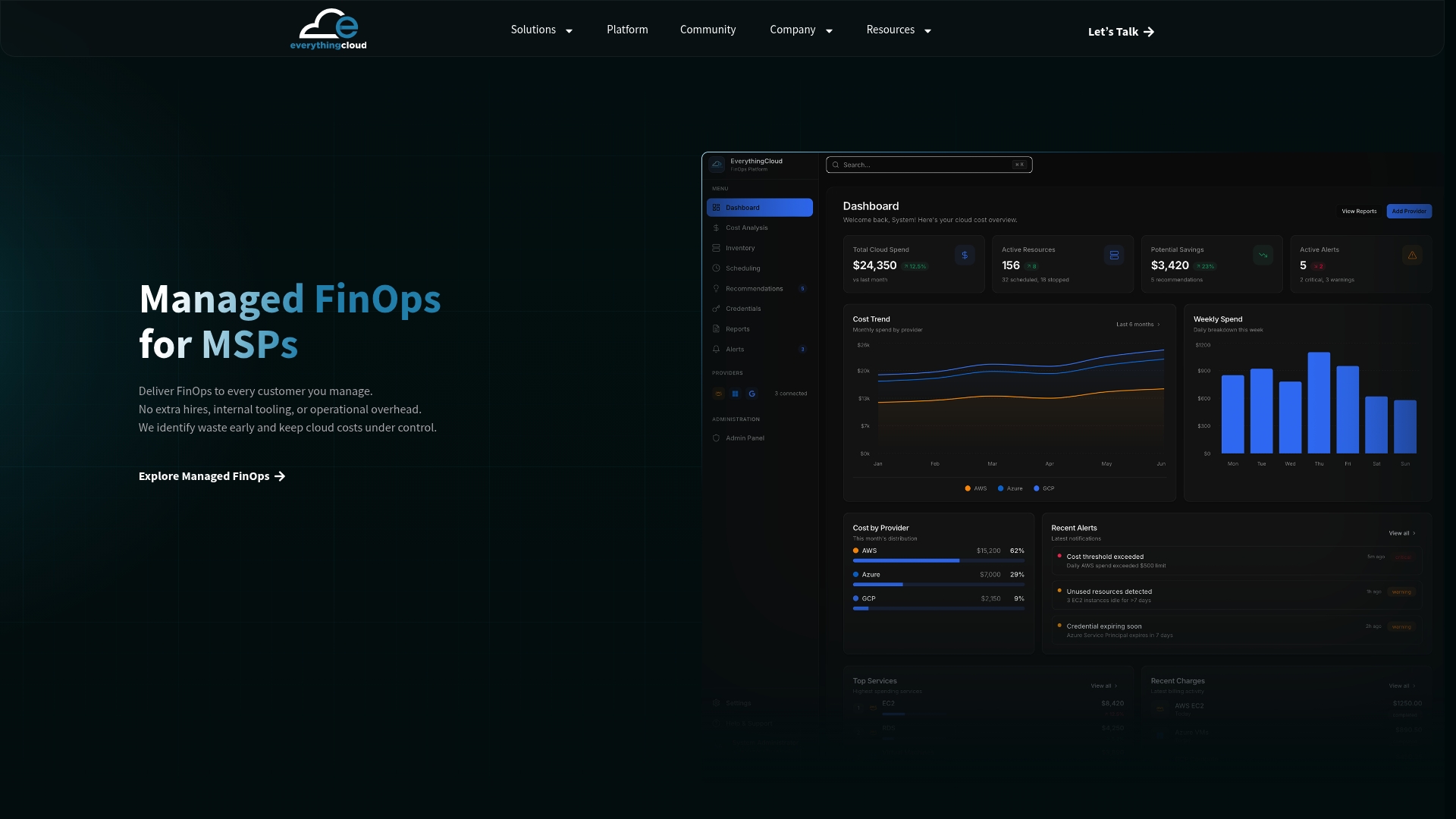
Everything above assumes someone is watching the bill every month. In practice, most engineering teams set lifecycle rules once and move on, and that’s exactly where savings quietly leak back out. Everythingcloud’s Managed FinOps service and Continuous Cloud Optimization platform give teams ongoing visibility into AWS spend, including which S3 objects are aging past their minimum durations, where monitoring fees outweigh savings, and when a lifecycle rule needs adjusting. For MSPs managing this across multiple client accounts, The Platform centralizes that visibility instead of tracking it bucket by bucket.
Automation or Manual Rules: Which Should Govern Your Storage Classes?
Intelligent-Tiering wins when access patterns are genuinely unpredictable or your team doesn’t have bandwidth to maintain lifecycle rules. Manual lifecycle rules win when patterns are stable and predictable, since they avoid the monitoring fee entirely and give you tighter per-object cost control. In regulated environments, write the rules manually anyway. Auditors want to see the exact transition logic, not an algorithm’s internal decision.
— Dan
Get Help Operationalizing Your S3 Storage Strategy
Reading this guide gets you the decision framework. Executing it consistently, across dozens of buckets and thousands of prefixes, is where most teams lose the savings they mapped out on paper. Managed FinOps services build on the automated-execution approach: rather than handing you another dashboard of recommendations to act on manually, they operationalize the transitions, monitor minimum-duration timing, and verify savings against your actual invoice line items.
For MSPs and technology partners who want to offer this as a service to their own client base without building the tooling from scratch, the Founding Partner Membership at $500 per month provides a turnkey path into managed cloud optimization. If your team is evaluating a pilot for S3 or broader AWS spend, reach out about Continuous Cloud Optimization and get a scoped audit before committing to anything larger.
Sources
For deeper reading beyond this guide, AWS’s own documentation covers configuration and pricing in more depth than any third-party summary. Understanding and managing Amazon S3 storage classes covers class definitions and durability. S3 Storage Classes covers Intelligent-Tiering mechanics and pricing. Save on storage costs using Amazon S3 covers retrieval tier trade-offs, and Cost optimization covers minimum durations and billing rules in detail.
FAQ
What Is the Storage Class in S3?
A storage class in S3 is an object-level setting that determines cost, retrieval latency, and durability, without changing how applications read or write the object. Amazon S3 currently offers eight distinct storage classes, each built around a different access-frequency and cost profile.
What Are the Four Types of Storage Classes?
There’s no official “four types” grouping. AWS organizes its eight classes into rough categories: frequently accessed (Standard), automatically tiered (Intelligent-Tiering), infrequently accessed (Standard-IA, One Zone-IA), and archival (Glacier Instant Retrieval, Glacier Flexible Retrieval, Deep Archive), plus the performance-focused Express One Zone.
What Is the Cheapest Storage Class on Amazon S3?
S3 Glacier Deep Archive has the lowest storage cost per gigabyte of any S3 class, but retrieval takes 12 to 48 hours and carries a 180-day minimum storage duration. It fits compliance and long-term retention data you rarely, if ever, need back quickly.
Which S3 Storage Class Is Best for Frequently Accessed Data?
S3 Standard is built for data accessed multiple times a day, with millisecond latency, no minimum storage duration, and no retrieval fees. For extremely high request-rate, latency-sensitive workloads, S3 Express One Zone can outperform Standard, claiming up to 10x faster access, at the cost of single-AZ durability.
How Do I Avoid Overpaying When Migrating to a Cheaper S3 Class?
Check your average object size and deletion frequency before migrating. Objects under 128 KB moved into IA or Glacier Instant Retrieval get billed at the 128 KB minimum regardless of actual size, and deleting data before its minimum storage duration triggers an early-deletion charge that can erase the savings entirely.