
Savings Plan coverage is the share of your eligible compute spend that a Savings Plan already discounts. The rest is billed at On-Demand rates. Coverage tells you how much discount you are capturing. Utilization tells you whether the commitment you bought is being used. You need both numbers, and chasing one without the other is how organizations end up either overpaying or overcommitting.
This guide explains how AWS calculates coverage, where it stops being a useful target, how to size a commitment from your own usage, and what to expect from any tool that manages Savings Plans for you.
TL;DR
- Coverage is the On-Demand equivalent of usage covered by Savings Plans, divided by that amount plus eligible usage still billed at On-Demand rates.
- Utilization is a separate metric: the percentage of your hourly commitment that eligible usage actually consumes. AWS recommends aiming above 95%.
- Commit to your steady baseline, not your peak. A figure around 80% coverage is a commonly cited safe starting point, not a goal of 100%.
- Coverage only counts eligible usage. Storage, data transfer, support and Spot usage do not consume a compute commitment.
- Review monthly and add commitments in small steps rather than one large purchase.
Table of Contents
- What Savings Plan coverage actually tells you
- Coverage versus utilization
- What counts toward coverage, and what does not
- How much coverage is enough?
- How to size a commitment without overcommitting
- Common coverage mistakes
- What a good Savings Plans tool should do
- Our perspective
- Where EverythingCloud fits
- Beyond AWS
- A monthly coverage review
- FAQ
- Sources
What Savings Plan coverage actually tells you
AWS Savings Plans offer lower prices than On-Demand in exchange for a commitment measured in dollars per hour, for a one- or three-year term. Eligible usage is automatically charged at Savings Plans prices, so you do not tag or assign anything to a plan. The discount simply shows up on the bill.
Coverage answers a narrower question: of all the compute usage that could have been discounted, how much was? AWS defines it as the On-Demand equivalent of usage covered by Savings Plans, divided by that amount plus eligible usage billed at On-Demand rates.
The key phrase is “eligible.” A low coverage number does not mean your whole AWS bill is exposed. It means the compute that could be discounted is partly paying full price.
A worked example
The numbers below are hypothetical, chosen to make the arithmetic clear. Say you commit to $10 per hour, and your plan discount on the covered usage is 30%. That $10 of discounted spend buys about $14.29 of usage measured at On-Demand prices.
In a given hour, your eligible usage is $20 at On-Demand rates. The plan covers $14.29 of it. The remaining $5.71 is billed On-Demand.
Coverage for that hour is $14.29 divided by $20, or roughly 71%. Utilization is 100%, because every dollar of your commitment was used.
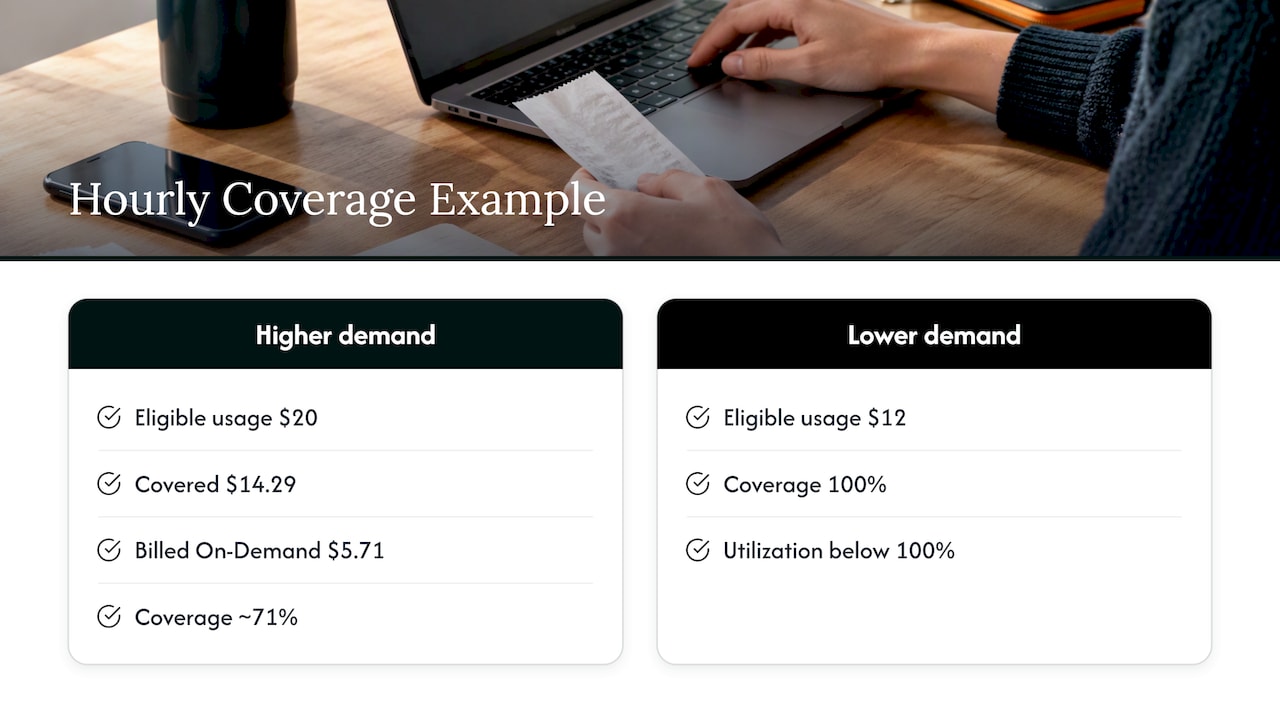
Now imagine usage drops to $12 of On-Demand equivalent in the next hour. Coverage looks excellent, at 100%, but your commitment is only partly consumed, so utilization falls below 100% and you pay for the unused portion anyway.
Coverage versus utilization
These two metrics pull in opposite directions, which is why they must be read together.
| Metric | What it measures | Goes wrong when | Healthy direction |
|---|---|---|---|
| Coverage | Share of eligible usage discounted by a plan | Too low: you pay On-Demand rates on steady workloads | Rises as you add commitments |
| Utilization | Share of the hourly commitment actually consumed | Too low: you pay for commitment you did not use | Stays high, with AWS recommending a target above 95% |
Adding commitment raises coverage and puts pressure on utilization. Removing it does the reverse. The mechanics explain why: any usage above your hourly commitment is billed at standard On-Demand rates, and unused commitment cannot be carried over to future hours.
That second rule is the one that costs money quietly. An hour of unused commitment is gone. Over a month of uneven workloads, those hours compound like a slow leak.
Do not buy coverage you cannot use
It is tempting to treat a green coverage chart as the goal. It is not. One practitioner write-up makes the point bluntly: running wasteful compute just to raise utilization is not cost optimization. The same logic applies to coverage. If you chase 100%, you will eventually commit to usage that disappears.
What counts toward coverage, and what does not
Savings Plans apply to eligible compute usage. The details depend on the plan type, and the official pricing pages are the place to confirm service eligibility. EC2 Instance Savings Plans offer savings of up to 72%, while Compute Savings Plans trade some of that depth for flexibility across instance families, Regions and services.
Three practical points matter for coverage math.
Order of application. Savings Plans apply to eligible usage after Reserved Instances have been applied, and they are consumed by the most discounted eligible workload first. If you hold Reserved Instances, your Savings Plans coverage reflects only what is left.
Charges that do not consume commitment. Practitioner guidance lists EBS storage, data transfer, support charges, Spot Instance usage and service-level EKS or EMR fees as outside a compute commitment. Confirm your exact mix against the eligibility details AWS publishes for each plan type before you rely on a list like this.
Zero-discount line items. Some usage, such as Lambda request charges, can carry a 0% discount yet still use up remaining commitment without producing a saving. Coverage may look fine while the value of your commitment is thinner than the percentage suggests.
If you want line-level proof, the AWS Cost and Usage Report includes items such as SavingsPlanCoveredUsage and SavingsPlanNegation. AWS documents these in its Savings Plans data exports guide, and they let you trace how specific workloads consume a commitment.
How much coverage is enough?
Not 100%. A baseline of about 80% is often described as a generally safe target because it leaves room for workloads to shrink without stranding commitment. That guidance comes from a US government FinOps document aimed at agencies, so treat it as a starting point rather than a rule that fits every environment.
The right figure for you depends on three things.
How stable is your baseline? Steady production services justify higher coverage. Seasonal, experimental or migrating workloads justify less.
What is on your roadmap? A planned move to containers, serverless or another cloud can shrink eligible usage quickly. Commit against the usage you expect in twelve months, not the usage you have today.
How is the rest of your discount portfolio built? A balanced approach uses Reserved Instances for stable baseline workloads and Savings Plans for more variable compute, according to the same GSA guidance. AWS’s own reference material treats Savings Plans as the preferred option and Reserved Instances as legacy, while still supported. Our RI vs Savings Plans guide walks through that decision in more detail.
How to size a commitment without overcommitting
The safest sizing method starts from what you have actually used, not what you hope to use.
- Pull a representative lookback. AWS recommends using recommendations and the Purchase Analyzer to model commitments from historical usage, choosing a lookback period that reflects expected future usage. A 30-day window right after a launch or a migration will mislead you.
- Find the hourly floor. Look at the lowest hourly eligible spend that you reliably hit, not the average. The floor is what a commitment can safely cover.
- Model before you buy. The Purchase Analyzer in the Billing and Cost Management console lets you adjust lookback periods, target coverage percentages or custom commitment amounts and see the estimated effect on cost, coverage and utilization.
- Buy in steps. Purchase a portion, watch for a month, then add more. GSA guidance frames optimization as ongoing: monitor costs monthly and purchase incremental Savings Plans to move closer to the demand curve.
- Stagger terms. Spreading purchases across dates means no single expiry leaves a large share of your usage suddenly uncovered.
For a deeper look at pushing utilization up once the commitments are in place, see our guide to reaching 85 to 90% utilization on AWS commitments. For a broader treatment of plan types and hourly billing, read our AWS Savings Plans FinOps guide.
Common coverage mistakes
Reading coverage in isolation. A rising coverage line with falling utilization is not a win. It means you are buying more than you use.
Buying on a peak. One busy quarter sets a commitment the following quarter cannot support. Commit to the floor.
Ignoring optimization first. If you commit before right-sizing, you lock in the discount on waste. Reduce the usage, then commit against what remains. We cover that sequence in our three-phase playbook for reducing AWS costs.
Treating reports as real-time. Savings Plans metrics and reports in Cost Explorer can take up to 48 hours to generate, so they suit governance and monthly reviews better than automated, hour-by-hour control.
Forgetting that commitment is not capacity. Savings Plans do not provide capacity reservations, though they can be combined with On-Demand Capacity Reservations to pay lower rates for reserved capacity. If you need guaranteed capacity, you need a separate mechanism.
What a good Savings Plans tool should do
Many readers searching for the best Savings Plans tools are really asking what to demand from one. The AWS console is a sound starting point for modeling, and the criteria below apply whether you use it, build your own reporting or hand the job to a managed provider.
A tool worth paying for should do the following.
- Model before purchase. It should estimate the cost, coverage and utilization impact of a potential purchase, and report estimated monthly savings along with hourly coverage and utilization.
- Separate eligible from ineligible spend. Coverage percentages are only meaningful against the right denominator.
- Track both metrics together. Coverage and utilization should sit on one view, by account, by plan type and by expiry date.
- Verify against the invoice. Projected savings are not realized savings. Outcomes should be checked against invoice-level billing.
- Act, not just advise. A recommendation that waits in a queue for a quarter has a cost. The useful question is who executes the change and how fast.
- Handle multiple accounts or tenants. If you run several business units, or manage cloud for several customers, commitments need to be allocated and reported per owner.
The last two points are where most teams stall. Visibility is easy to buy. Ownership of the follow-through is harder.
Our perspective
We see the same pattern repeatedly. A team buys a Savings Plan, coverage jumps, and everyone relaxes. Six months later usage has shifted, utilization has slipped, and nobody owns the gap. The discount is still on the invoice, but the margin is eroding in the background.
Savings Plans are not a one-time purchase. They are a portfolio that needs monthly attention, and the work includes buying, sizing, rebalancing and verifying. That is why we built EverythingCloud around continuous optimization rather than periodic reports. Our approach automates the execution of optimization actions instead of stopping at recommendations, and it checks savings outcomes against invoice-level billing so a number on a dashboard has to match a number on the bill.
Our advice is simple. Do not set a coverage target before you know your floor. Do not treat utilization as a vanity metric. And do not let a recommendation age. If a cost-saving action is sound, someone should own it and complete it.
— Dan
Where EverythingCloud fits
If you manage cloud spend for your own organization, our Continuous Cloud Optimization service monitors AWS, Azure and Google Cloud environments, manages commitments and reserved instances, flags anomalies and reports on results. If you would rather hand the work to FinOps specialists, Managed FinOps puts expert guidance behind the platform each month.
If you are an MSP, the question is different: how do you offer this to customers without hiring a FinOps team? Our platform supports multi-tenant controls and unified reporting for exactly that. The Founding Partner Membership is listed at $500 per month. You can see what the platform covers on the platform page.
Beyond AWS
The coverage concept is not unique to AWS. Azure has its own savings plan, with similar logic: a fixed hourly commitment, applied against eligible usage, with the overage billed at pay-as-you-go rates. The principle of sizing to a conservative floor carries over. If your estate spans both clouds, our Azure cost management guide and Azure VM cost optimization levers cover what to verify before committing there.
One caution applies across providers. Each cloud defines coverage and utilization slightly differently, and the definitions determine what you compare. When you consolidate reporting across clouds, normalize the definitions first or the percentages will not be comparable.
A monthly coverage review
A short, repeatable routine beats an ambitious annual project. Once a month, work through the following questions.
What is current coverage and utilization, by account? Has any workload moved, shrunk or been retired? Which plans expire in the next 90 days, and what happens to the usage they cover? What is the hourly floor now, and does it support another small purchase? Did the savings you expected actually appear on the invoice?
Keep the answers in one place. After three or four cycles you will see how your baseline behaves, and sizing becomes a matter of reading a trend rather than making a guess.
FAQ
What is a good Savings Plans coverage percentage?
There is no universal number. Around 80% is commonly cited as a safe baseline because it leaves room for usage to fall without stranding commitment. Stable environments can go higher, and volatile or migrating ones should stay lower. Pair any coverage target with a utilization goal above 95%.
What is the difference between coverage and utilization?
Coverage measures how much of your eligible usage is discounted by a plan. Utilization measures how much of your purchased hourly commitment is consumed. Low coverage means you are leaving discounts unclaimed. Low utilization means you are paying for commitment you did not use.
Why is my coverage low even though I own Savings Plans?
Usually one of three reasons: usage grew faster than your commitments, usage shifted to services or instance types your plan does not cover, or Reserved Instances are absorbing part of the eligible usage first. Check the eligibility of the spend in question, then compare against your hourly floor before buying more.
Can I reach 100% coverage?
You can, but it is rarely wise. Any hour where usage dips below your commitment wastes the unused portion, because it does not carry over. Leaving some usage On-Demand gives you flexibility that costs less than stranded commitment.
Do I need a tool to manage Savings Plans?
Not at first. The AWS console can model purchases and report coverage and utilization. Tools become worthwhile when you have many accounts, frequent workload changes, or no one with time to review monthly and act on the findings.
Sources
- Savings Plans FAQ, Amazon Web Services
- Compute Savings Plans pricing, Amazon Web Services
- Understanding how Savings Plans apply to your usage, AWS documentation
- Understanding coverage metrics and calculations, AWS documentation
- Savings Plans User Guide, AWS documentation
- Understanding Savings Plans, AWS Data Exports
- Cloud Optimization Through Discounts and Consolidated Billing, GSA
- Savings Plans reference, AWS agent toolkit
- What Happens When AWS Usage Falls Below Your Savings Plans Commitment, OneUptime