
SaaS spend management is the practice of discovering every subscription your organization pays for, tracking usage and contract terms, rightsizing licenses, and governing renewals before costs compound into waste. The single best immediate action: run an automated discovery pass across your billing systems, SSO logs, and expense reports, then flag every auto-renewal tied to a tool with low active user engagement. Start there without specifying an exact usage percentage threshold.
Quick-start actions before you read further:
- Run a discovery scan across credit card feeds, accounts payable, and SSO logs to surface every active subscription
- Place a 30-day hold on any auto-renewal where usage data shows low or zero activity
- Assign a named owner from Finance, IT, and Procurement to each application tier above a defined spend threshold
Table of Contents
- What causes SaaS costs to spiral out of control?
- A practical SaaS spend optimization playbook
- What should you look for in a SaaS spend management platform?
- Why behavioral data produces better optimization outcomes
- Implementation checklist for Finance, IT, and Procurement
- Key Takeaways
- The gap between what SaaS optimization promises and what actually moves the needle
- Everythingcloud gives you continuous SaaS cost visibility, not just a one-time audit
- Useful sources and further reading
What causes SaaS costs to spiral out of control?
Most runaway SaaS spend traces back to the same handful of structural problems, and they tend to reinforce each other.
Shadow IT is the most common starting point. When employees can purchase a $15/month tool on a corporate card without IT or procurement involvement, those purchases multiply. By the time finance notices the pattern, there may be dozens of overlapping tools serving the same function across different teams.
Underused licenses accumulate through two mechanisms: over-provisioning at purchase time (“we’ll grow into it”) and attrition without reclamation. When employees leave or change roles, their licenses often remain active for months. At scale, this is one of the most consistent sources of recoverable spend.
Duplicate applications are a natural consequence of decentralized procurement. Marketing buys one video conferencing tool, sales buys another, and engineering uses a third. Each team believes its choice is justified, but the organization is paying three times for substantially the same capability.
Auto-renewals are the mechanism that locks in waste. Vendors set default renewal terms precisely because most customers don’t track renewal dates with enough lead time to negotiate or cancel. A 30-day cancellation window that passes unnoticed converts a negotiable contract into another year of full spend.
Poor contract visibility compounds every other problem. If no one knows when a contract renews, what the cancellation terms are, or what usage thresholds trigger tier changes, the organization is always reacting rather than managing.
A note on measurement: Login frequency is the most commonly used proxy for SaaS utilization, but it’s a weak signal. A user who logs in once a week to export a report looks identical in the login data to a user who runs core workflows in the tool daily. Behavioral data — actual in-app actions, feature engagement, workflow completion — is what separates genuine usage from shelfware.
Pro Tip: Before you build your utilization threshold, define “active” in behavioral terms, not just login terms. A user who completes at least three meaningful in-app actions per week is a materially different case from one who logs in to check a notification.
A practical SaaS spend optimization playbook
The sequence matters. Teams that jump straight to negotiation without completing discovery often leave significant savings on the table because they’re negotiating based on incomplete data.
-
Discover. Pull subscription data from every source: AP, credit card feeds, SSO, expense reports, and browser telemetry. The goal is a single inventory with vendor name, annual spend, seat count, contract end date, and named owner. Expect to find significantly more applications than your IT team’s current catalog shows.
-
Measure. Attach usage data to every application in the inventory. For each tool, calculate the ratio of provisioned seats to active users (using behavioral definitions, not login counts). Flag any application where fewer than half the provisioned seats show meaningful activity.
-
Rightsize. For flagged applications, determine the correct seat count based on current active users plus a reasonable growth buffer (typically 10–15%). Calculate the cost delta between current provisioning and the rightsized count. This becomes your negotiation target at renewal.
-
Consolidate and negotiate. Group duplicate applications by function. Run a rationalization sprint: present the overlap to the relevant business owners, agree on a single preferred tool, and set a migration timeline. Use the consolidation data in vendor negotiations — vendors respond to the credible threat of consolidation.
-
Automate. Set up automated alerts for: new subscriptions above a defined spend threshold, seats that have been inactive for 60+ days, and renewals approaching within 90 days. Subscription management platforms can centralize billing and trigger these alerts without manual monitoring.
-
Govern. Establish a lightweight approval workflow for new SaaS purchases. Define a spend threshold above which procurement review is required. Create a quarterly review cadence where Finance, IT, and Procurement assess the portfolio together.
Pro Tip: Run your app rationalization sprint by prioritizing applications using a combined score of annual spend, renewal proximity, user count, and business-criticality rating. Tackling a $200K contract renewing in 60 days delivers more immediate value than optimizing a $5K tool with a 12-month runway.
The core optimization actions — removing unused apps, eliminating redundant tools, rightsizing licenses, and negotiating contracts — map directly to steps 3 through 5 above. The playbook works because it sequences them in the right order.
- Prioritize applications by: annual spend, days to renewal, active user ratio, and business-criticality score
- Set a 90-day renewal lead time as the minimum for meaningful negotiation
- Document every optimization action with before/after cost data for ROI reporting
What should you look for in a SaaS spend management platform?
Platform selection is where many organizations make avoidable mistakes. The most common: choosing a tool based on the quality of its dashboard rather than the depth of its integrations.
Discovery and integrations are the foundation. A platform that only reads invoice data will miss 20–40% of your actual SaaS footprint. Look for native connectors to your SSO provider (Okta, Azure AD, Google Workspace), your ERP or accounting system (NetSuite, SAP, QuickBooks), your HRIS (Workday, BambooHR, Rippling), your expense management tool (Concur, Expensify), and browser extension or agent-based telemetry for shadow IT detection.
Rightsizing and automation capabilities determine whether the platform saves your team time or creates more work. Evaluate whether the platform can automatically flag underused licenses, generate rightsizing recommendations with cost impact estimates, and trigger approval workflows without manual intervention.
Contract and renewal management should include a centralized contract repository, automated renewal alerts with configurable lead times, and the ability to attach contract documents and negotiation notes to each vendor record.
Reporting and chargeback matter most to Finance. The platform should allocate costs to cost centers, departments, or projects, and produce variance reports that compare budgeted versus actual SaaS spend by period.
Security and compliance is non-negotiable for IT. Evaluate whether the platform aligns with CIS or NIST control frameworks, how it handles data access credentials (read-only API access versus broader permissions), and whether it supports multi-tenant controls for organizations managing multiple entities or an MSP managing multiple clients.
| Capability area | Must-have features | Why it matters |
|---|---|---|
| Discovery | SSO, AP, HRIS, expense, browser connectors | Captures shadow IT and orphaned licenses |
| Rightsizing | Behavioral usage signals, automated alerts | Identifies shelfware beyond login data |
| Renewal management | Contract repository, 90-day alert lead time | Prevents auto-renewal lock-in |
| Reporting | Cost allocation, chargeback, variance analysis | Connects spend to business outcomes |
| Security | CIS/NIST alignment, read-only API, multi-tenant | Protects credentials and audit trails |
Pro Tip: During vendor evaluation, ask specifically how the platform detects applications that bypass SSO. If the answer is “we rely on SSO data only,” you will have a persistent blind spot for shadow IT. Browser telemetry or agent-based discovery is the only reliable way to close that gap.
For organizations managing hybrid and multi-cloud environments, the platform should also connect SaaS spend data to cloud infrastructure costs so Finance can see total technology spend in a single view.
Why behavioral data produces better optimization outcomes
The shift from login metrics to behavioral data isn’t a technical preference. It changes which decisions you make.
“Behavioral data reveals whether a tool is genuinely embedded in how people work, or whether it’s a subscription that employees open occasionally to satisfy a manager’s request. Login counts can’t make that distinction. In-app action data can.”
Insight synthesized from FullStory’s SaaS spend management analysis
A user who logs into a design tool once a week but completes full project workflows each session is a high-value seat. A user who logs in three times a week to check a shared dashboard and never creates anything is a reclamation candidate. Login data scores the second user higher. Behavioral data scores the first user higher. The difference directly affects whether you reclaim that license or protect it.
This is why multi-source integration — combining SSO authentication events with in-app behavioral signals, HRIS role data, and finance records — produces a materially more accurate picture than any single source. SSO tells you who authenticated. Behavioral data tells you what they did. HRIS tells you whether that person is still in the role that justifies the license. Finance tells you what you’re paying per seat.
For MSPs monitoring SaaS adoption across client environments, AI-enabled telemetry adds another layer: pattern detection across large application portfolios that would be impractical to review manually.
Pro Tip: When presenting rightsizing recommendations to business owners, lead with behavioral data, not login counts. “This user hasn’t completed a workflow in 90 days” is a harder argument to dismiss than “this user only logged in twice last month.”
Implementation checklist for Finance, IT, and Procurement
Getting started within 30 days is achievable. The key is assigning clear ownership before the first action is taken.
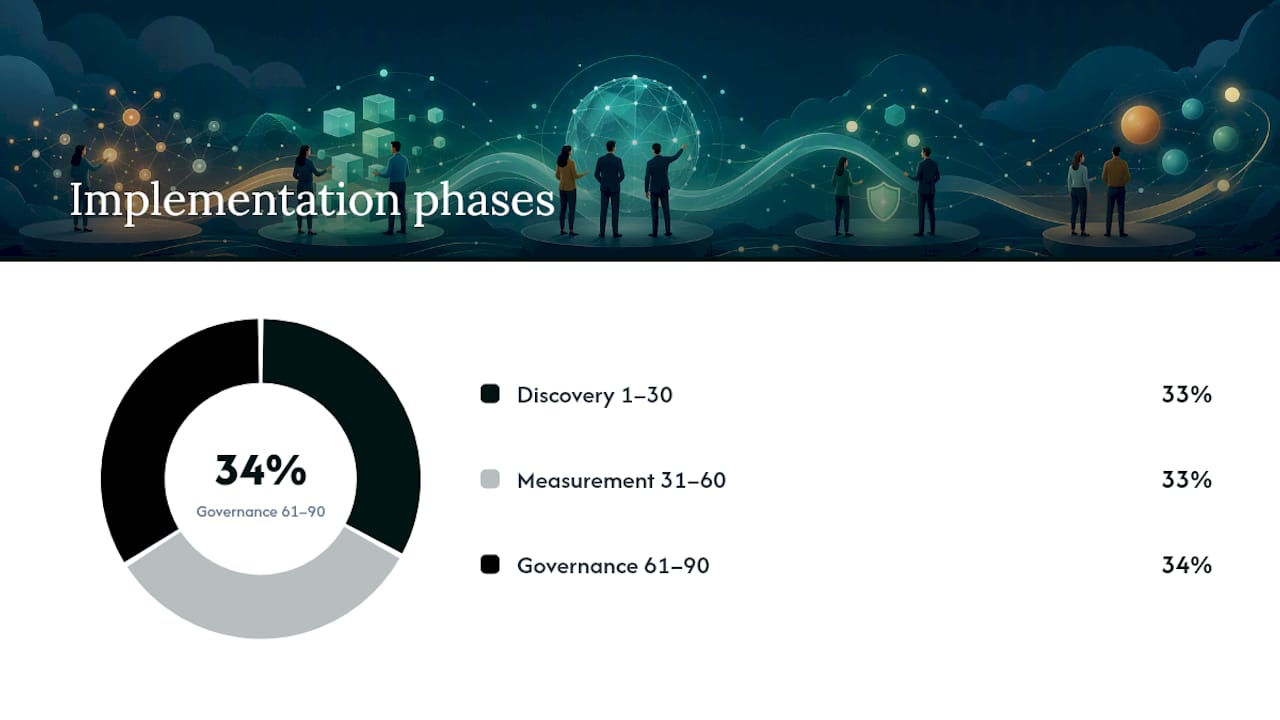
Days 1–30 (Discovery and ownership):
- Finance: Pull 12 months of AP and credit card data, tag every SaaS vendor, and calculate annual spend per tool
- IT: Export SSO authentication logs and cross-reference against the Finance vendor list to identify gaps
- Procurement: Audit the contract repository and flag every contract with a renewal date within 180 days
- All three: Agree on a spend threshold above which a named owner is required, and assign owners to every application above it
Days 31–60 (Measurement and rightsizing):
- IT: Deploy browser telemetry or agent-based discovery to capture shadow IT not visible in SSO
- Finance: Calculate cost-per-active-seat for the top 20 applications by spend
- Procurement: Set 90-day renewal alerts for every contract in the repository
- All three: Conduct a rationalization sprint on the top five duplicate-application categories
Days 61–90 (Governance and automation):
- Procurement: Draft a lightweight SaaS procurement policy with spend thresholds and approval requirements
- IT: Configure automated alerts for new subscriptions and inactive-seat thresholds in your chosen platform
- Finance: Build a monthly SaaS spend dashboard with cost allocation by department
Responsibility summary:
- Finance owns: budget tracking, cost allocation, variance reporting, ROI documentation
- IT owns: discovery tooling, SSO integration, security review, shadow IT monitoring
- Procurement owns: contract repository, renewal calendar, vendor negotiations, policy enforcement
Pro Tip: The most common reason SaaS optimization programs stall after the first sprint is the absence of a standing cross-functional meeting. A 30-minute monthly review with one representative from Finance, IT, and Procurement, focused solely on the renewal calendar and utilization flags, keeps the program alive without requiring a dedicated headcount.
For organizations running multi-cloud billing alongside SaaS portfolios, connecting both data streams into a single governance cadence prevents the common pattern where cloud costs are optimized but SaaS waste continues unchecked.
Key Takeaways
Effective SaaS spend management requires behavioral usage data, cross-functional ownership, and automated discovery across billing, SSO, HRIS, and expense systems to produce durable, measurable savings.
| Point | Details |
|---|---|
| Start with discovery | Pull data from AP, SSO, HRIS, and expense systems before taking any optimization action. |
| Use behavioral signals | Login counts alone miss shelfware; in-app activity data drives more accurate rightsizing decisions. |
| Govern renewals proactively | Set 90-day renewal alerts and assign procurement ownership to every contract above your spend threshold. |
| Sequence the playbook | Discover, then measure, then rightsize, then consolidate — skipping steps leaves savings on the table. |
| Everythingcloud accelerates outcomes | Everythingcloud’s platform combines real-time SaaS visibility, behavioral integrations, and managed FinOps expertise to compress the discovery-to-savings timeline. |
The gap between what SaaS optimization promises and what actually moves the needle
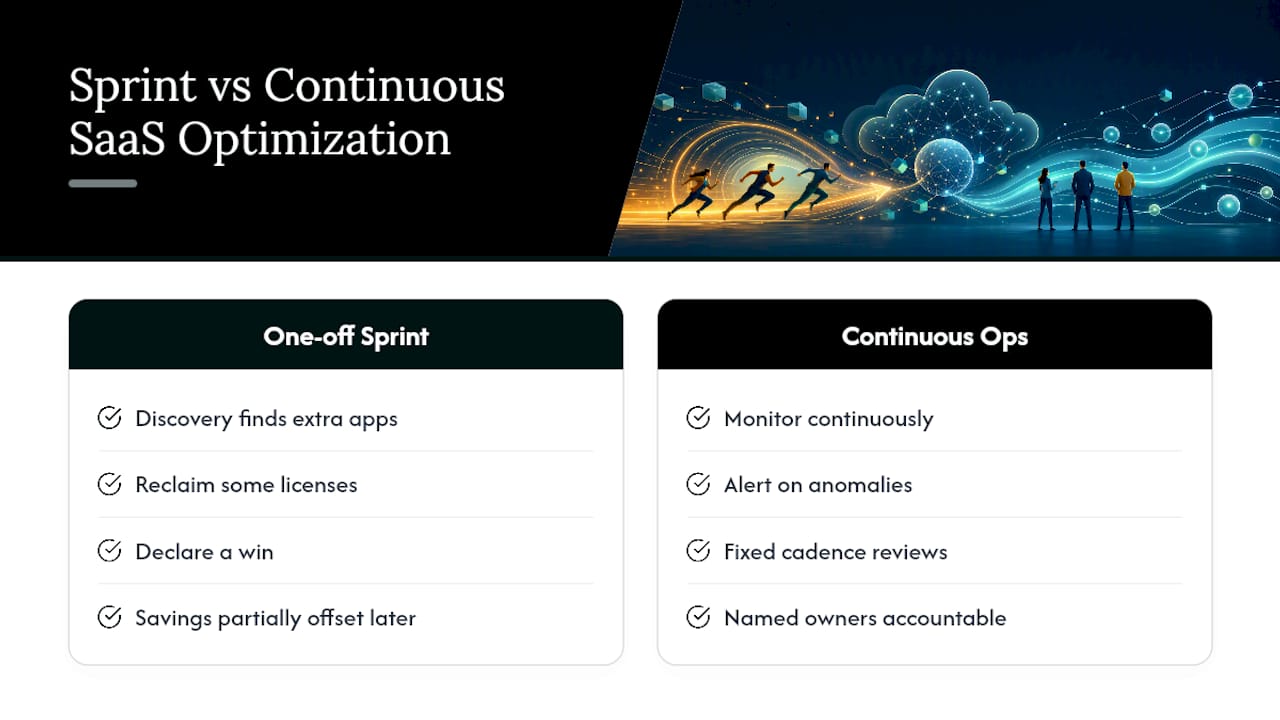
Most organizations that attempt a SaaS optimization program get the first sprint right. They run discovery, find more applications than expected, reclaim some licenses, and declare a win. Then the program quietly stalls. Six months later, shadow IT has regrown, a few auto-renewals slipped through, and the savings from the first sprint have been partially offset by new unmanaged spend.
The problem isn’t the tools or the playbook. It’s the assumption that optimization is a project rather than a continuous operating discipline.
The organizations that sustain savings share one characteristic: they treat SaaS spend the same way they treat cloud infrastructure spend. They monitor it continuously, they alert on anomalies, and they review it on a fixed cadence with named owners accountable for specific outcomes. The first sprint is just the baseline.
There’s also a harder organizational truth worth naming. The biggest source of resistance in SaaS optimization programs isn’t IT or Finance. It’s the business unit leaders who believe their team’s preferred tools are exempt from scrutiny. The only thing that consistently overcomes that resistance is data. Not policy, not mandates. Specific, behavioral data showing that 40% of the seats they’re defending haven’t been used in a meaningful way in three months. That’s the conversation that moves.
Negotiation is the other underestimated lever. Most procurement teams approach SaaS renewals as a pricing conversation. The vendors who price SaaS aggressively know that most buyers arrive without utilization data. When you arrive with a precise seat count, a behavioral usage breakdown, and a credible consolidation alternative, the negotiation dynamic shifts. Vendors would rather retain a rightsized contract than lose it entirely.
The enterprise FinOps discipline that has matured around cloud infrastructure is now extending to SaaS. The teams applying those same rigor and accountability frameworks to their SaaS portfolios are the ones seeing sustained, compounding savings rather than a one-time sprint result.
Everythingcloud gives you continuous SaaS cost visibility, not just a one-time audit
Most SaaS optimization efforts produce a solid first-sprint result and then drift. The spend creeps back. The renewal calendar slips. Shadow IT reappears. The difference between a one-time audit and a continuous program is the infrastructure behind it.
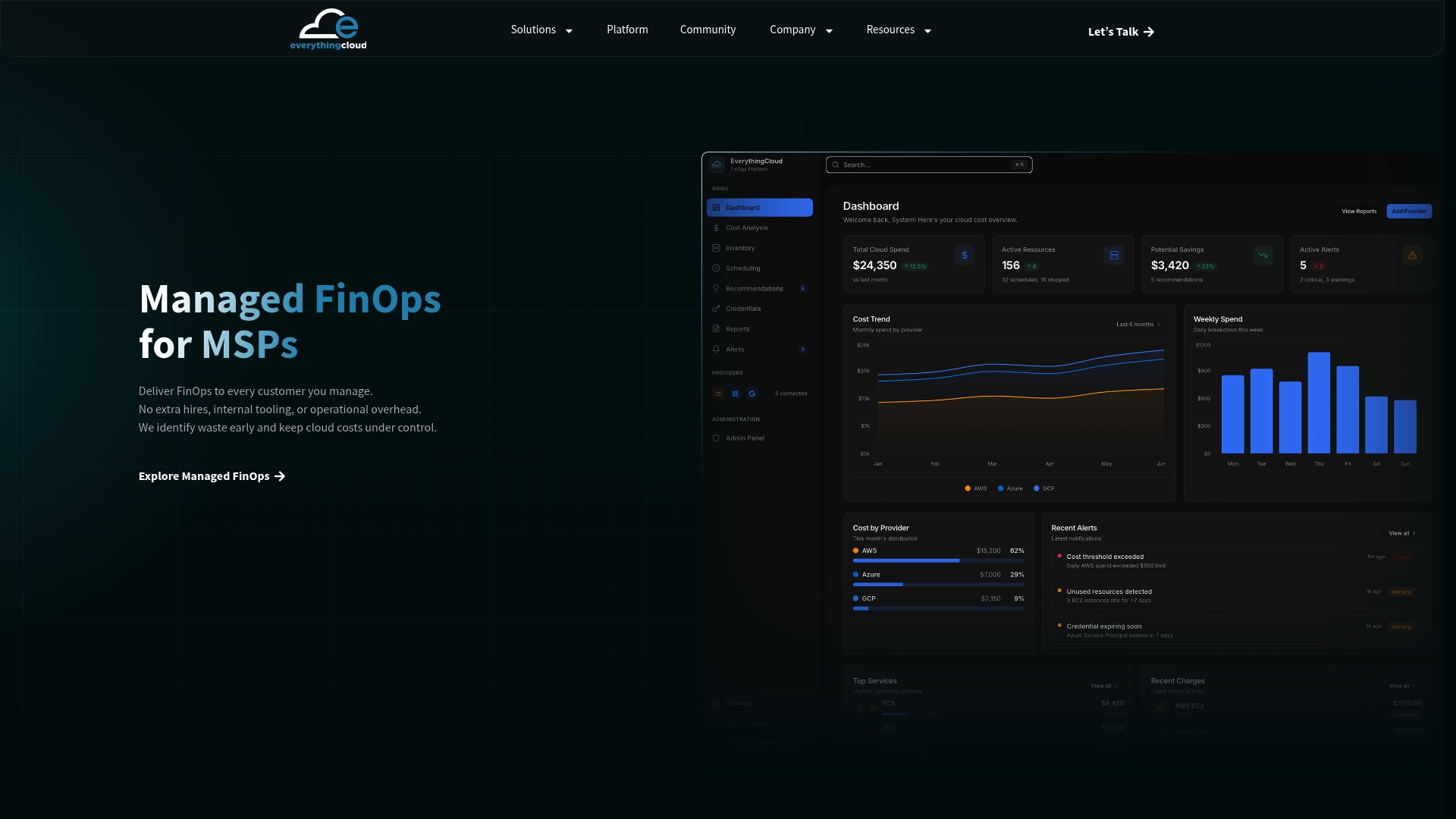
Everythingcloud’s managed FinOps platform connects real-time SaaS spend data to behavioral usage signals, SSO, HRIS, and finance systems, giving Finance, IT, and Procurement a single source of truth that updates continuously rather than quarterly. The platform flags underused licenses, surfaces upcoming renewals with lead time for negotiation, and allocates costs to departments without manual reporting cycles.
For MSPs, Everythingcloud delivers FinOps in a Box: a turnkey capability to offer SaaS and cloud optimization as a managed service to clients, without building the tooling from scratch. For enterprise buyers, the managed service option means expert FinOps guidance alongside the platform, compressing the time from discovery to documented savings.
The platform’s capabilities align directly with the evaluation checklist above: CIS and NIST-aligned governance controls, multi-tenant support, automated rightsizing alerts, and executive reporting built for Finance leadership.
Ready to see what’s actually running in your environment? Request a managed FinOps assessment and get a clear picture of your SaaS footprint within days, not months.
Useful sources and further reading
- SaaS Spend Management: Cut Costs & Optimize Your Stack
- SaaS Spend Optimization — The Definitive Guide | LeanIX
- Gartner forecasts worldwide public cloud end-user spending to reach nearly $600 billion in 2023
- Software as a Service (SaaS) Market Analysis | Fortune Business Insights
- Subscription Commerce Solutions for Digital Transformation — AppDirect