
Amazon EMR cost optimization comes down to five levers: stop paying for idle clusters, size nodes to the job, buy capacity the right way, attribute every dollar to an owner, and keep measuring after the first round of savings. Most of the waste hides in the EC2 layer underneath EMR, not in the EMR fee itself. This guide walks through where the money goes and which changes pay off first. It also covers how to keep the gains from slipping away.
TL;DR
- Your EMR on EC2 bill is EMR charges plus EC2, plus EBS if volumes are attached. Optimize the instances first, because that is where most of the spend sits.
- Idle always-on clusters are the most common leak. Transient clusters, auto-termination and managed scaling close it.
- Spot Instances can run up to 90% below On-Demand prices, but belong on failure-tolerant work, not SLA-critical jobs.
- Tag every cluster and job so cost per team and per pipeline is visible. Without allocation, nobody owns the number.
- One-time tuning decays. Continuous monitoring and automated action keep savings from eroding.
Table of Contents
- What actually makes up an EMR bill
- Where EMR money leaks
- Step 1: Stop paying for idle clusters
- Step 2: Size the cluster to the job
- Step 3: Buy capacity the right way
- Step 4: Make every dollar belong to someone
- Step 5: Measure cost per job, then keep measuring
- The four pillars of cloud cost optimization, applied to EMR
- Our perspective: recommendations are not savings
- Where EverythingCloud fits
- A practical order of operations
- FAQ
- Sources
What actually makes up an EMR bill
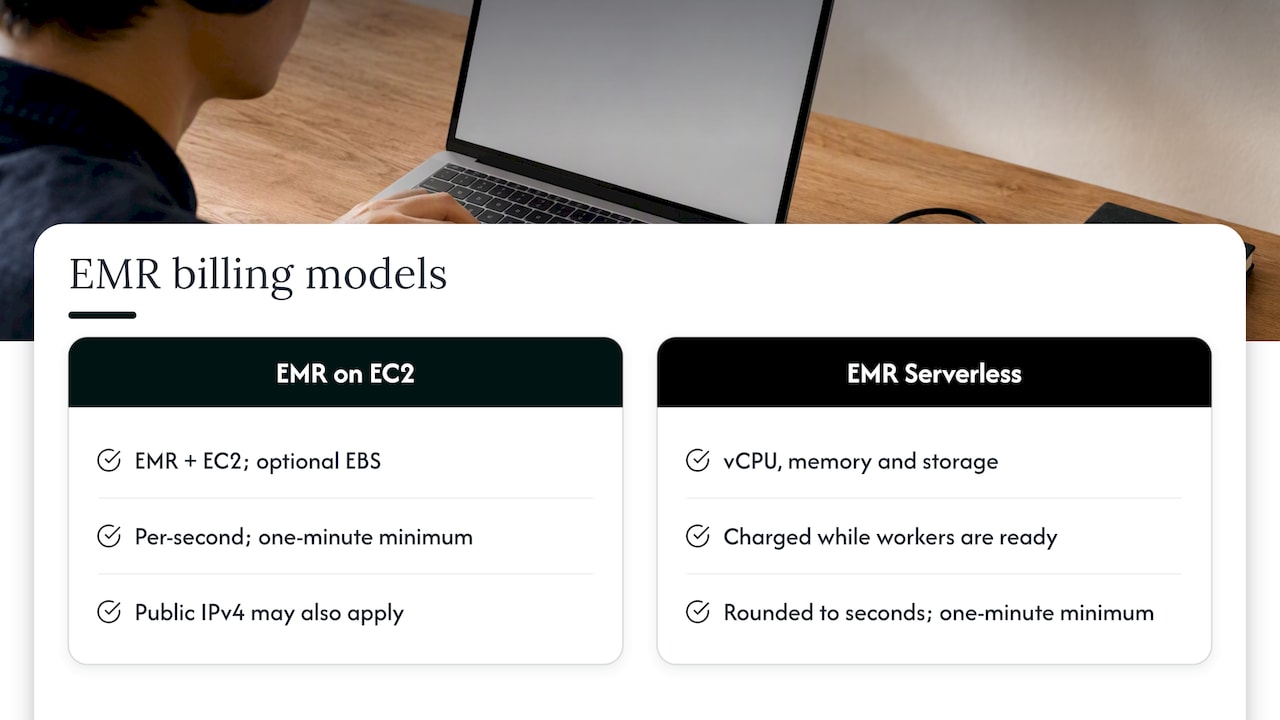
Before you cut anything, know what you are cutting. For EMR on EC2, AWS adds the EMR price to the EC2 price and, if you attach storage, the EBS price. Charges are billed per second with a one-minute minimum, and public IPv4 address charges may also apply.
EMR Serverless works differently. It charges for the vCPU, memory and storage your workers use from the moment workers are ready to run the workload until they stop, rounded up to the nearest second with a one-minute minimum.
That structure explains a common misconception. EMR is not just a small management fee on top of free servers. The EC2 instances are the larger line in most clusters, and the EMR charge scales with the instance types you choose. Every decision about node count, instance family and runtime multiplies through both lines.
EMR vs. EC2: how the costs relate
EC2 gives you generic servers. EMR is the managed layer that configures those servers for big data frameworks such as Hadoop and Spark. You do not choose one or the other. With EMR on EC2 you pay for both, which is why an instance that looks cheap in the EC2 price list costs more once it joins an EMR cluster. When you compare running your own Spark on EC2 against EMR, compare total cost including the engineering hours to patch, scale and troubleshoot, not only the hourly rate.
Where EMR money leaks
In our experience with cloud estates, EMR waste rarely comes from one dramatic mistake. It builds up quietly: a cluster left running over a weekend, a core node group sized for last year’s data volume, a development job running on On-Demand capacity. Each looks small. Together they become a margin leak that finance eventually notices.
AWS’s own best practices point to the same drivers. The key factors are cluster utilization, the choice between transient and long-running clusters, the mix of On-Demand and Spot purchasing, and the EC2 instance family you match to the workload, for example compute-optimized against memory-optimized.
If you want a single diagnostic question, ask this: what share of the hours we pay for is spent doing work? Everything below is a way to raise that number.
Step 1: Stop paying for idle clusters
Transient clusters, which terminate after a job finishes, are generally recommended for job-scoped pipelines because they avoid idle resources. Long-running clusters make more sense for streaming or ad-hoc work where people need a standing environment.
Most teams run a mix, and that is fine. The failure mode is a cluster that was meant to be transient but never gets cleaned up. Three habits fix this:
Enforce auto-termination. Set an idle timeout on every cluster by policy, not by individual goodwill. Engineers forget. Policies do not.
Chain jobs on one short-lived cluster. If several ETL jobs run back to back, running them on the same temporary cluster is often cheaper than keeping an always-on cluster waiting between runs. You also avoid paying repeated startup time for several clusters.
Review the schedule. A nightly pipeline that finishes at 2 a.m. should not leave a cluster up until the morning stand-up.
Step 2: Size the cluster to the job
Oversized clusters are the second most common leak. Two mechanisms help.
Managed scaling
EMR Managed Scaling automatically resizes clusters based on workload needs, which improves utilization and saves cost. Set sensible minimum and maximum limits, then watch how often the cluster hits the ceiling. A cluster that always sits at maximum is a sizing problem. One that always sits at minimum is also telling you something.
Instance family and generation
Match the family to how the job behaves. Shuffle-heavy Spark jobs often want memory. Parsing and transformation jobs may want compute. Practitioners in the AWS community also report good results from newer-generation and Graviton instances, and AWS’s published customer case for EMR on EC2 includes Graviton adoption among its savings steps. Test your own jobs for compatibility and runtime before you commit, because a cheaper instance that runs 40% longer is not a saving.
A rule of thumb on utilization
One re:Invent 2024 session summary suggests that at public On-Demand prices, EMR on EC2 tends to win above roughly 70% utilization, while EKS or Serverless can be cheaper below that. Treat the number as a starting hypothesis, not a law. Your job shapes, startup times and discounts will move the crossover. Measure your real utilization first, then decide whether to stay on EC2, move to Serverless, or consolidate.
The same question applies to Kubernetes-based EMR. If you run it on EKS, the discipline is the same as for any container platform: fix resource requests before chasing discounts. Our guide to EKS cost optimization for engineers covers that in detail.
Step 3: Buy capacity the right way
Once the cluster is the right size and only runs when needed, change how you pay for it.
Use Spot for the right work
Spot Instances are spare EC2 capacity available at up to a 90% discount compared with On-Demand prices. The catch is that AWS can reclaim them. AWS’s best practices recommend mixing On-Demand for SLA-sensitive workloads with Spot for additional compute.
In practice, that means:
- Keep master and core nodes on On-Demand so a reclaimed instance cannot take down the cluster or lose HDFS data.
- Put task nodes, which only process data, on Spot.
- Run development, testing and retry-tolerant jobs on Spot first.
- Diversify across several instance types so one capacity pool running dry does not stall the job.
Commitments for steady workloads
If a cluster genuinely runs around the clock, a commitment such as a Savings Plan or Reserved Instances can beat On-Demand. The danger is committing against a workload you are about to shrink or migrate. Commit to the baseline you are confident will exist in a year, and leave the variable part on Spot or On-Demand. Commitment management is where many teams lose money in either direction: too little coverage wastes discounts, too much strands spend. Our piece on AWS enterprise discount deals explains how larger agreements change that calculation.
Architecture that supports utilization
Some cost problems are infrastructure problems. If data movement, storage placement or network design is forcing clusters to run longer than the compute needs, no scaling policy fixes it. Teams with steady, predictable data workloads sometimes also weigh private cloud architecture options against pay-as-you-go capacity, and that comparison is only meaningful once you know your real utilization. Data transfer between regions and services is another quiet contributor, covered in our walkthrough of AWS data transfer cost reduction.
Step 4: Make every dollar belong to someone
You cannot optimize what you cannot attribute. A shared EMR environment with no ownership data produces a single large number that nobody feels responsible for.
Start with tags. To use user-defined cost allocation tags, create and apply the tags, then activate them in the Billing and Cost Management console. Only after activation do they show up in cost allocation reports. Pick a small, enforced set: team, pipeline, environment and cost center. Our article on cost allocation tags and 90% allocation coverage goes deeper on how to reach and hold coverage.
For EMR Serverless, AWS announced in January 2026 that it supports job run-level cost allocation. You can tag individual job submissions, which fixes the earlier limit where attribution worked only at the application level.
For shared EMR on EC2 clusters, where several teams submit work to the same YARN cluster, the AWS sample EMR cost toolbox shows how to combine Cost and Usage Report data with YARN resource manager metrics. That gives you billing repartitioning by user or application, so a shared cluster stops being a black box.
Step 5: Measure cost per job, then keep measuring
Total spend goes up when the business grows, so it is a poor success metric. Cost per job, per pipeline or per terabyte processed tells you whether you are getting more efficient.
AWS’s published case study of a global financial services provider is a useful template. The team reduced EMR costs by 30% over three months by combining auto-termination of idle clusters, managed scaling, Spot Instances and cost allocation tagging. They also built a job-tracking script and report to follow cost per job, along with cost-tracking dashboards, so improvements could be measured instead of assumed.
Treat that result as one organization’s outcome, not a promise for yours. What transfers is the sequence: remove idle time, right-size, change purchasing, tag, then track.
Why savings decay
The pattern that frustrates finance leaders goes like this. A team spends a quarter tuning EMR. The bill drops. Six months later new pipelines arrive, defaults get copied from old templates, a Spot fleet gets swapped to On-Demand during an incident and never switched back. The pattern starts compounding quietly again.
A governance layer prevents that. On EMR Serverless, for example, teams can set account-level limits on maximum concurrent vCPUs and alert on quota utilization. The principle applies everywhere: guardrails and alerts, not heroics.
The four pillars of cloud cost optimization, applied to EMR
People often ask for the four pillars. Frameworks vary, so here is the version we use when working with EMR estates, mapped to the steps above.
| Pillar | What it means for EMR | Where it appears above |
|---|---|---|
| Visibility | Know cost by cluster, team and job | Steps 4 and 5 |
| Rightsizing | Match nodes, families and scaling limits to demand | Steps 1 and 2 |
| Purchasing | Blend On-Demand, Spot and commitments | Step 3 |
| Governance | Policies, alerts and ownership that keep gains in place | Step 5 |
The order matters. Teams that buy commitments before rightsizing lock in discounts on capacity they should not be running at all.
Our perspective: recommendations are not savings
Most EMR advice, including a lot of what ranks for this topic, stops at a list of things an engineer should go and do. We think that is where the leak actually starts. A recommendation sitting in a dashboard saves nothing. Someone has to act on it, test it, and make sure it does not break a pipeline, and that someone is usually busy.
That is why we built EverythingCloud around execution rather than reporting alone. Our platform automates optimization actions, not just recommendations, and it can work alongside the visibility tools you already own. We verify savings against invoice-level billing, because a projected number in a dashboard is not a number your CFO will accept.
For MSPs the problem is sharper. Managing EMR across many customer accounts without adding headcount means unified reporting and governance across tenants, or margin erodes account by account. If your team supports data platforms for clients and has no one watching idle clusters on a Tuesday night, ask what that is costing you.
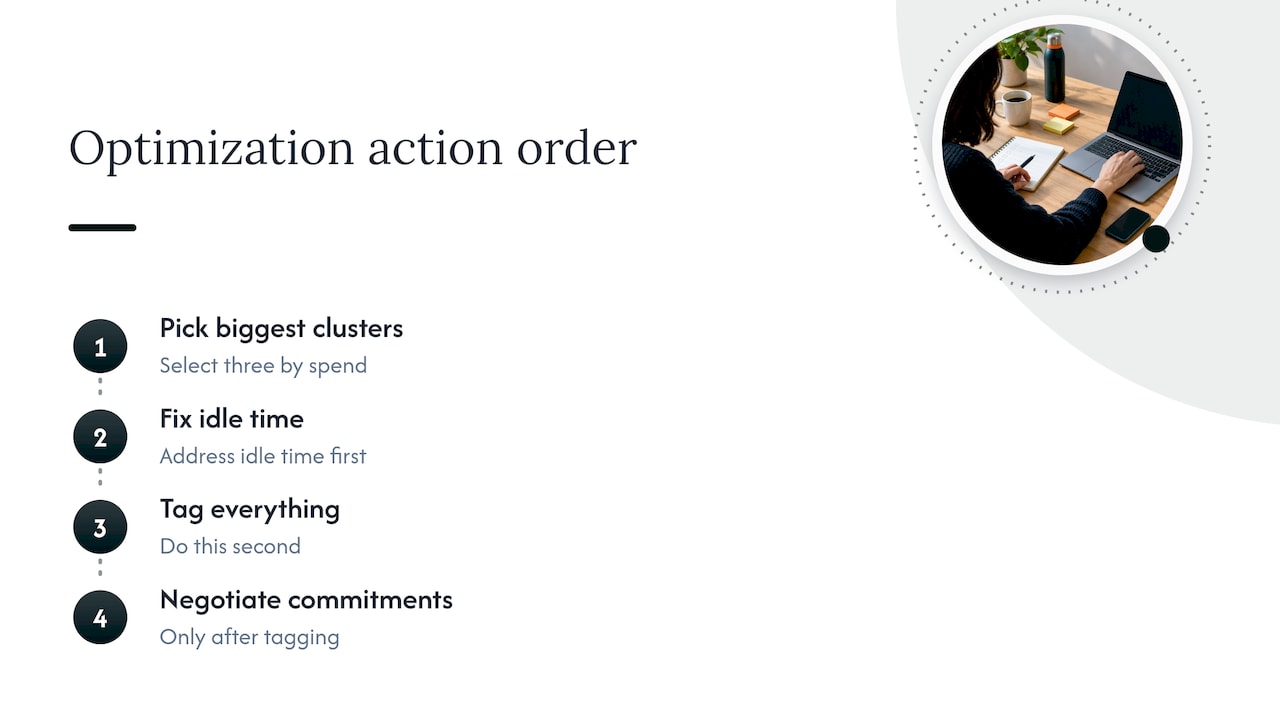
Our advice for any organization: pick the three biggest EMR clusters by spend, fix idle time first, tag everything second, and only then negotiate commitments.
— Dan
Where EverythingCloud fits
If you run EMR, EC2, SaaS and AI workloads and want continuous optimization rather than a one-off cleanup, our Continuous Cloud Optimization service monitors your environment, identifies savings, and automates the actions. If you would rather hand the work to experts, Managed FinOps puts FinOps specialists on your account. You can see how it all connects on the platform page.
MSPs and partners can launch their own managed FinOps practice with our Founding Partner Membership at $500 per month, details on the Founding Partner program page.
A practical order of operations
If you have a week, do this:
- Day one: list every EMR cluster, its owner, its average utilization and whether it terminates on its own.
- Day two: apply auto-termination policies and tag requirements to all new clusters.
- Days three and four: move task nodes and non-critical jobs to Spot, with several instance types in the fleet.
- Day five: set up cost per job reporting and an alert for any cluster running past its expected window.
Then revisit instance families and commitments with real utilization data in hand. Related AWS services deserve the same treatment. S3 storage behind your clusters is covered in our S3 cost optimization playbook, and the broader approach is laid out in reducing AWS costs in three phases.
FAQ
How much does Amazon EMR cost?
It depends on the deployment. EMR on EC2 adds an EMR charge to the EC2 price, plus EBS if attached, billed per second with a one-minute minimum. EMR Serverless bills for the vCPU, memory and storage used while workers run. Exact rates vary by instance type and region, so check the Amazon EMR pricing page for current figures.
What is the difference between EMR and EC2?
EC2 provides general-purpose virtual servers. EMR is a managed service that runs big data frameworks such as Hadoop and Spark, and with EMR on EC2 it runs on top of EC2 instances. You pay for the instances and the EMR layer together.
What is the fastest way to reduce EMR costs?
Eliminate idle time. Set auto-termination, use transient clusters for job-scoped pipelines and enable managed scaling. These changes usually require little code change and no commitment. Spot for task nodes is a common second step.
Should I use Spot Instances for every EMR node?
No. Spot capacity can be reclaimed, so keep master and core nodes on On-Demand for SLA-sensitive work and use Spot for task nodes and failure-tolerant jobs. AWS lists discounts of up to 90% compared with On-Demand prices.
How do I track EMR costs by team?
Apply and activate cost allocation tags in the Billing and Cost Management console. On shared YARN clusters, combine Cost and Usage Report data with YARN metrics. On EMR Serverless, tag at the job run level.
Sources
- Amazon EMR Pricing
- Amazon EMR Best Practices: Cost Optimizations
- Amazon EMR Features
- Using user-defined cost allocation tags
- Amazon EMR Serverless adds support for job run level cost allocation
- aws-samples/aws-emr-cost-toolbox
- Amazon EMR on EC2 cost optimization: How a global financial services provider reduced costs by 30%