
Partner Earned Credit (PEC) is Microsoft’s reward for CSP partners who actually run a customer’s Azure environment, not just resell it. If you manage that environment and your access is set up correctly, Microsoft takes 15% off eligible Azure charges after any Azure credit offer is applied. If the access isn’t right, you get nothing, and nobody sends you a warning.
So PEC is less a bonus and more a test: are you doing managed services, and can you prove it in the billing data? MSPs that treat it as a core part of a managed cloud service keep margin they’d otherwise leak. This guide covers what PEC is, who qualifies, how to check you’re getting it, and how to turn it into a service customers pay for every month.
TL;DR
- PEC is a credit Microsoft gives CSP partners that own IT operational control and management of some or all of a customer’s Azure environment.
- It applies to eligible pay as you go Azure charges, and it only shows up when your admin access (AOBO, Azure Lighthouse or a Partner Admin Link) is correctly configured and stays in place.
- It doesn’t appear as its own invoice line, so you have to verify it in the daily usage and reconciliation files.
- Reservations and savings plans are excluded, so your optimization plan and your PEC math have to be done together.
- The strongest play is to pair PEC with ongoing cost work: visible savings for the customer, protected margin for you, and a reason to stay.
Table of Contents
- What Partner Earned Credit actually is
- What it’s worth, in plain math
- Who qualifies, and what access you need
- How to verify you’re getting it
- When PEC goes missing
- PEC and the rest of Microsoft’s CSP incentives
- How PEC helps you build a recurring service
- How PEC protects your margin
- How PEC helps you keep customers longer
- How PEC reduces work for your team
- How an MSP delivers this for clients
- Perspective
- Putting it to work with a partner
- FAQ
- Sources
What Partner Earned Credit actually is
Microsoft’s Partner Center documentation describes PEC as a credit that recognizes partners who own IT operational control and management of some or all of a customer’s Azure environment. It’s part of the Azure plan, the CSP model where Azure is sold at published pay as you go prices. Microsoft says the point is to keep Azure pricing uniform across its sales channels, to encourage value added managed services, and to stop partners competing on margin alone.
Read that again, because it shapes how you should sell. Microsoft isn’t paying you for moving licenses or passing along a bill. It’s paying you for managing the environment. A partner that hands the customer a login and a monthly invoice is, in Microsoft’s framing, not who PEC is for.
How PEC differs from other Azure credits
People mix these up all the time, so here’s the short version:
PEC is an ongoing credit tied to the managed services you deliver. It’s calculated and applied to eligible resources and subscriptions daily.
Azure credit offer (ACO) is a separate credit. When both apply in the same billing period, the ACO is applied first at 100%, and PEC then gives an additional 15% on whatever charges remain.
Partner benefit credits come with your Microsoft partner memberships. Depending on whether you’re on the legacy or modernized experience, they may be monthly credits that lapse if unused or bulk yearly credits that last a year. They’re for your own use and demos, not a customer rebate.
What it’s worth, in plain math
Microsoft’s own example is simple. At a 15% PEC, a unit price of $10 becomes an effective unit price of $8.50. Scale that across every eligible dollar a customer consumes and you can see why partners with large managed Azure books care about it.
Two things matter here. First, the credit is calculated daily, so a gap in access on a Tuesday costs you Tuesday. Microsoft’s troubleshooting guidance tells partners to confirm admin access for the entire day. Second, the credit rides on top of consumption. Cut a customer’s waste and the eligible base shrinks, and so does the dollar value of PEC. That’s good for the customer. It’s something you plan for, not something you fear, and we’ll get to how.
Who qualifies, and what access you need
Only indirect providers and direct bill partners can earn PEC. Beyond that, Microsoft’s troubleshooting guide says the transacting partner needs valid admin on behalf of (AOBO) or eligible role based access control (RBAC) access to the subscription, resource group or resource. Azure Lighthouse access with a linked PartnerID also works.
In practice, Microsoft’s PEC explanation page lays out three requirements:
An active Microsoft AI Cloud Partner Program agreement.
An eligible Azure RBAC role. Not every role qualifies.
One of three access setups: AOBO, Azure Lighthouse, or a manually added Partner Admin Link, each with the matching partner association type.
The PEC FAQ adds a detail that trips people up: the Foreign Principal Object needs at least one PEC eligible role, assigned at management group, subscription, resource group or resource level. A role assigned only at the root scope doesn’t count.
What PEC doesn’t cover
The same FAQ says PEC applies to pay as you go Azure offers in CSP, with these exceptions: Azure reservations, savings plans, third party products tagged “Third Party,” non Microsoft Marketplace products and Azure Spot Virtual Machines. Microsoft’s savings plan billing documentation says the same about usage covered by a savings plan.
This matters for anyone doing commitment management. Moving steady workloads onto a reservation or savings plan can cut the customer’s bill, and that’s usually the right call. But the usage moved is no longer PEC eligible, so you want to know both numbers before you make the recommendation. Model the discount and the credit together and pick the combination that serves the customer and keeps your service profitable.
How to verify you’re getting it
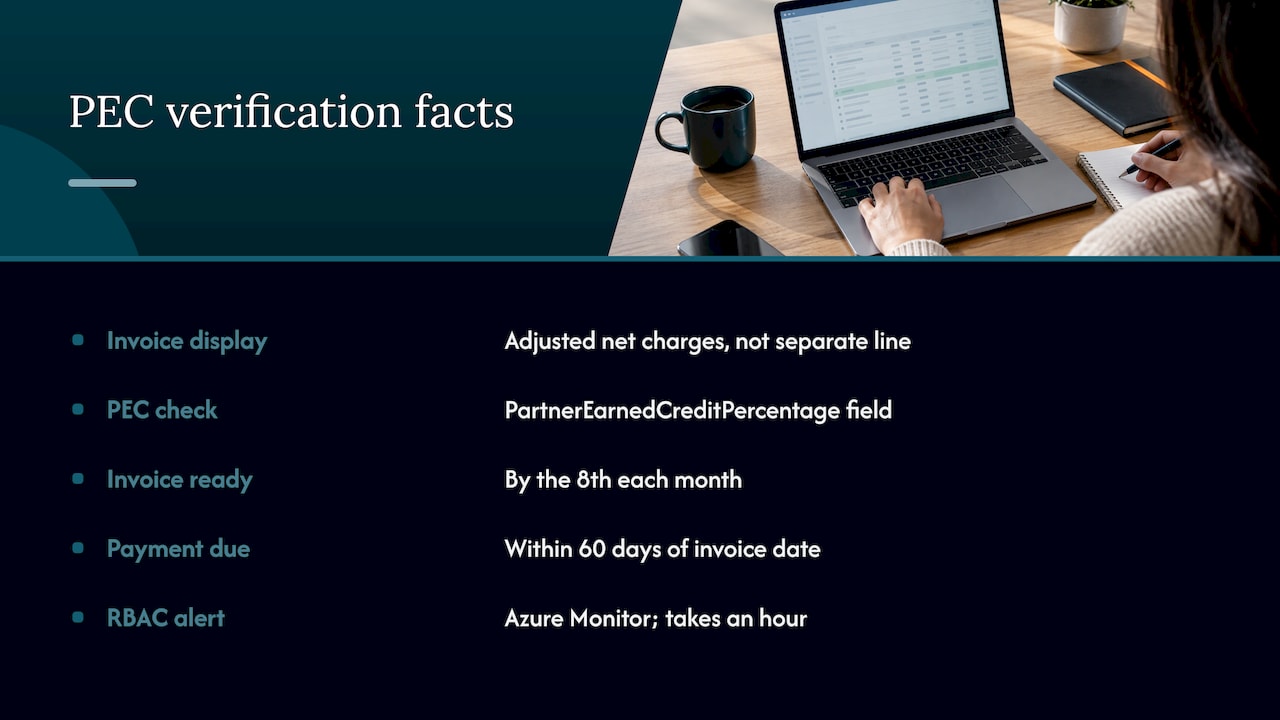
Here’s the part that surprises partners. PEC doesn’t show up as a separate credit line on the monthly invoice. It’s folded into the adjusted net charges. The detail lives in the daily rated usage file and the monthly invoice reconciliation file, and you can also pull it through the API and Microsoft Cost Management.
Microsoft’s FAQ describes the reconciliation routine: use the daily rated usage reconciliation and invoice reconciliation files in the Partner Center Billing workspace, and compare ProductId, SkuId and AvailabilityId for each SubscriptionId. To confirm you’re earning, check the PartnerEarnedCreditPercentage field in the daily usage file.
Timing is worth knowing. Microsoft’s invoice is ready by the eighth of each month, covers a full calendar month and is due within 60 days of the invoice date, with net charges adjusted for partner earned credits. That gives you a monthly window to catch problems early instead of discovering them a quarter later.
One more safeguard from the FAQ: set up Azure Monitor activity log alerts that tell you when your RBAC access is removed from CSP subscriptions. It takes an hour to set up and can save you months of lost credit.
If you want a repeatable version of this routine, our guide to MSP billing reconciliation walks through a monthly process for catching revenue leaks.
When PEC goes missing
It happens, and it usually comes down to access. Microsoft’s troubleshooting guide gives a sensible order of checks:
Make sure you’re looking at the G invoice and reconciliation file, which is the new commerce experience.
Confirm the agreement is active and the offer is eligible.
Verify valid AOBO or eligible RBAC access, or Azure Lighthouse access with a linked PartnerID.
Confirm you had admin access for the whole day.
Check whether the customer removed your AOBO permissions.
That last one deserves attention. If a customer removes your RBAC admin access, you keep the Azure billing relationship but lose PEC on that invoice. You can regain partial access through Directory or Guest user accounts with RBAC, or through Azure Lighthouse. A customer who tidies up permissions during a security review can quietly switch off your credit without meaning to. A good onboarding conversation, explaining why your access exists, prevents that.
A channel incentives tracker, Rebates-On, calls misconfigured attribution the most common way partners lose PEC: a Partner Admin Link or AOBO that isn’t set per customer environment. Eligibility on paper isn’t enough. The credit is paid when attribution is right.
If you’re after a missing credit on a specific product, Microsoft also lets partners request credits through a Partner Center support ticket, within 120 days for new commerce products. Check the page for the current rules before you file.
PEC and the rest of Microsoft’s CSP incentives
PEC isn’t the only money in the CSP program, and it isn’t the same plumbing. Rebates-On points out that Partner Admin Link and the digital partner of record attribute managed Azure consumption, while the claim based mechanism for Microsoft 365 and Dynamics 365 customers works differently. Don’t assume one setup covers the other.
Microsoft also rebuilt CSP incentives for fiscal year 2026 (July 1, 2025 to June 30, 2026), and the rules were applied retroactively with recalculations in February 2026, according to Rebates-On’s analysis. Their advice is to treat incentives as exposure, not cash in the bank, since paid amounts can be adjusted if a designation lapses. That’s a sensible way to budget. Your cost optimization service should stand on its own margin, with PEC and incentives as a bonus you plan around carefully.
For the current fiscal year, check Microsoft’s own CSP incentive overview and your Partner Center account for the requirements that apply to your direct bill or indirect reseller status. They update each July.
How PEC helps you build a recurring service
Here’s my honest opinion: PEC is a reason to build a managed cloud service, not a reason to bill for one you don’t deliver. Microsoft says it wants to reward services that generate sustainable profitability. Recurring work is exactly that.
A workable recurring service around Azure has a few parts. Monthly review of spend and waste. A prioritized fix list. Someone who actually does the fixes. A report the customer can understand. That’s a service you can price monthly and defend in a renewal meeting, and it’s also the kind of operational ownership PEC is designed to recognize.
We’ve covered the commercial side in more depth in how to turn Azure cost management into a recurring service and in our piece on how a Microsoft CSP can resell cloud cost optimization.
How PEC protects your margin
Margin on cloud resale is thin and gets thinner when you’re not watching. PEC adds a credit on eligible Azure usage, and that only counts if you’re verifying it. A partner who never checks the reconciliation file doesn’t know whether the margin they quoted internally is the margin they’re getting.
The same discipline catches the other leaks: missing access, expired agreements, subscriptions outside your management scope. We wrote about this pattern in your MSP probably has a cloud margin leak. The leak rarely announces itself. It starts small and compounds quietly.
How PEC helps you keep customers longer
Customers don’t stay for credits. They stay because their cloud bill makes sense and someone is accountable for it. If every month you can say, here’s what we found, here’s what we fixed, here’s what it saved you, you’re a partner, not a vendor.
PEC supports that indirectly. It gives you a structural reason to hold the admin access that lets you actually manage the environment. Customers who see you doing real operational work have fewer reasons to shop around, and fewer reasons to pull your permissions.
How PEC reduces work for your team
The manual version of PEC compliance is ugly: pulling the reconciliation files, comparing SKUs by subscription, chasing access changes, filing credit tickets. Do it by hand for twenty customers and you’ve created a part time job nobody wanted.
The fix is to make it a routine, not a project. Alerts for access removal. A monthly check on the PartnerEarnedCreditPercentage field. A standing agenda item in your billing review. And a single place where optimization findings turn into tracked work, so your engineers aren’t working from spreadsheets and memory.
How an MSP delivers this for clients
The technical side of PEC and cost optimization comes down to four monthly jobs:
Confirm access. Check that AOBO, Lighthouse or Partner Admin Link access is in place for each customer subscription, with an eligible RBAC role.
Reconcile billing. Compare the daily usage and invoice files, and confirm PEC is flowing for eligible usage.
Find and rank waste. Look for idle and oversized resources, and decide where reservations or savings plans make sense, knowing those are excluded from PEC.
Report and track. Give the customer a plain report on what was found, what was fixed and what’s still open.
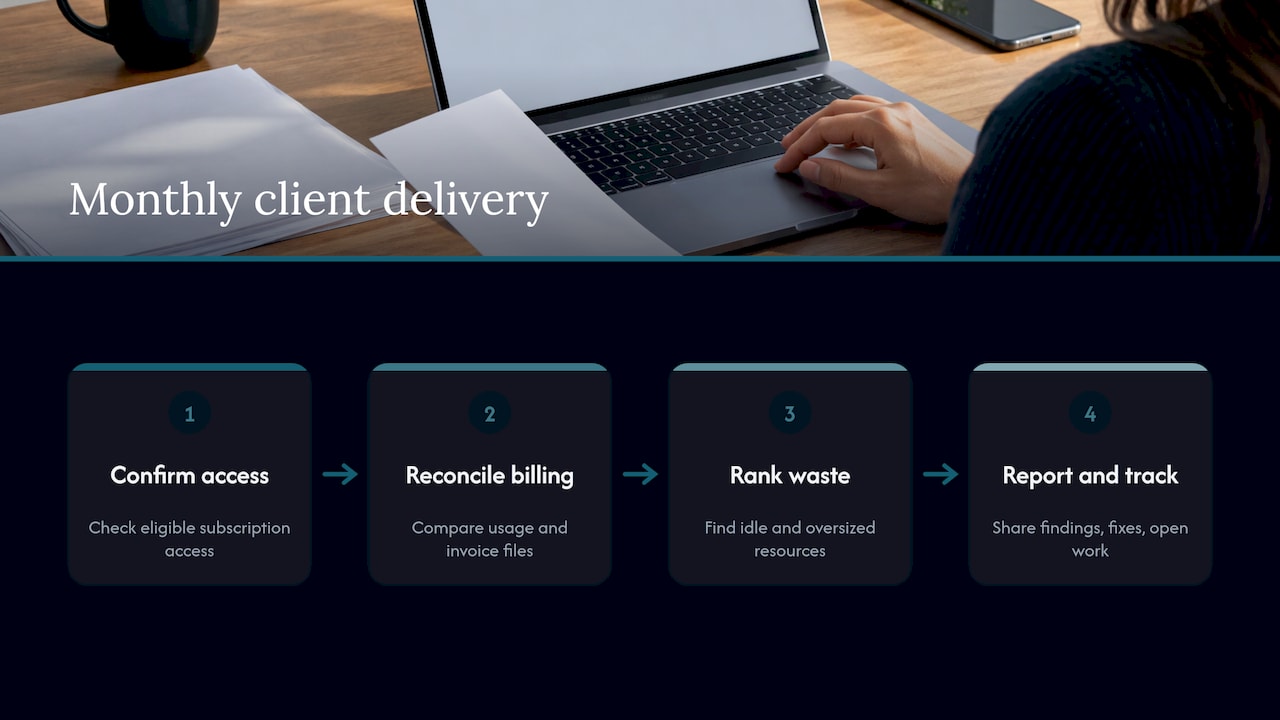
The fourth job is where most services fall apart. Visibility matters, but someone still has to own the work. A dashboard that shows 40 recommendations doesn’t reduce a bill. A named person closing them out does.
Perspective
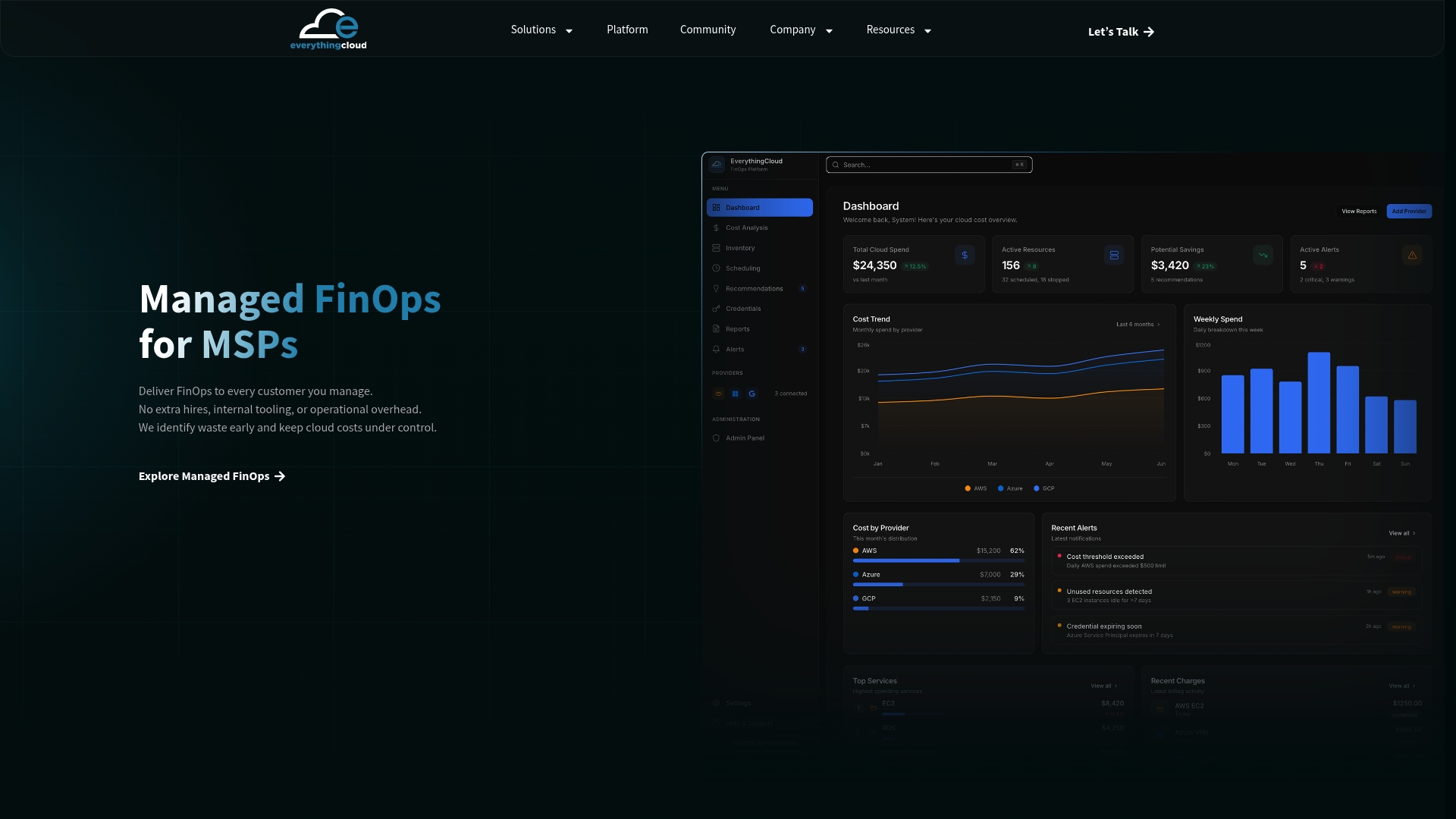
We built EverythingCloud around a simple idea: most cost tools stop at a dashboard, and partners need the work done. PEC is a good example of why. Microsoft rewards partners who own operational control of a customer’s Azure environment, and ownership means follow through, not just visibility.
Our platform is multi-tenant, so a partner manages many customers from one workspace. It covers Azure, AWS, Google Cloud, Microsoft 365 licenses and AI spend such as OpenAI and Anthropic, and it handles security posture too. It finds waste, ranks fixes by savings and effort, and turns them into tracked work. Monthly reports are white label, so the customer sees the partner’s brand.
The partner owns the customer relationship. We provide the platform and the FinOps expertise behind the service, so a partner can offer it without hiring a FinOps team. We can also be deployed in Canada, with Canadian data residency, for customers who need it.
Our view is that the partners who win this market will be the ones who treat cost management as a monthly service with an owner, a report and a result, not a one time clean up.
Dan Belkie
Putting it to work with a partner
If you’d like the managed service without building the FinOps practice yourself, EverythingCloud works through MSPs, cloud partners and distributors. You keep the customer relationship. We provide the multi-tenant platform and the expertise behind the monthly work, and the reports go out under your brand. Azure Marketplace private offers are available too.
The Founding MSP Program is a small partner cohort for MSPs that want to start with a handful of customers. If you’d rather test the model first, we can also work with one of your customers to show what a monthly service looks like in practice.
FAQ
Is Partner Earned Credit the same as an Azure discount?
No. PEC is a credit that Microsoft gives partners that own operational control and management of a customer’s Azure environment. It’s tied to the services you deliver and the access you hold, and it’s calculated daily on eligible usage.
Is the 15% rate guaranteed?
Microsoft’s documentation uses 15% in its examples and says PEC gives an additional 15% on charges remaining after an Azure credit offer. You can confirm what you’re actually receiving by checking the PartnerEarnedCreditPercentage field in the daily usage file.
Why don’t I see PEC on my invoice?
Microsoft folds PEC into the adjusted net charges line instead of showing it separately. The detail is in the daily rated usage file and the monthly invoice reconciliation file in Partner Center, and you can also query it through the API and Microsoft Cost Management.
Do reservations and savings plans earn PEC?
No. Microsoft excludes Azure reservations and savings plans, along with third party products, non Microsoft Marketplace products and Spot Virtual Machines. Factor that into your commitment recommendations so you know the full picture for each customer.
What happens if a customer removes my access?
You keep the Azure billing relationship but are no longer eligible for PEC on that invoice. You can regain partial access through Directory or Guest user accounts with RBAC or through Azure Lighthouse, so it’s worth explaining to customers why your access matters.
Sources
- Partner-Earned Credit for Managed Services, Microsoft Partner Center
- Partner-Earned Credit Overview, Microsoft Partner Center
- Azure Credit Offer Balance, Microsoft Partner Center
- Azure Benefits, Microsoft Partner Center
- Partner earned credit troubleshooting guide, Microsoft Partner Center
- Partner earned credit FAQ, Microsoft Partner Center
- Azure Savings Plan Billing, Microsoft Partner Center
- New commerce experience in CSP, usage based billing
- The new commerce experience for CSP, Microsoft Licensing
- Microsoft Channel Incentives and Claims in FY26, Rebates-On