
MSP cloud billing is the monthly job of matching what Microsoft, AWS and Google charge you with what you invoice each customer. Do it well and cloud becomes a steady, predictable revenue line. Skip it and you quietly eat the difference.
Here’s the part most billing guides skip. Invoicing software gets the bill out the door. It doesn’t tell you whether the cloud spend behind the bill is waste, whether a commitment is going unused, or whether anyone is fixing what’s wrong. That’s the work customers will pay you to own, and it’s where the recurring revenue is.
TL;DR
- Cloud billing differs from ordinary MSP billing because charges move every month. Seats change, usage changes and vendor rates change.
- The margin leak sits between your vendor invoice and your customer invoice. Reconcile every customer, every month.
- Billing software handles invoices. Someone still has to review the spend behind them and own the fixes.
- Pair monthly reconciliation with a cost review and you have a service you can sell, not just a pass through charge.
- A partner owned, white label model lets you deliver that review without hiring a FinOps team.
Table of Contents
- Why cloud billing isn’t like your other billing
- What you need to capture on every customer invoice
- Where the margin actually leaks
- A monthly reconciliation routine that holds up
- Automate the plumbing, but know what it doesn’t do
- How billing becomes a recurring service
- How an MSP delivers cloud cost management for clients
- Where EverythingCloud fits
- Common questions
- Sources
Why cloud billing isn’t like your other billing
A managed services agreement is simple. Fixed fee, fixed scope, same number next month. Cloud isn’t like that.
MSPs usually run a mix of billing models: recurring managed services, projects, hardware and usage based cloud charges. Cloud services need usage tracking and detailed invoice breakdowns that generic invoicing handles badly. A flat line item called “Azure” won’t survive the first question from a customer’s CFO.
Three things make it harder than it looks:
- Timing. Vendors bill on one calendar and you bill on another. Usage can be reported at a different point in the month than when clients are invoiced, so the two numbers rarely match on their own.
- Movement. Users come and go, promotional pricing expires and vendors change rates.
- Visibility. The customer sees one total. You see dozens of meters, SKUs and subscriptions behind it.
If you’re a Microsoft CSP, the calendar matters in a concrete way. Under new commerce, Partner Center invoices cover the calendar month and are available by the eighth of the following month. Microsoft also leaves the customer billing to you: partners can bill customers however they want, and use the reconciliation file, matched by CustomerId, to confirm each customer’s charges. That freedom is useful. It also means the accuracy is entirely your responsibility.
What you need to capture on every customer invoice
A typical MSP invoice has to carry recurring managed service fees, project labor at different rates, resold third party licenses whose costs fluctuate, overage charges and one time items. Cloud adds a layer on top of that.
For each customer, you want to see these charges clearly:
- Subscription and license seats. Microsoft 365, security add ons and other per seat products.
- Consumption. Azure meters, AWS and Google Cloud usage, backup storage. Usage tracking records measurable quantities such as active licensed seats or gigabytes of backup storage, and only usage above an included allowance becomes overage.
- Commitments. Reserved Instances and savings plans, which are paid on a schedule that doesn’t match monthly consumption.
- AI spend. OpenAI, Anthropic and similar usage that’s growing fast in customer environments and often has no clear owner. We cover that in more detail in our piece on AI cost governance for MSPs.
Here’s a simple habit that saves a lot of pain. Keep a license dictionary: one record per vendor SKU. One bookkeeping firm recommends storing vendor name, product ID, billing unit, commitment term, renewal date, cost basis, client facing name, approved billing rule and a responsible owner. It’s dull. It’s also the difference between knowing your margin and guessing at it.
Where the margin actually leaks
The same firm describes a scenario that will feel familiar. An MSP buys 420 seats, assigns 403 in the vendor console and bills 397 to clients. Nobody did anything dramatic. The numbers just drifted, and the MSP paid for the gap.
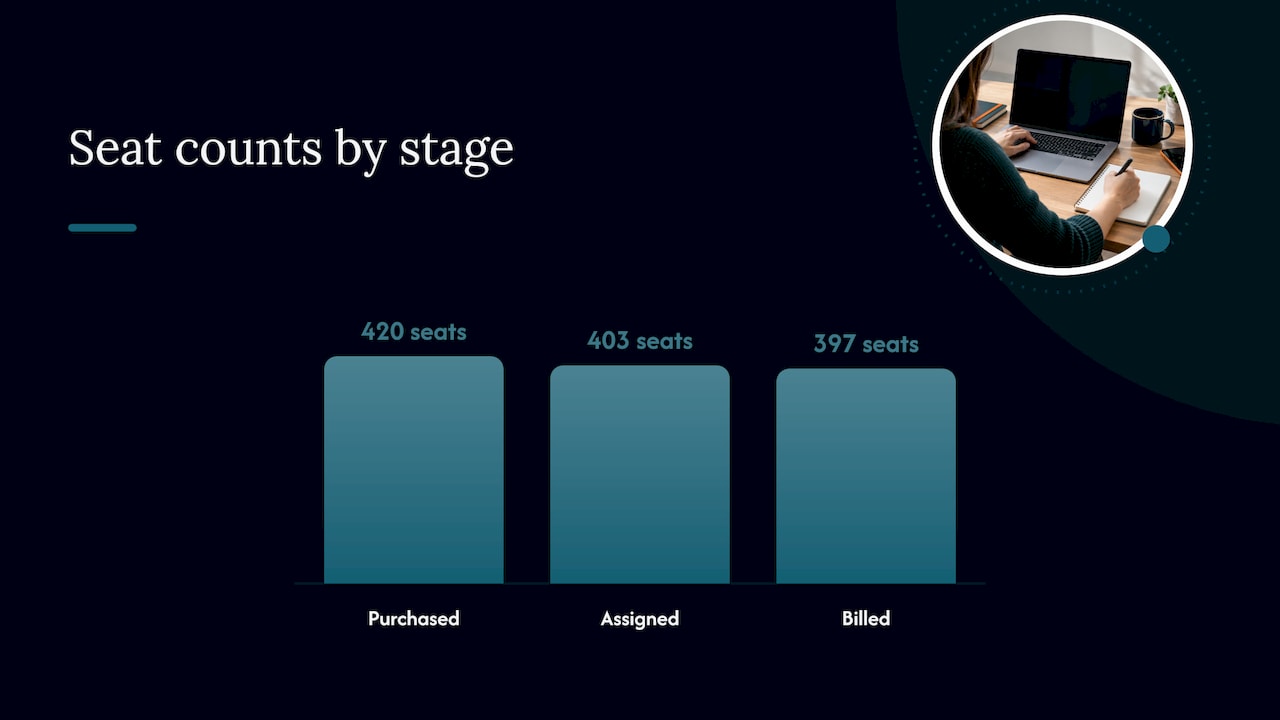
That’s the pattern. It starts small and compounds quietly. SystemX’s Matthew Lekoutovich puts the consequence plainly: without reconciling vendor invoices against client billing, MSPs are either absorbing costs they should pass on or carrying margin erosion they don’t know about.
We’ve written about this as a cloud margin leak, and the multi cloud version gets ugly fast, which we cover in multi cloud billing visibility. The short version: the more clouds and customers you add, the more places a small mismatch can hide.
My opinion, for what it’s worth: most MSPs don’t have a billing problem. They have an ownership problem. Everyone assumes someone else is checking.
A monthly reconciliation routine that holds up
Reconciliation is simple to describe. It checks that what you buy, what you agreed to bill and what you actually invoiced line up for each client, every month. Here’s a routine you can run in half a day once it’s set up.
1. Pull the vendor side
Download the vendor invoices and reconciliation files as soon as they’re available. For Microsoft CSP, that’s the Partner Center reconciliation file. For AWS and Google Cloud, it’s the billing exports for each linked account or project.
Where it goes wrong: pulling at different times for different vendors, then comparing numbers that cover different periods.
2. Map every charge to a customer
Every line needs a customer, a product name your customer would recognize and a billing rule. Shared costs and untagged resources are where this breaks. If you can’t say whose it is, you can’t bill it.
3. Compare to what you invoiced
Look for three kinds of gap: charges you paid but didn’t bill, charges you billed at the wrong rate and seats you billed but no longer buy. Fix them in the same cycle, not next quarter.
4. Adjust the rules, not just the invoice
SystemX recommends margin buffers in license pricing, contract language that allows rate adjustments when vendor costs shift significantly, and reconciliation at least monthly. If the same gap shows up three months running, the fix belongs in your agreement or your price list.
5. Write invoices people can read
Usage changes the total from month to month. Line items that separate usage from recurring charges let clients see why the total moved. List recurring services first, then usage, then one time items. A customer who understands the invoice doesn’t call you about it.
We’ve laid out the same process with a worked monthly checklist in our guide to MSP billing reconciliation.
Automate the plumbing, but know what it doesn’t do
Billing automation is worth having. When PSA and distributor systems connect, they cut the manual copy and paste where errors creep in. ChannelE2E reported in May 2026 that the Sherweb and HaloPSA integration supports yearly Microsoft licenses billed monthly, Azure subscription details including usage and consumption data, and both pre bill and post bill workflows.
That solves a real problem: getting the right numbers onto the right invoice. It doesn’t answer the questions a customer will eventually ask:
- Why did our Azure bill go up 30 percent?
- Are we paying for things we don’t use?
- Are we covered on commitments, or are we about to overspend?
Visibility matters. But someone still has to own the work of finding the waste, ranking the fixes and making sure they get done. If that someone is nobody, the dashboard just documents the problem.
How billing becomes a recurring service
This is where the commercial opportunity sits. Billing is a cost center. A cloud cost review is a service.
Once your monthly reconciliation is clean, you already hold the data a customer wants explained. Add a regular review and you can sell a recurring line item:
- Recurring revenue. A monthly cost and license review has a clear deliverable and a clear cadence. It’s the same shape as the rest of your managed services.
- Margin protection. Reviewing spend alongside billing catches unused seats, idle resources and commitment gaps before they hit your margin or your customer’s budget.
- Longer customer relationships. A customer who sees their cloud bill explained each month, with savings tracked, has a reason to stay. A customer who only gets an invoice has a reason to shop around.
- Less work for your team. When findings are ranked by savings and effort and turned into tracked tasks, your engineers work from a short list instead of firefighting.
One caution on promises. Don’t sell a savings number you can’t back up. Sell the process, the cadence and the verified results, and let the numbers speak when you have them.
How an MSP delivers cloud cost management for clients
The delivery model has five parts, and you can run them with a small team if the tooling is right.
- Connect the environments. Azure, AWS, Google Cloud, Microsoft 365 and AI platforms, for every customer, in one workspace.
- Find the waste. Idle resources, oversized workloads, unused licenses, uncovered or underused commitments and spend anomalies.
- Rank the fixes. Order them by savings and effort so the easy wins go first.
- Turn findings into tracked work. Each fix gets an owner, a status and a verified outcome.
- Report monthly. A branded summary that shows the customer what was found, what was fixed and what’s next.
The hard part isn’t step one. It’s steps three and four, because that’s where most tools stop and most MSPs run out of hours. It’s also why a lot of MSPs end up with a cost tool nobody opens.
Where EverythingCloud fits
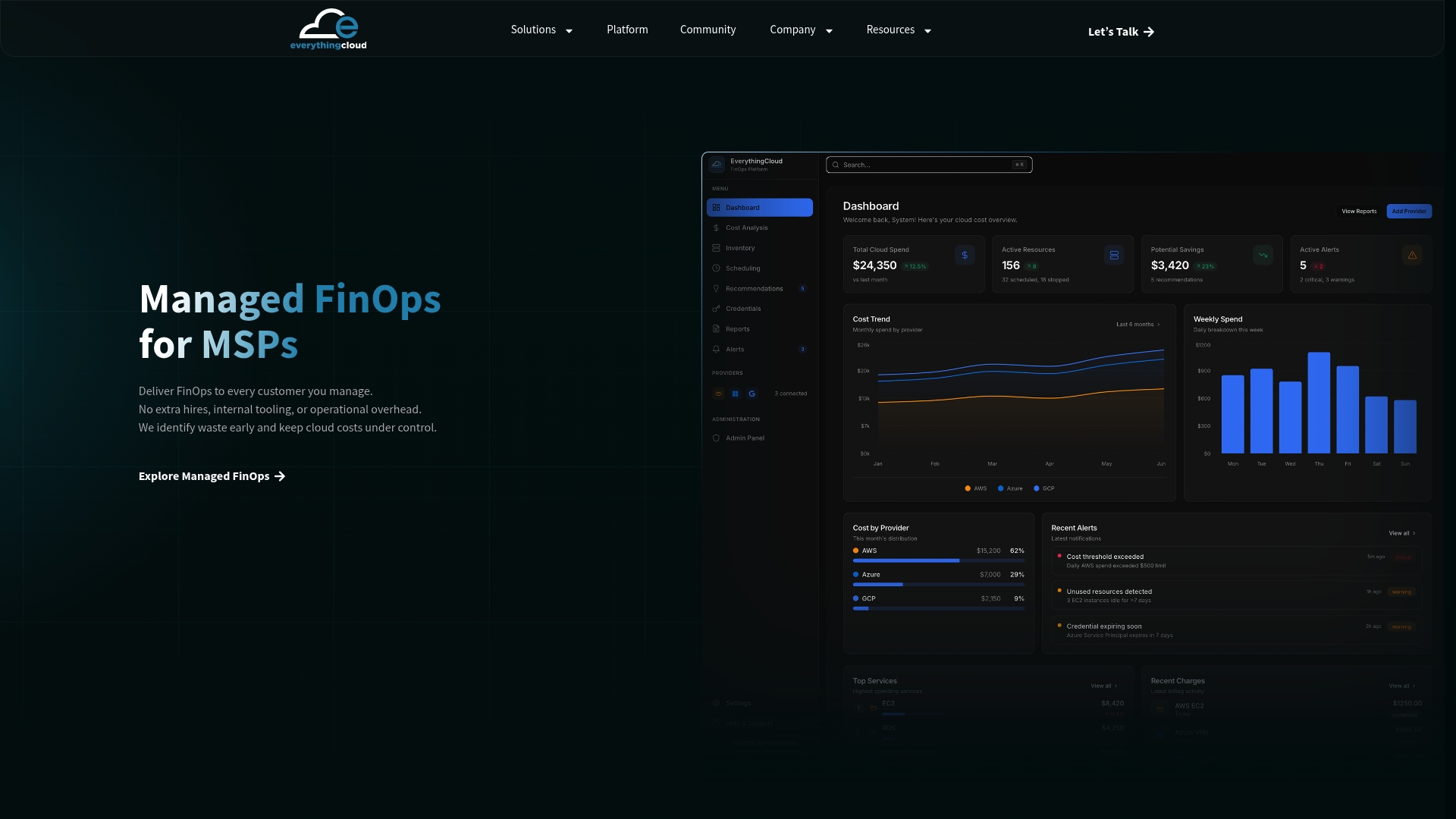
EverythingCloud is a built platform that works through MSPs, cloud partners and distributors. You own the customer relationship. We provide the multitenant platform and the FinOps expertise behind the service, so you don’t need to hire a FinOps team to offer it.
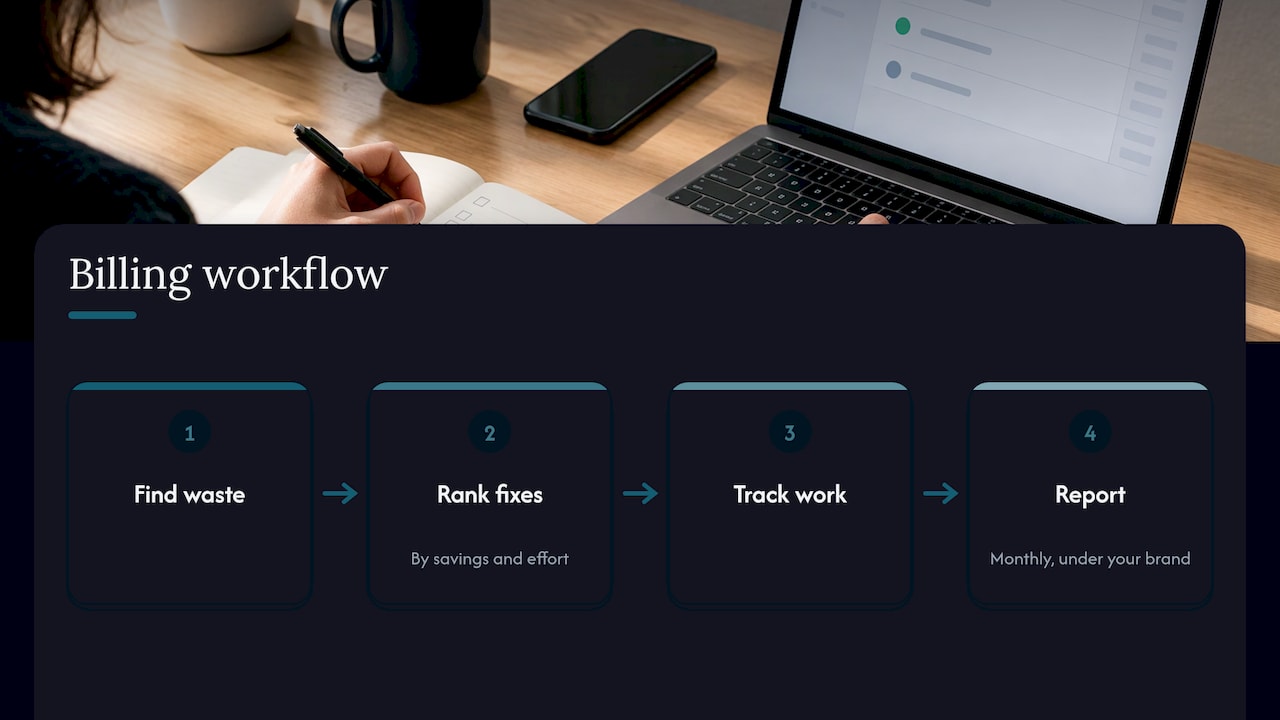
One workspace covers Azure, AWS, Google Cloud, Microsoft 365 licenses, AI spend such as OpenAI and Anthropic, and security posture. The platform finds waste, ranks fixes by savings and effort, turns them into tracked work and produces white label monthly reports under your brand. For customers with data residency requirements, it can be deployed in Canada, and Azure Marketplace private offers are available.
If you want to see how that fits your customer base, start with the platform or our Managed FinOps for MSPs service. Partners starting out can look at the Founding MSP Program, a small partner cohort, or talk to us about working with one of your customers first.
Our view on cloud billing
We think MSPs have been asked to treat cloud billing as an admin task, and that’s why so much margin disappears. The invoice is the last step of a process that starts with knowing what’s running, who it belongs to and whether it should be running at all.
Most cost tools stop at a dashboard. We built EverythingCloud for partners who need the work done: findings become tracked actions, savings are verified, and you deliver the service under your own brand. The customer stays yours. We do the heavy lifting behind the report.
If you take one thing from this article, make it this: reconcile monthly, review the spend behind the bill, and put a name next to every fix.
Dan Belkie
Common questions
Is cloud billing different for Microsoft CSPs?
Yes, in the details. Under new commerce, Microsoft invoices cover the calendar month, and partners bill customers however they choose, using the reconciliation file to confirm charges per customer. Your customer invoice is your responsibility, so the reconciliation step is yours to run.
How often should an MSP reconcile cloud billing?
At least monthly, matching the vendor’s cycle. Monthly reconciliation is a common recommendation because license counts, usage and vendor rates shift within a month. Catching a gap in the same cycle keeps it from compounding.
Do I need billing software or a FinOps platform?
They do different jobs. Billing software produces accurate invoices. A FinOps platform reviews the spend behind them, finds waste and tracks fixes. MSPs that want a recurring cost service need the second one, ideally with white label reporting.
How do I explain a changing cloud bill to customers?
Separate recurring charges from usage on the invoice, and label what’s included and what’s additional. Clear line items let clients see why the total changed. A short monthly report on what changed and why does the rest.
Sources
- Overview of Partner Center billing, Microsoft Learn
- What Makes MSP Billing So Complicated, SystemX
- MSP Billing Software guide, SuperOps
- Track Usage for Consumption Billing, AlgaPSA Docs
- Reconcile managed service cloud licenses, Offshore Bookkeepers
- MSP billing reconciliation, MSP Billing Cloud
- MSP Billing Software Guide, Alternative Payments
- Sherweb and HaloPSA integration, ChannelE2E