
Azure Cost Management is the free, built-in toolset you already have for tracking customer Azure spend. On its own, it’s a window. Turned into a monthly service with an owner, a routine and a report, it becomes recurring revenue that also keeps your customers around longer.
That gap between “we can see the bill” and “we fixed the bill” is where most MSPs stall. Here’s how to close it, what the native tooling does well, where it runs out of road across many customers, and how to package the work so your team isn’t buried by it.
TL;DR
- Microsoft’s Cost Management is a suite of tools to analyze, monitor and optimize Microsoft Cloud costs. It’s the right starting point for any Azure practice.
- CSP partners can see invoiced costs in the partner tenant once a customer is on a Microsoft Customer Agreement and an Azure Plan. Customer tenant access needs Azure RBAC and a cost visibility policy.
- Native tools get awkward across many tenants. Management groups, allocation rules and data lag all have limits you’ll feel at scale.
- The money is in the routine: inform, optimize, operate, then report the savings every month under your own brand.
- Visibility matters, but someone still has to own the work. That owner should be you.
Table of Contents
- What Azure Cost Management gives an MSP
- How CSP partners get access to customer cost data
- Where native tooling gets tight across many customers
- Build it as a recurring service, not a one-off cleanup
- Protect your margin first
- Keep customers longer by proving the value monthly
- Cut the work for your team
- How an MSP delivers this for clients
- Our perspective
- Bringing it to your customers
- FAQ
- Sources
What Azure Cost Management gives an MSP
Microsoft describes Cost Management as a suite of FinOps tools to analyze, monitor and optimize Microsoft Cloud costs. For an MSP, that translates into a few practical jobs.
You can break spend down by tag, service, location, subscription and resource group in Cost Analysis. You can set budgets and alerts. And you can use Azure Advisor recommendations to spot low-usage resources that are quietly costing your customer money.
Budgets are more flexible than many people realize. A budget can track reservation utilization separately from cost, so you can get an alert when a commitment your customer bought stops being used. That’s a classic margin and customer-trust problem: nobody notices until the renewal conversation, and by then the money is gone.
None of this is exotic. It’s the plumbing. The question is who uses it every month, and for whom.
How CSP partners get access to customer cost data
Access depends on how the customer buys Azure, and getting this wrong is the first reason a cost project stalls.
For CSP partners, Cost Management is available in the partner tenant to view invoiced costs for subscriptions under an Azure Plan, provided the customer has been onboarded to a Microsoft Customer Agreement. Admin agents and billing admins can reach the billing scopes.
Going deeper, into the customer’s own tenant, requires Azure RBAC and an enabled cost visibility policy. In plain terms: you’ll want that conversation and that permission set up during onboarding, not the week the customer asks why the bill jumped.
A practical habit: put cost visibility into your standard Azure onboarding checklist, next to backup and security baselines. If it’s part of the first week, it’s never an awkward ask later.
Where native tooling gets tight across many customers
One customer, one tenant, one subscription? Native tools are fine. Thirty customers with several subscriptions each is a different animal.
A few limits worth knowing, all from Microsoft’s own documentation:
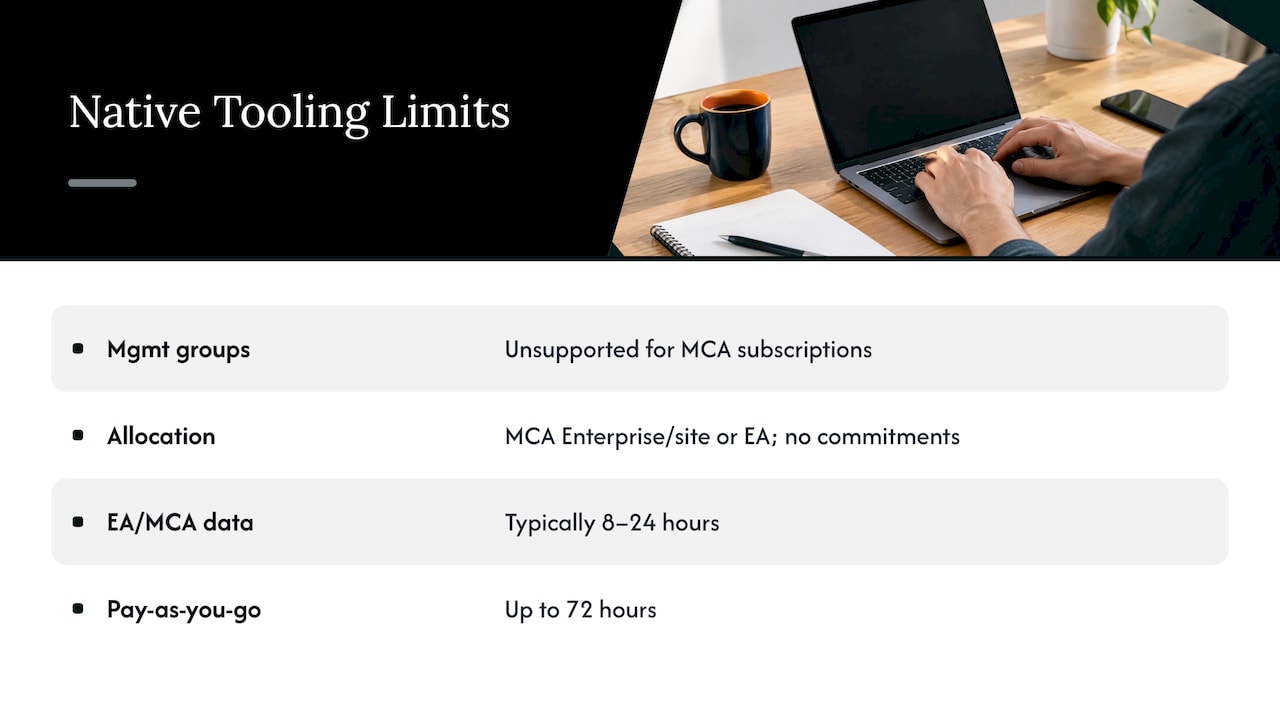
Management groups. Microsoft states that management groups aren’t currently supported in Cost Management for Microsoft Customer Agreement subscriptions. That removes the neat roll-up view many teams expect.
Cost allocation. Allocation rules currently support customers with an MCA in the Enterprise motion, an MCA bought through the Azure website, or an EA. Purchases including reservations and savings plans aren’t supported. If your customers lean on commitments, chargeback conversations get manual fast.
Data latency. For EA and MCA subscriptions, cost and usage data is typically available within 8 to 24 hours, and for pay-as-you-go it can take up to 72 hours. That’s fine for a monthly review. It’s not great for catching a runaway workload on a Friday afternoon.
Add the day to day reality of switching between customer tenants, and you can see the pattern. Each limit is small. Together they turn a monthly cost review into a half day of tab juggling per customer. That’s where the margin goes, and it’s your team’s time, not the customer’s.
Build it as a recurring service, not a one-off cleanup
A one-time “cost review” is a project. Projects end. Customers say thanks, and the invoice stops. A recurring service has a cadence.
A workable model follows the lifecycle that Managed Services Journal describes for mature MSP FinOps practices: Inform, Optimize and Operate.
Inform. Tagging and structure, so every dollar belongs to something. Without this, every later step is guesswork. Agree a tagging standard with the customer once, and enforce it.
Optimize. Rightsizing, spot where the workload allows it, and reserved instances or savings plans where usage is steady. This is where real savings come from, and also where careless advice causes real damage. Our own piece on four levers to verify before committing on Azure VMs covers the checks that keep a commitment from becoming a new problem.
Operate. Budgets, alerts and a monthly review. The same source notes that tying cost tools into your PSA workflows can produce automated monthly value reports showing what the client saved through your intervention.
That last line is the service. The customer pays for the routine and gets a document each month that proves it was done.
Protect your margin first
Here’s the uncomfortable bit. If you resell Azure through CSP, waste in a customer’s environment can be revenue to you on paper and a relationship risk in practice. Cutting spend feels like cutting your own top line. Don’t let that logic win.
Customers eventually find the waste, or someone else does. A competing partner, a finance director with a spreadsheet, a Microsoft rep. When that happens, the question is why you didn’t tell them. We’ve written about this pattern as a cloud margin leak: quiet, compounding, and easy to ignore until it isn’t.
The better position is the one where you find the waste first, and charge a fee for fixing and managing it. You swap a bit of pass-through revenue for a service fee that doesn’t depend on how much they burn. Your margin gets more predictable, and your customer gets a partner who’s visibly on their side.
Margin also leaks inside your own delivery. Every hour spent exporting CSVs and rebuilding the same report for the fifth customer is an hour that’s not billed. A repeatable process is margin protection too.
Keep customers longer by proving the value monthly
The research brief behind this article found no hard benchmark for how often cost reporting reduces churn, so we won’t invent one. What we can say from experience is simpler: customers leave partners whose value they can’t see.
A monthly one page report changes that. It should answer four questions in plain English:
- What did we spend, and how does that compare with last month?
- What did we find?
- What did we fix, and what did it save?
- What’s next, and what do we need from you?
Keep the savings numbers conservative and tied to actions you actually took. A smaller number you can defend beats a big one that gets questioned. If you can’t point to the change that produced the saving, leave it out.
Done every month, this becomes a habit your customer’s finance lead looks forward to. It also gives you a natural moment to bring up the next conversation: commitments, a new workload, security posture, Microsoft 365 licences. That’s how a cost service turns into a broader relationship.
Cut the work for your team
Most MSPs don’t have a FinOps team, and most shouldn’t hire one just to start. The trick is to make the work small and repeatable.
Pick one standard review per customer, once a month. Use the same tagging rules, the same budget structure and the same report layout everywhere. Alert on the exceptions only, such as a budget breach or a reservation sitting unused, so engineers aren’t staring at dashboards.
Then assign an owner. This matters more than any tool choice. Visibility is useful, but someone still has to own the work: open the ticket, make the change, check the result, and tell the customer. A finding nobody owns is just a more detailed way of watching money leave.
How an MSP delivers this for clients
Here’s a delivery rhythm that works for a small team.
Week one, onboarding. Confirm the customer’s agreement type and Azure Plan status, set up partner tenant billing access, and agree RBAC and cost visibility for the customer tenant. Document the tagging standard.
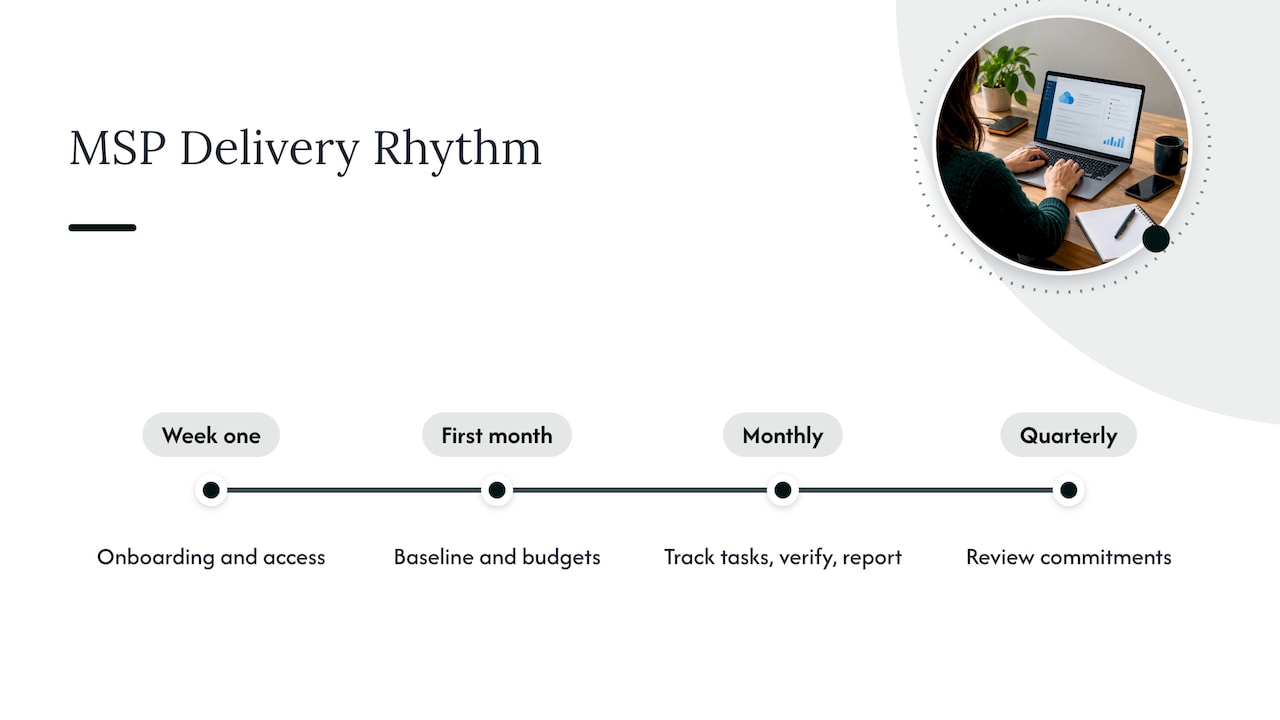
First month, baseline. Review spend by service, subscription and resource group. Check Advisor for idle or underused resources. Set budgets and alerts, including reservation utilization where the customer holds commitments.
Every month after. Review new findings, rank them by savings and effort, and take the quick wins first. Turn each into a tracked task with an owner and a due date. Verify the result in the next cycle. Send the report.
Quarterly. Revisit commitments. Usage changes, and a reservation that made sense last year might not now. Bring a recommendation, not a spreadsheet.
A note on region and buying model: the US is the usual starting point for CSP partners, but if you serve Canadian or UK customers, check data residency expectations early. Some customers will ask where their cost and tenant data lives before they sign anything.
Our perspective
Most cost tools stop at a dashboard. We think that’s the wrong place to stop, and it’s the reason so many MSPs try FinOps once and quietly drop it.
The problem isn’t finding waste. Azure’s own tools find plenty. The problem is turning findings into work that gets done, verified and reported, across many customers, without a dedicated FinOps hire.
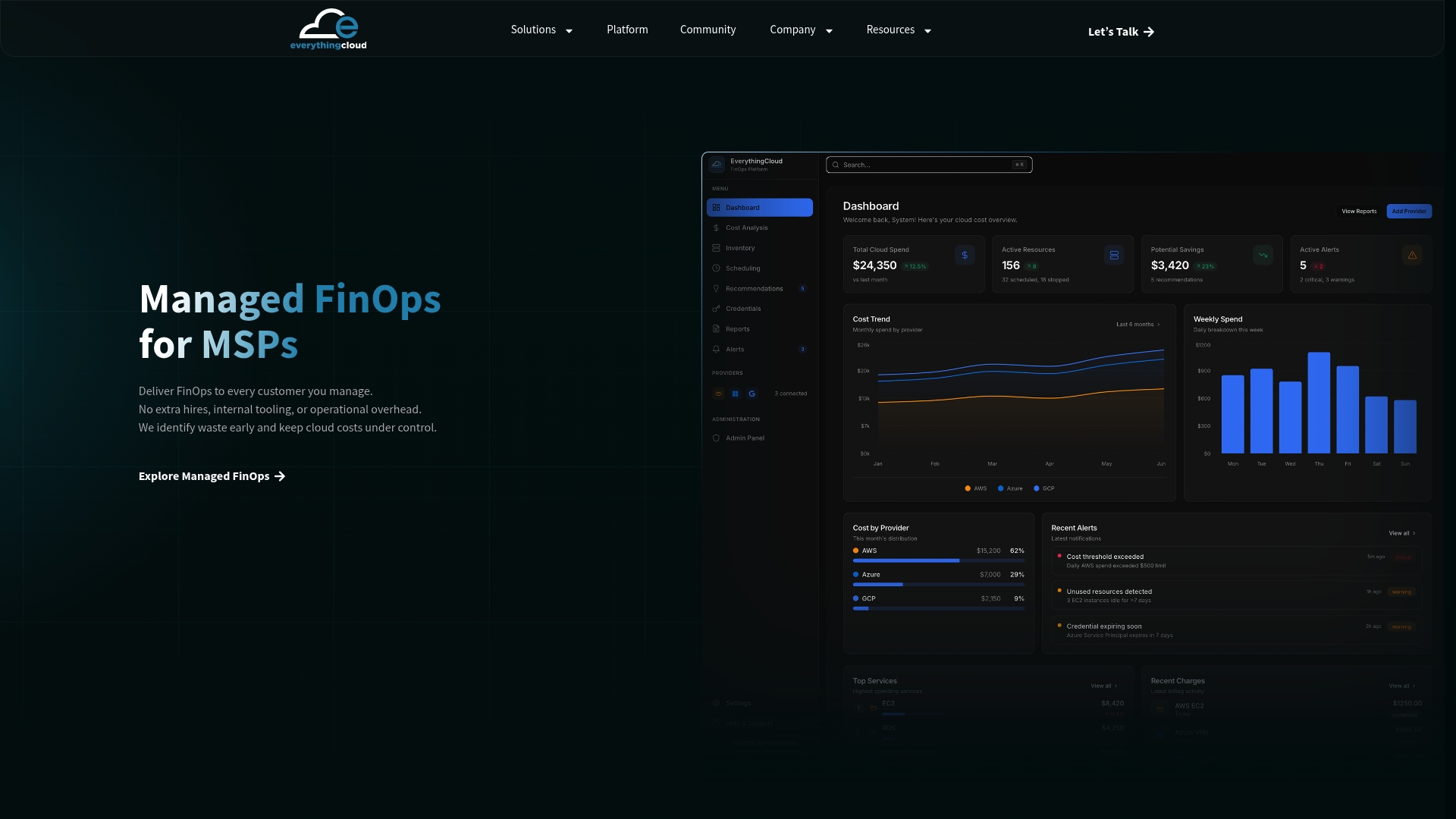
That’s why we built EverythingCloud for partners. The partner owns the customer relationship. We provide the multi-tenant platform and the FinOps expertise behind the service. Findings become tracked work, and monthly reports go out under the partner’s brand.
One workspace covers Azure, AWS, Google Cloud, Microsoft 365 licences and AI spend such as OpenAI and Anthropic, and it can be deployed in Canada for customers who care about data residency. Azure is usually where the conversation starts. It rarely stays the only cloud in the room.
Dan Belkie
Bringing it to your customers
If you want to launch this without building a practice from scratch, EverythingCloud is a built platform that works through MSPs, cloud partners and distributors. You keep the customer relationship. We help deliver the service behind it: multi-tenant visibility, ranked fixes, tracked work and white label monthly reports. See how the platform works.
We’re working with a small cohort of partners through the Founding Partner Membership. If you’d rather start smaller, we can also work with one of your customers to show what the service looks like in practice.
FAQ
Can I use Azure Cost Management for all my CSP customers?
Only where the setup allows it. Microsoft documents that partners can view invoiced costs in the partner tenant for customers onboarded to a Microsoft Customer Agreement and an Azure Plan. Deeper access to the customer tenant needs Azure RBAC and an enabled cost visibility policy.
Is native Azure Cost Management enough for an MSP?
For a handful of customers, often yes. As the count grows, limits like unsupported management groups for MCA subscriptions, allocation gaps around reservations and savings plans, and data delays of up to 72 hours on pay-as-you-go add manual work. A repeatable process and a multi-tenant view keep that work under control.
How often should I review a customer’s Azure costs?
Monthly is a sensible baseline for the full review and report, with alerts handling anything urgent in between. Commitments deserve a deeper check each quarter, since usage patterns shift.
How do I show a customer the value of cost optimization?
Send a short monthly report listing what you found, what you changed and the verified result. Only count savings tied to a specific action. Over time the reports build a record that makes your fee easy to justify.
Sources
- Overview of Cost Management, Microsoft Learn
- Plan to manage Azure costs, Microsoft Learn
- Budgets template reference, Microsoft Learn
- Get started with Cost Management for partners, Microsoft Learn
- Understand and work with Cost Management scopes, Microsoft Learn
- Allocate Azure costs, Microsoft Learn
- Understand Cost Management data, Microsoft Learn
- Turn cloud sprawl into profit through managed FinOps, Managed Services Journal