
GCP Cloud Functions cost comes down to three meters: invocations, compute time, and outbound data. Google now sells the product as Cloud Run functions, and you pay for execution time, rounded up to the nearest 100 milliseconds, and nothing while the function is idle. A low-traffic function can cost nothing at all. A busy one with generous memory, chatty logging and heavy egress can quietly become a line item finance asks about.
This guide walks through how the bill is built, a worked example you can reproduce, the charges that sit outside the function price, and how to find the functions that actually drive spend.
TL;DR
- Cloud Functions is now Cloud Run functions. First-gen functions bill on invocations, GB-seconds, GHz-seconds and egress. Second-gen functions bill like Cloud Run services.
- The monthly free tier covers 2 million invocations, 400,000 GB-seconds, 200,000 GHz-seconds and 5 GB of outbound data.
- Google’s own example, a 128 MB function invoked 10 million times at 300 ms, costs $7.20 a month after the free tier.
- Build tools, registries, event delivery, logs and egress are billed separately and often surprise teams.
- Billing reports grouped by service and SKU show which usage category is growing. Labels and billing export show which function.
Table of Contents
- What Cloud Functions are now called, and why it matters for the bill
- How first-gen function pricing works
- How second-gen (Cloud Run) function pricing works
- The free tier, and where it stops
- A worked example you can reproduce
- A simple estimating routine
- Charges that sit outside the function price
- How to find which functions are driving the cost
- Ways to bring the bill down
- Our perspective on serverless cost
- Put the monthly review on autopilot
- FAQ
- Sources
What Cloud Functions are now called, and why it matters for the bill
Cloud Functions was folded into Cloud Run. Google’s pricing overview for Cloud Run functions points to two separate billing models: the Cloud Run pricing page for second-gen functions, and a dedicated page for the legacy first generation. If you search for “Cloud Functions pricing” and see two different sets of numbers, that is why.
The practical consequence: before you estimate anything, check which generation each function runs on. A first-gen function is metered by invocations, GB-seconds and GHz-seconds. A second-gen function is deployed as a Cloud Run service and billed accordingly, by vCPU-seconds, GiB-seconds and requests.
Mixed estates are common. A team that created functions in 2021 and more in 2025 will have both, and the same code can price differently depending on where it sits.
How first-gen function pricing works
First-gen pricing has three parts, all taken from Google’s first-gen pricing page.
Invocations. After the first 2 million each month, you pay $0.40 per million, or $0.0000004 per invocation. The charge applies whatever the outcome or duration. A function that errors out immediately still counts.
Compute time. Time is measured in 100 ms increments, rounded up, and priced by the memory and CPU you provision. It is metered in GB-seconds and GHz-seconds, with Tier 1 and Tier 2 regional rates. A 20 ms function is billed as 100 ms.
Networking. Outbound data is $0.12 per GB beyond 5 GB free each month. Inbound data and outbound data to Google APIs in the same region are free.
Two details deserve attention. Provisioned memory and CPU, not what the function actually uses, set the rate. And minimum instances, which keep functions warm to avoid cold starts, bill their idle time at a different rate.
How second-gen (Cloud Run) function pricing works
Second-gen functions follow Cloud Run’s consumption model. In us-central1, on-demand pricing for instance-based billing is $0.000018 per vCPU-second and $0.000002 per GiB-second. Request-based billing is $0.000024 per vCPU-second, and requests are $0.40 per million after the first 2 million free.
The difference between the two billing settings matters more than most teams expect. Per a practical guide from Google Cloud engineers, request-based billing charges for resources when instances start, shut down or process requests, plus a per-request fee. Instance-based billing charges for the whole instance lifecycle, even with no incoming requests, and adds no per-request fee. Spiky, low-volume workloads usually suit request-based billing. Steady, high-concurrency loads are where instance-based billing can pay off.
The free tier also differs. For instance-based billing, the first 240,000 vCPU-seconds and 450,000 GiB-seconds are free each month. For request-based billing, it is 180,000 vCPU-seconds, 360,000 GiB-seconds and 2 million requests. Google applies the free tier across projects by billing account, as a spending-based discount using Tier 1 pricing, and it resets monthly.
The free tier, and where it stops
Every customer gets the same monthly allowance on first-gen functions: 2 million invocations, 5 GiB of outbound data, 400,000 GB-seconds and 200,000 GHz-seconds. New customers also get $300 in free credits to run, test and deploy workloads.
Firebase users on the Blaze plan see the same structure. Firebase’s pricing page lists invocations free up to 2 million a month then $0.40 per million, and outbound networking free up to 5 GB then $0.12 per GB.
The free tier is a development cushion, not a production budget. It is fixed, so it shrinks as a share of your bill as traffic grows. Model production costs without it, then add it back as a small credit.
A worked example you can reproduce
Google’s first-gen page gives an example: a simple event-driven function with 128 MB of memory and 200 MHz of CPU, invoked 10 million times a month and running 300 ms each time. The monthly cost after the free tier is $7.20.
Here is how that number breaks down.
| Component | Usage | After free tier | Cost |
|---|---|---|---|
| Invocations | 10,000,000 | 8,000,000 billable | $3.20 |
| Memory (GB-seconds) | 10M x 0.125 GB x 0.3 s = 375,000 | 0 (under 400,000 free) | $0.00 |
| CPU (GHz-seconds) | 10M x 0.2 GHz x 0.3 s = 600,000 | 400,000 billable | $4.00 |
| Total | $7.20 |
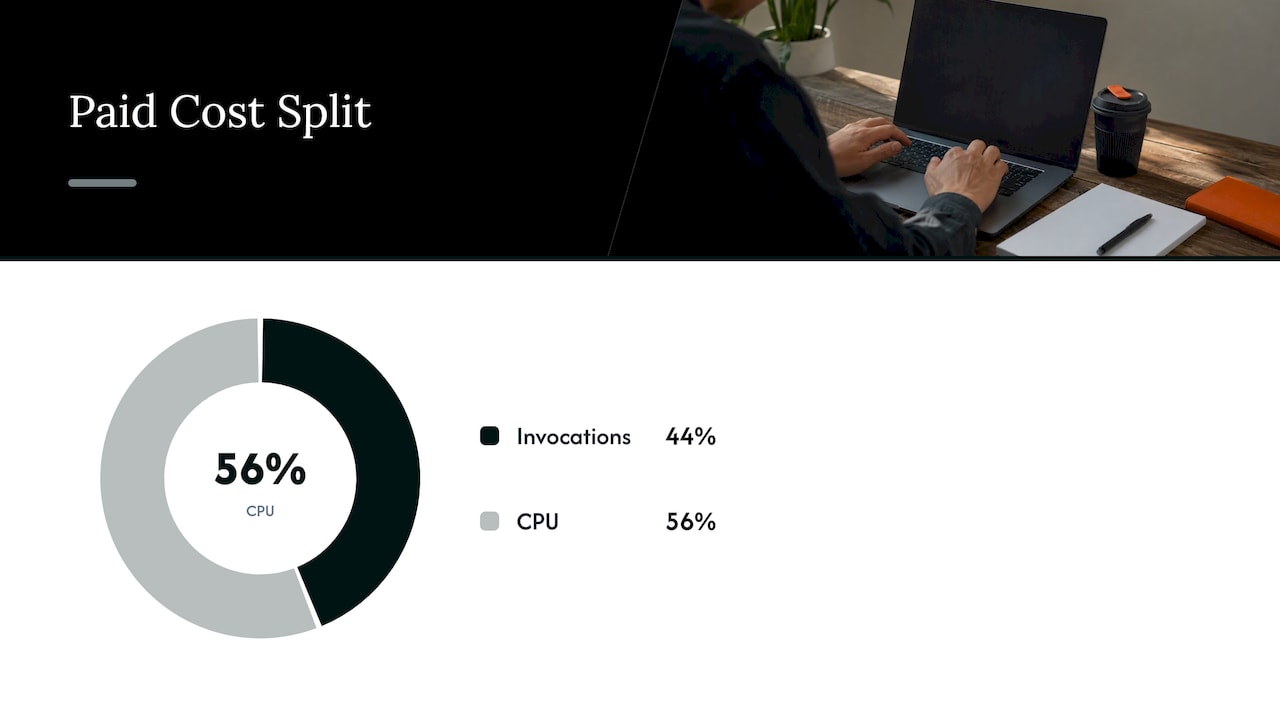
The CPU line uses the Tier 1 rate of $0.0000100 per GHz-second. Notice how the bill splits: roughly 44% invocations and 56% CPU, with memory fully absorbed by the free tier. Change the memory setting and the picture changes with it.
Now a heavier function. A Google Cloud engineer’s example of a second-gen function with 2 vCPU and 4 GB running 1,000 ms across 1 million invocations lands around $58 a month. Same invocation count class, roughly eight times the cost, because resources and duration both grew.
The same author describes the formula as linear: resources configured at deploy time multiplied by execution duration. Halving the configuration saves about half, but only if the function does not slow down as a result. A function that runs twice as long on half the CPU saves nothing.
A simple estimating routine
Use the same steps for every function, so estimates stay comparable.
- Count invocations, including the ones nobody planned. Retries, scheduler runs, event fan-out and health checks all count. Each retry is another billed invocation.
- Pick realistic duration. Use a typical run and a slow run, not the best case. Round each up to the next 100 ms.
- Take memory and CPU from the deployed configuration. That is what you are billed on.
- Estimate outbound data separately. Anything beyond 5 GB leaves the free tier at $0.12 per GB on first gen.
- Add the neighbors: logs, build and registry storage, event delivery and any API the function calls.
- Rerun at five and ten times your traffic. If the answer changes how you feel, design for that now.
Keeping compute, transfer and logging as separate lines is the habit that pays off. It tells you which one to attack first when traffic grows.
Charges that sit outside the function price
Most surprise bills on serverless do not come from the function line. They come from what surrounds it.
Build and registry. Cloud Build, Container Registry and Artifact Registry are priced separately. Exceeding the Artifact Registry free tier incurs charges for deploying functions, even when the function’s own usage stays in its free tier.
Event delivery. Cloud Run uses Eventarc for events, and Eventarc pricing is not included in Cloud Run pricing.
Egress. Outbound internet traffic beyond the free 5 GB is $0.12 per GB on first gen. A function that returns large payloads or exports files can spend more on transfer than on compute.
Minimum instances. Warm instances avoid cold starts but bill idle time. Set them only where latency truly demands it.
Downstream services. Costs from other Google Cloud products or APIs the function calls land on the bill too: databases, queues, storage, AI APIs. For AI-calling functions, token charges can dwarf the function’s compute.
Logging. Not a line on the function page, but real. A function that logs every request payload at high volume can pay more to log than to compute. Treat log ingestion and retention as their own line in the estimate.
Commitments. For continuous Cloud Run use, committed use discounts with one-year and three-year options can lower cost. They reward steady load, so commit only to the baseline you are sure about. Our guide to GCP committed use discounts covers how to size that baseline without overbuying.
How to find which functions are driving the cost
A project with dozens of functions rarely has a cost problem in all of them. Usually two or three account for most of the spend. The question is which.
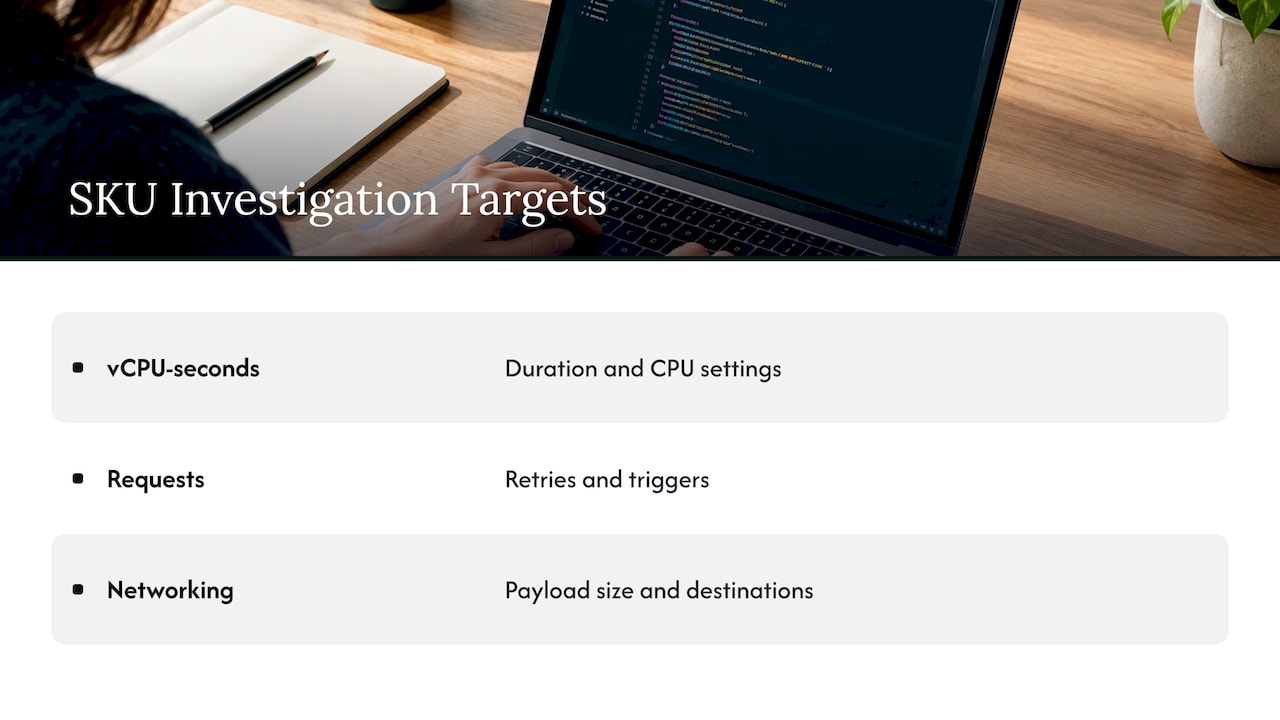
Start in Cloud Billing reports. Google’s documentation explains that you can filter by time range and group the data by project, service, SKU or location. Group by SKU first. If the growth is in vCPU-seconds, look at duration and CPU settings. If it is in requests, look at retries and triggers. If it is in networking, look at payload size and destinations.
Then go from category to function. Reports alone show services and SKUs, not individual function names. To attribute spend to a function, label your functions consistently (team, application, environment) and enable detailed billing export to BigQuery. Export does not backfill, so it pays to turn it on early. Once data flows, query by label and SKU to rank functions by monthly cost.
A routine that works: once a month, rank functions by cost, pick the top three, and ask one question of each. Is the memory sized to the workload? Is every invocation needed? Is the output leaving the region? If you are managing BigQuery for this analysis, our BigQuery cost optimization guide helps keep the export itself inexpensive to query.
Ways to bring the bill down
Right-size memory and CPU against measured duration. Test a lower setting, then check that duration did not rise enough to cancel the savings. Because the formula is linear, the gain is real only when runtime holds.
Cut wasted invocations. Fix retry loops, dedupe events, and make schedulers run only as often as the business needs. Because failed invocations bill too, an error loop is a cost leak.
Shorten execution. Reuse connections, avoid loading large libraries on each call, and move slow work out of the request path.
Keep traffic in region. Calls to Google APIs in the same region carry no outbound charge. Cross-region and internet egress do.
Pick the billing mode on purpose. Review request-based versus instance-based per workload instead of leaving the default. Google Cloud’s own engineers note that for some steady background workloads, Cloud Run jobs, workerpools or GKE Autopilot may offer a better cost-to-performance ratio. If containers are part of the picture, see our Kubernetes cost optimization guide.
Track cost per business unit. A function bill of $400 is meaningless alone. $0.002 per order processed is something you can manage. Our cloud unit economics playbook shows how to connect the two.
Our perspective on serverless cost
Serverless cost problems are rarely dramatic. They compound quietly. A function is sized generously during a launch, a retry policy doubles traffic, logs grow, and nobody revisits it because each function looks cheap on its own.
That is the pattern we see: cost leaks that no single owner is looking at. Visibility tools can show you the leak. They usually stop at a recommendation, and recommendations sit in a backlog.
Our approach at EverythingCloud is to automate execution of optimization actions, not just list them, and to verify savings against invoice-level billing so the number finance sees is the number that actually landed. Existing visibility tools can stay in place and feed that process.
For MSPs, the stakes are about margin. A client’s serverless estate that drifts upward erodes the margin on your managed service unless someone owns the monthly review. That is the work Managed FinOps is designed to take on.
Dan
Put the monthly review on autopilot
If your team spends its time exporting billing data and arguing over which function to fix first, that time is the cost worth cutting. EverythingCloud’s platform gives real-time visibility into AWS, Azure, Google Cloud, SaaS and AI spending, and our Managed FinOps service adds expert recommendations and automated cost-saving actions every month.
MSPs can launch their own managed FinOps practice with our Founding Partner Membership at $500 per month. Organizations that want continuous optimization can look at Continuous Cloud Optimization, or see how the platform works.
FAQ
Is there a free tier for Google Cloud Functions?
Yes. Every month you get 2 million invocations, 5 GiB of outbound data, 400,000 GB-seconds and 200,000 GHz-seconds of compute on first-gen functions, per Google’s product page. Second-gen functions use Cloud Run’s free tier instead. It covers 180,000 vCPU-seconds, 360,000 GiB-seconds and 2 million requests on request-based billing.
What are Cloud Functions in GCP?
They are a way to run code in response to events or requests while Google Cloud manages the infrastructure. The product is now called Cloud Run functions. You pay for execution time and nothing while idle, with pricing based on runtime, invocations and provisioned resources.
How much does a typical function cost per month?
It depends on memory, CPU, duration and volume. Google’s example of a 128 MB function invoked 10 million times at 300 ms each costs $7.20 a month after the free tier. A 2 vCPU, 4 GB function running one second a call at 1 million invocations is closer to $58.
Why is my bill higher than the function price suggests?
Usually because of costs outside the function meter: Artifact Registry and Cloud Build, Eventarc, logging, outbound data and the services your function calls. Group Cloud Billing reports by SKU to see which category grew.
Is GCP cheaper than AWS?
It depends on the workload, region, commitments and how well each environment is optimized. Our enterprise comparison of the three major clouds lays out the trade-offs.
Sources
- Cloud Run functions | Google Cloud
- Pricing | Cloud Run functions (1st gen) | Google Cloud
- Pricing Overview | Cloud Run functions | Google Cloud
- Cloud Run pricing | Google Cloud
- Pricing Overview | Google Cloud
- Firebase Pricing
- Cloud Run services: a practical guide (Google Cloud on Medium)
- Optimize your Cloud Run functions (Google Cloud on Medium)
- Analyze billing data and cost trends with Reports | Cloud Billing
- Google Cloud FinOps Guide: Labels, Billing Export & Showback