
The fastest way to reduce SaaS costs is to stop paying for what nobody uses: find every application, measure real usage against what you bought, reclaim idle seats, retire duplicates, and negotiate renewals with that data in hand. Then keep doing it. A one-time cleanup fades within a year, because new tools, new hires and auto-renewals quietly rebuild the waste.
This guide walks through that sequence in the order we would run it for a mid-market or enterprise team, with the checks that keep the work from disrupting the people who depend on these tools.
TL;DR
- You cannot cut what you cannot see. Start with a single inventory of every SaaS application, its owner, its contract and its renewal date.
- Compare seats paid for against seats actually used. Inactive-account reports in the 30, 60, 90 and 120-plus day ranges are the standard way to spot idle licenses.
- Reclaim in stages: warn the user, downgrade before you remove, and keep a short grace period so nobody loses access to something they need.
- Contracts decide your next year’s bill. Review auto-renewal clauses, price caps and the right to adjust license counts well before the renewal date.
- Savings last only with an operating model: a named owner for every platform, a justification for every new tool, and a usage review before every renewal.
Table of Contents
- Where SaaS spend actually leaks
- Step 1: Build one inventory of every SaaS application
- Step 2: Audit usage against what you pay for
- Step 3: Right-size and reclaim seats without disrupting anyone
- Step 4: Consolidate redundant applications
- Step 5: Control contracts and renewals
- Keep the savings: governance that holds
- Our perspective: recommendations are not savings
- Where EverythingCloud fits
- FAQ
- Sources
Where SaaS spend actually leaks
Most SaaS waste is not dramatic. It is a pattern that compounds quietly: a license left assigned to someone who changed roles, a second project-management tool bought by a team that did not know the first existed, a renewal that slid through on auto-pilot at a higher price.
The visibility problem is bigger than most leaders expect. Capterra research reported by SHRM found that only 44% of HR departments keep a running inventory of their software, and nearly 20% are unaware of all the tools they own. That is one department. Across a company, with marketing, sales, engineering and finance each buying on their own, the gap is wider.
Price pressure adds to it. Vendors increasingly use auto-renewal clauses to raise prices, which means a tool you stopped thinking about can cost more each year without anyone deciding it should.
The leaks fall into four buckets:
Idle and orphaned licenses
Seats assigned to departed employees, contractors whose projects ended, and people who logged in once during onboarding. These are the easiest dollars to recover and the first place to look.
Over-provisioned tiers
Everyone sits on the premium plan because it was simpler to buy that way, though most users touch only the base features.
Duplicate tools
Two or three products doing the same job across different departments, each with its own contract and renewal date.
Unmanaged renewals
Contracts that renew automatically, at list or increased pricing, because nobody owned the date.
Step 1: Build one inventory of every SaaS application
Every later step depends on this one. You need a single list of applications that includes who owns each one, what it costs, how many seats you pay for, and when the contract renews.
The Center for Internet Security gives a useful template. Its guidance recommends a software inventory that records title, publisher, initial install or use date, business purpose and, where appropriate, URL, versions and decommission date, reviewed at least twice a year. For cost control, add three columns that security teams do not always track: annual cost, seat count and renewal date.
Where does the list come from? Use three sources and reconcile them:
- Finance data. Pull corporate card, expense and accounts-payable lines for the last 12 months. Anything recurring and software-shaped goes on the list.
- Identity data. Your single sign-on or identity provider shows which apps people actually authenticate into, including ones finance never saw.
- Procurement and contract records. These give you terms, notice periods and negotiated prices.
The second source matters because shadow IT rarely shows up in procurement. If you want a structured way to run that discovery, our guide to identity-first shadow IT and SaaS discovery lays out a 90-day approach.
Sapient Insights Group experts make a related point in the same SHRM piece: many leadership teams are unaware of the shadow AI and point solutions operating in their organizations, which makes an exhaustive inventory the precondition for dealing with sprawl. AI subscriptions and usage-based AI tools now belong on this list too.
The NIST guide to IT asset management makes the efficiency case plainly: a centralized asset-management solution improves efficiency and gives auditors detailed system information. The same record that satisfies an auditor also feeds your savings plan.
For the broader discipline around this, see our overview of SaaS spend management for finance, IT and procurement.
Step 2: Audit usage against what you pay for
An inventory tells you what you own. A usage audit tells you what you use. The gap between them is your savings.
NIST’s IT asset management guide describes this exact comparison: its solution determines how many software licenses are actually used compared with how many were paid for. Whatever tooling you use, the logic is the same.
For each application, pull the last-login or last-activity date for every assigned user. Then sort users into inactivity bands. Microsoft’s documentation for Dynamics 365 finance and operations notes that inactive accounts can distort license requirements, and its User Activity Aging report groups users into ranges such as 30, 60, 90 and 120-plus days of inactivity so stale accounts can be disabled and the license baseline corrected. Those bands work well as a general model for any SaaS tool.
A practical reading of the bands:
| Inactivity | What it usually means | Typical action |
|---|---|---|
| 30 to 60 days | Seasonal use, leave, or a slow start | Watch; no action yet |
| 60 to 90 days | Probably not needed in the current role | Send a notice; offer to keep access |
| 90 to 120 days | Likely idle | Downgrade or unassign after confirmation |
| 120-plus days | Almost certainly orphaned | Reclaim and document |
These thresholds are starting points, not rules. A tax tool used once a quarter looks idle for 90 days by design, so check with the owner before you treat low activity as waste.
Account hygiene helps here too. CIS Control 5 recommends an account inventory with name, username, start and stop dates and department, validated at least quarterly. Tying those stop dates to HR offboarding closes the biggest source of orphaned seats before it opens.
Step 3: Right-size and reclaim seats without disrupting anyone
This is where cost projects usually go wrong. A finance team strips licenses on a Friday, and on Monday the sales director cannot open the tool she needs for a renewal call. The savings are real, the goodwill is gone, and the next audit meets resistance.
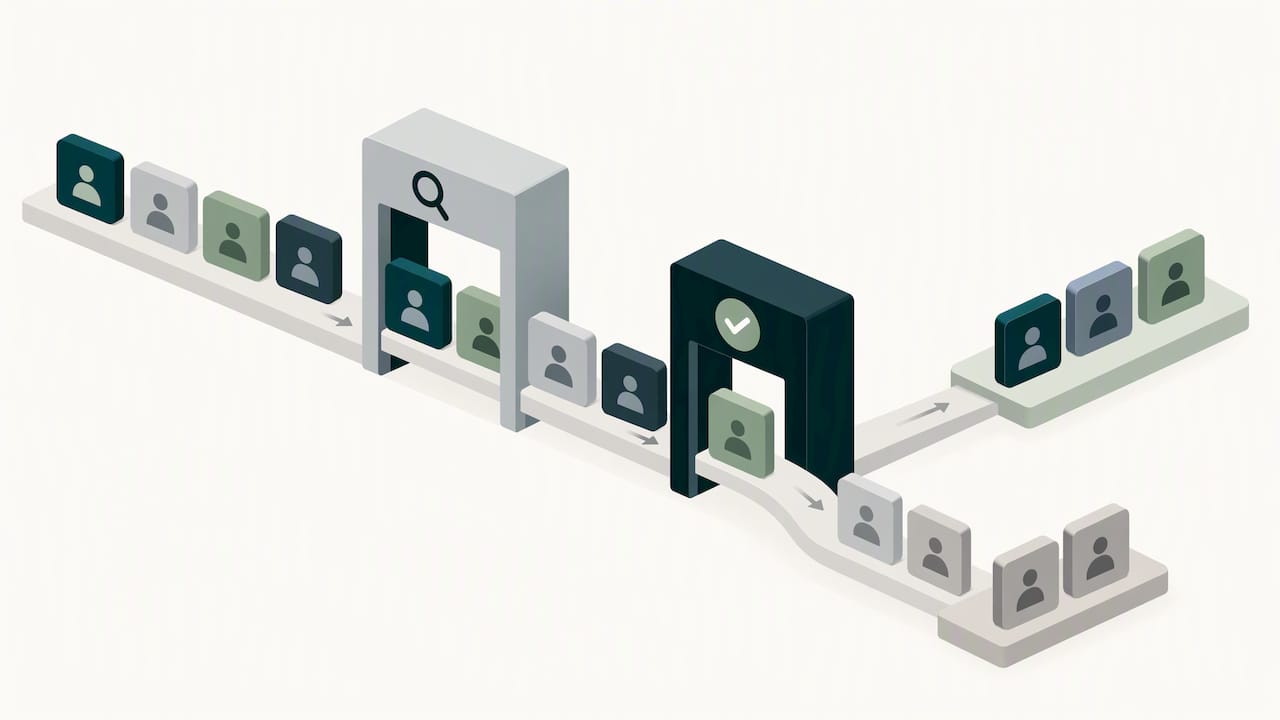
Two habits prevent that. Reclaim in stages, and make the owner of each application part of the decision.
A staged reclaim process
- Confirm with the application owner. Before touching any account, agree which usage signals count and which exceptions exist (seasonal users, executives, compliance roles).
- Notify the user. A short message that says the license will be reclaimed on a set date unless they reply. Silence after two reminders is a reasonable answer.
- Downgrade before you remove. Where the vendor offers a lighter tier, move the user there first. They keep access to the essentials and you pay less.
- Keep data and restore paths. Confirm what happens to the user’s content when a seat is removed, and how fast a seat can be restored if someone needs it back.
- Log the result. Record seats reclaimed, the monthly saving and the date, so you can prove the saving at renewal and avoid re-buying the same seats later.
Right-size the plan, not only the seat count
Once idle seats are gone, look at tiers. Ask the owner which premium features are used by how many people. If 15 of 200 users need the advanced tier, a split-tier contract or a smaller number of premium seats may cost far less than a company-wide upgrade. Not every vendor allows mixed tiers, which is one more reason to read the contract before you plan the change.
Watch the contract floor
Some agreements set a minimum seat commitment. Reclaiming 40 seats you cannot remove until renewal saves nothing today. In that case, the work is to reassign those seats to new hires and to reduce the commitment at the next renewal, which brings us to contracts.
Step 4: Consolidate redundant applications
Seat cleanup trims the edges. Consolidation changes the shape of the bill.
Start with categories rather than products: project management, video meetings, file storage, design, analytics, e-signature. Sort the inventory by function and look for categories with more than one tool. Then ask three questions for each:
- Do the tools serve genuinely different needs, or just different teams’ habits?
- What would migration cost in time, data transfer and retraining?
- When does each contract end, and what are the exit terms?
SHRM’s guidance on streamlining a software stack is a good checklist. It calls for documenting all systems, expiration dates and imported or exported data, and auditing workforce software even when it is owned outside HR. Integrations are the hidden cost of consolidation, so map what flows in and out of each tool before you decide.
CIO has described a helpful way to sort what you find. It suggests treating SaaS savings as an operating-model question and categorizing tools into systems of record, differentiation and experimentation. Systems of record deserve stability. Experimentation tools deserve a short leash and an end date. Differentiation tools deserve investment.
Do not consolidate everything at once. Pick the two or three categories with the most overlap and the nearest renewal dates, and finish those first.
Step 5: Control contracts and renewals
Every other step lowers your usage. This one lowers the price you pay for what remains, and it is where the biggest single-contract savings tend to come from.
What should IT, finance and procurement review together? The same questions in the same order:
- Terms of use. A CIO report on a proposed federal software reform bill says teams should review restrictions on software deployment and use, license costs and options for adjusting licenses as demand changes. That is good advice for private companies too.
- Auto-renewal and notice windows. Know the exact date by which you must give notice, and put it in a shared calendar owned by a named person, not a distribution list.
- Price protection. SHRM reports that buyers can negotiate renewal protections, such as capping annual rate increases at 3 to 4%, sometimes tied to maintaining a level of usage or licenses. Read the usage condition carefully: if you reclaim seats below the agreed level, you may lose the cap.
- Flexibility to scale down. Can you reduce seats mid-term? At renewal? Only with a fee? This single clause decides how much of your Step 3 work can turn into savings.
- Restrictions on automation. Gartner estimates that up to $234 billion of application software spending, about 20% of enterprise SaaS spending, could be at risk by 2030 as AI agents change how work gets done, and notes that vendor terms may prohibit or restrict third-party autonomous use. If you plan to use AI agents against your tools, check that your contract allows it.
The sequencing matters more than the negotiation tactics. Start the usage review about 90 days before the notice deadline, not before the renewal date. That gives you time to bring real numbers to the vendor, and time to walk away if the answer is poor. Our 90-day SaaS renewal playbook for mid-market teams breaks that timeline down week by week.
Keep the savings: governance that holds
Here is the uncomfortable part. Teams that finish a cleanup often see spend creep back within a year. The cause is not carelessness. It is that nothing changed in how software gets bought.
The FinOps Framework treats this as a standing practice rather than a project. It applies its capabilities to SaaS spending and calls for collaboration with IT asset management and software asset management. In other words, finance, IT and the business share the job.
CIO’s description of effective SaaS governance is short enough to adopt as policy: a named owner for every platform, a justification for each new tool, and usage and value reviewed ahead of renewals. The same article frames SaaS cost work as an operating-model problem rather than a one-time budget cut. If you are weighing why a lasting approach beats a quick trim, this piece on sustainable growth and lower costs makes a similar case from the software-buying side.
A few metrics are worth reviewing monthly:
- License utilization rate: active seats divided by paid seats, per application.
- Spend per employee: total SaaS cost divided by headcount, trended over time.
- Share of spend under a named owner: the aim is 100%.
- Renewals reviewed before the notice date: how many were reviewed in time versus renewed by default.
- Realized savings: reclaimed seats and negotiated reductions, verified against what you were actually billed.
That last one is easy to skip. A saving that cannot be seen on the invoice is a forecast, not a result.
If your SaaS spending sits alongside cloud infrastructure and AI usage, as it does for most companies running AWS, Azure or Google Cloud, treat them as one financial discipline. Our primer on FinOps in the cloud and our FinOps best practices for enterprise teams cover how the same habits apply across all three.
Our perspective: recommendations are not savings
We see the same pattern in nearly every environment we look at. Visibility tools produce long lists of opportunities. Then the list sits there, because acting on it means someone has to take the action, check the impact and follow up the next month.
That is why we build around execution rather than reporting. A recommendation to remove 60 idle seats saves nothing until the seats are removed, the owner agrees, and the result shows up on the invoice. Our approach is to automate the optimization actions where it is safe to, put an owner on the rest, and verify outcomes against invoice-level billing so the number that reaches the CFO is a billed number.
For MSPs, the same problem has a margin angle. Waste you do not manage for a customer is margin erosion you cannot see, and it compounds quietly. If you resell or manage SaaS, cloud and AI services, the unit that matters is the spend you can actually influence, every month, across every tenant.
Our advice to any team starting out: do not wait for the perfect inventory. Run the first audit on your five largest contracts, prove the process, then widen it.
— Dan
Where EverythingCloud fits
If you would rather not build this discipline in-house, we can run it with you. Managed FinOps pairs our platform with expert guidance so optimization continues every month rather than once a year. For organizations that want continuous cloud, SaaS and AI cost control, Continuous Cloud Optimization is the place to start, and the platform gives a closer look at the monitoring, governance and reporting behind it.
If you are an MSP that wants to offer this to your own customers, the Founding Partner Membership is listed at $500 per month.
FAQ
How much can a company realistically save on SaaS?
It depends on how mature your current practices are, and we would not promise a universal figure. Companies with no inventory and no renewal calendar usually have the most to recover, mainly from idle seats and duplicate tools. Measure your own baseline first, then compare it with billed spend after each change.
Where should I start if I have no SaaS inventory?
Start with twelve months of card and accounts-payable data, then add your identity provider’s list of connected apps. Together they surface most of what you are paying for and most of what people use. Add an owner and a renewal date to each line before you do anything else.
How do I reclaim licenses without upsetting employees?
Tell people before you act, give them a date and a way to say they still need access, and downgrade before you remove where the vendor allows. Confirm with each application owner first so seasonal and compliance users are protected.
When should I start preparing for a renewal?
About 90 days before the contractual notice deadline, which is often earlier than the renewal date itself. That window leaves time to gather usage data, ask for price protection and, if needed, move to another option.
Is SaaS cost control a finance or an IT job?
Both, plus the business owner of each tool. The FinOps Framework calls for collaboration between FinOps, IT asset management and software asset management, which is a good model: finance owns the budget, IT owns the data, and the application owner owns the value.
Sources
- Simplify Your Tech Stack: The Risks and Redundancies of HR Software Sprawl (SHRM)
- Establishing Essential Cyber Hygiene (CIS)
- NIST SP 1800-5a IT Asset Management Practice Guide
- Prepare for finance and operations apps user license validation (Microsoft Learn)
- CIS Control 5: Account Management
- US federal software reform bill aims to strengthen software management controls (CIO)
- HR Software Prices Are Rising (SHRM)
- Agentic AI puts $234B in enterprise SaaS spending at risk (CIO)
- Why SaaS cost optimization is an operating model problem (CIO)
- FinOps for SaaS (FinOps Foundation)